Somehow, in 2023, I guess I learned that to make an app with multiple pages, you have
- A parent of a type called “Tab”
- Child pages of a type called “TabPage”
I made myself a PPT then because there were a ton of quirks and even then it only worked like 50% of the time.
Well today I just felt like winging it and not using any “Tab” or “TabPage.”
- It worked
- It was MUCH easier
- I can add other elements to the page, too - not just the “tab strip” - and that was not possible with a “TabPage”
Maybe this is new-ish (we are on 2024.2; last time I messed with tabs was probably 2022.2).
Or maybe it was always this simple and I missed the forest for the trees.
Am I crazy? And/or why does “TabPage” exist in the first place?
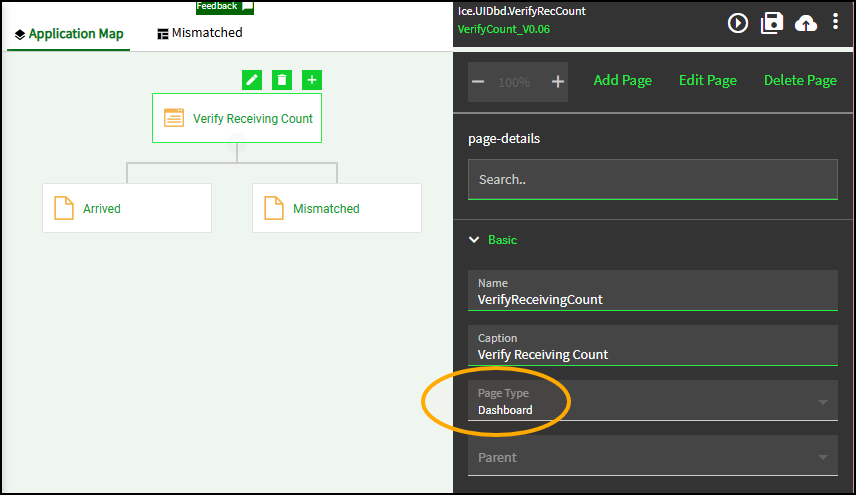
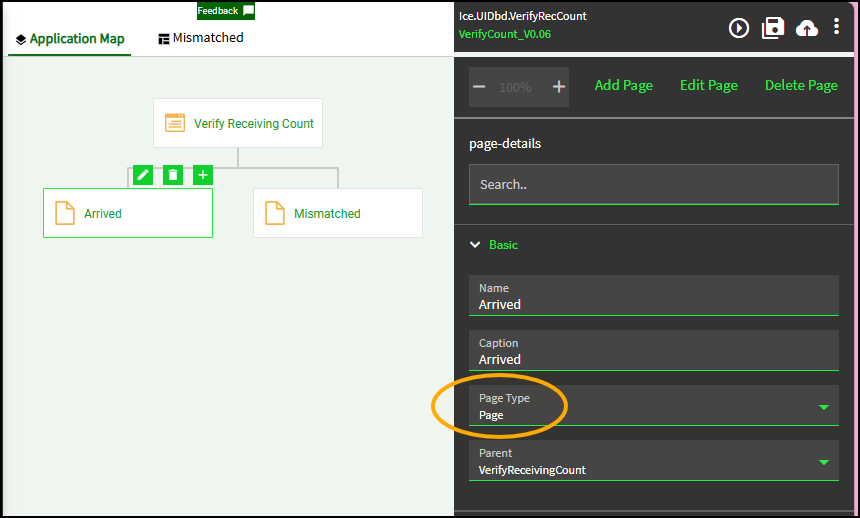
[Edit] To explain the pictures:
- The parent page (“Verify Receiving Count”) is the page they give you when you make a new app. You can see the “Page Type” is “Dashboard” and is not editable.
- While on that node, I clicked “Add Page” (twice)
- Then my child pages are just the “Page” type, and the parent was set automatically by me clicking “Add Page”
- Not shown: I added a “Tab Strip” to the parent page and configured it (adding my pages to it also)
- But the way I had done it in the past was to make the parent’s “Page Type” to be “Tab” and the children were that “TabPage”
Also, it is really Kafkaesque to explain “go to the Tab page… no, not the TabPage… page.”