If they add a parameter to the widget, it will not adjust the fields to allow for that.
2 Likes
There’s usually only one code block and “Check sytax” finds the problem.
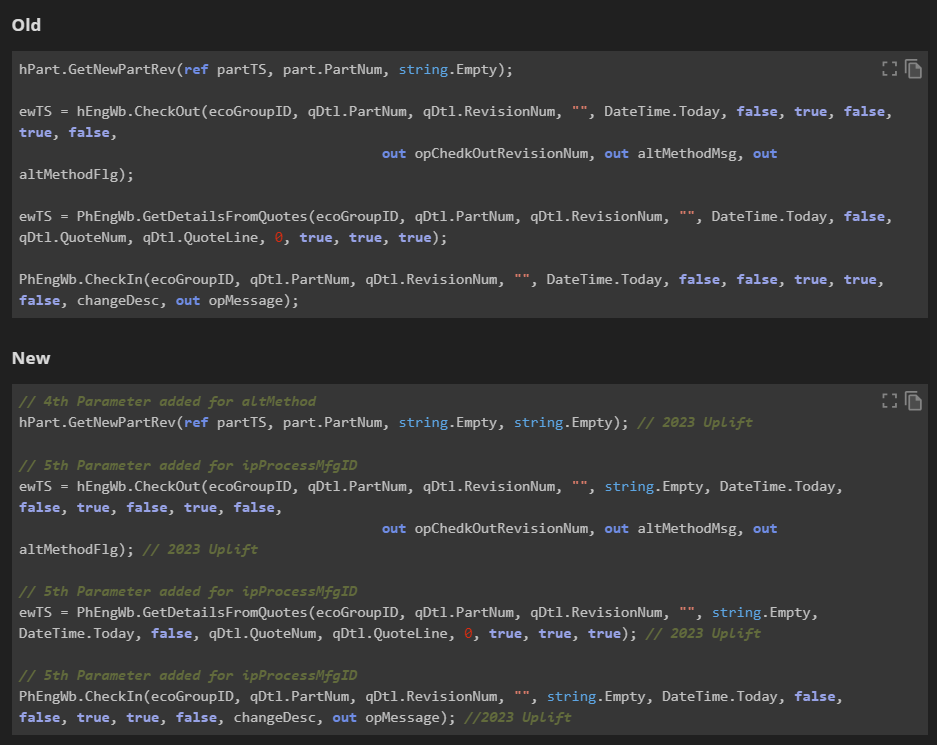
Here are some examples. Epicor added parameters to these calls. When I’ve had these method calls in widgets, the widget breaks, and doesn’t allow you to simply add the missing parameter. You have to create a brand new widget to get the added parameter calls. With the custom code, we just simply add a , and the parameter. Fixed.
1 Like
Oh, I’m guessing there’s more than one code block in all that code at SG! 
In fact, I seem to recall a time when Epicor changed the signature of a method that we had to update in dozens of places.
And nobody suggested it would. But for some changes, they could do some fixing up. Recompiling directives/functions will find syntax errors but we still need to test logical functionality.
If there was a way to do automated testing…

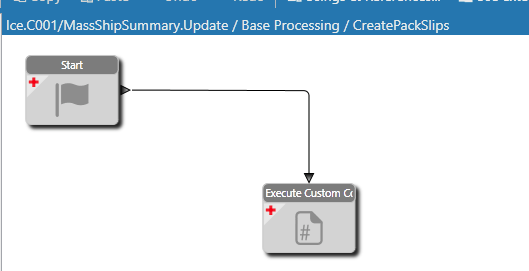
This is the typical BPM at SG.
By “Nobody” you mean Epicor. Because they say that Widgets upgrade cleanly.
All they would have to do to make it 1000% better is allow for a refresh of the signature so that you can fill in missing parameters.
And logical functionality is no different from custom code using the BO’s vs Widgets using the BOs
4 Likes

Yes, that was my point.
Widgets are not a panacea to me, but code generation can be a very powerful tool. Most of the recent changes in C# (Async/Await, Json processing, collections, etc.) are done using source generators to make the syntax easier for “coders.” We could code tasks for async work directly or we can use the syntactic sugar that Microsoft gives us. Widgets are the same. They make things easier for many small manufacturers who will never have great coders like the ones at SG.
2 Likes
Please tell me you give some meaning to the code widget!
You handle debug in code too then?
1 Like

1 Like
I make comments in the code saying what its doing. Actually I usually start with comments as a framework for what I want to to do, then fill in the code as each step/thing is done.
Debugging is either done with popups, like this. (which would be basically the same as the show message widget)
Infomessage.Publish($"SomethingHelpfulHere {field.Value}");
Or we have the luxury of getting on the server and debugging via DNSPY so we can see the data set’s live.
4 Likes
The person who EVENTUALLY may have to maintain this may NOT be named @Banderson … he may be named @Ernie and have absolutely no idea how to code in the first place.
9 Likes
This would be the first argument that I would agree with for widgets.
6 Likes

ah. I have before, there’s a flag for it. But I don’t usually use it.
1 Like
And for the record (to anyone else who comes in here reading this down the road). The “Custom Code” that I am talking about is using the Epicor BO’s following a trace for each of the calls. Which is the same thing you would do with the widgets, as you call each BO in the widget just like the trace does.
Truly “Custom” stuff, like using reflection or DB updates or external DLLs, that’s whole different animal and I agree can be dangerous. That isn’t what I’m talking about here.
2 Likes
The “longest” BPM I ever wrote was to add every plant (I think there were 7 plants) to every newly created part number, and then also set Primary Warehouse and Default Bin. That was the only time I ever even came close to filling the display window with widgets. Could that have been VASTLY simpler by a single code block? ABSO-FREAKING-LUTELY.
But I don’t know how to code that, the client would not have been able to ever make any changes to it, and it would have been probably an 8-week lead time for my development staff to write it in the first place.
I find the arguments about code vs widgets to be tilting at windmills. What programmers do and demonstrate on this site boggles my mind. NO WAY could most of that even be DONE in widgets.
But for the (probably) majority of Epicor customers, it’s a skill they just don’t have.
5 Likes

7 Likes

5 Likes
Yep. That’s a big pain point at upgrade time.
And as @Mark_Wonsil said, it would be so nice to set multiple fields, variables, etc. with widgets.
Also, there are some kinds of absurd limitations with widgets - like I cannot have an array variable unless it lives entirely inside of a code block widget. (Please correct me if I am wrong!)
5 Likes
I drank the widget Kool-Aide when we went on Epicor in 2017. Mostly, it was easier to write BPMs etc. using them.
I have transitioned to writing more Functions in the past year to 18 months and these seem to penalize people who write widgets. After completing my upgrade to 2023.2 two weeks ago, some very complex functions were converted by removing the comments and overlapping all the widgets as a single stream with no connecting lines. Luckily, the preview of the function was an image of the original flow that I could rearrange all the widgets into.
Even to preview what a function does you need to move it from production and open it in designer. I scan all the functions and try to remember if any are part of a scheduled task. Heaven forbid if I forget to put it back 8nto production. For the functions which are code, you see all the code without removing it from production.
I appreciate Jose’s analysis but this goes back to the old argument in the 90’s about CASE systems. The company I was with used CASE to generate a full financial system but ended up having to buy 3 times the mini-computer to run it. (Yes - it was long ago)
At least the performance hit for widgets are relatively minimal unless you use them for parttran or some other high transaction table.
5 Likes