This is a summary, grouping of the Original 2026.100 Feedback Thread. There are a number of separate and unrelated issues raised in that thread and keeping up with / following that thead as is has become a bit of a nightmare (through no ones fault)
The below is my attempt (with the assistance of my old buddy Claude) to provide some specific topics, sections and information about the different issues raised and their current status. If I missed anything please reply here, even with Ai this was a bit of a nightmare to put together and my eyes are crossing
At this point I think we should try and open new issues as a new / separate thread and feel free to link it back form that thread but at 200+ replies, nobody is gonna be able to fallow that in a useful way.
Existing personalization filters still affect results after upgrade, but the grid header does not show that a filter is active.
Summary
A user reported that a custom dashboard with saved personalization retained its pre-upgrade filter after moving to 2026.1.100. The problem is that the filter remained active while the UI gave no obvious indication that filtering was applied. This could easily lead users to think records are missing or the dashboard is broken. The user was able to manually clear the filter, but no product fix was reported in the thread.
Early in the thread, one user thought date sorting in grids had improved, but another user tested and reported that dates were still sorting as strings rather than true date values. The discussion drifted into preferred date formats, but no confirmed fix or workaround was provided for the underlying grid sorting behavior.
Status
Issue Raised
First Report
Notes
Open
Grid Filter State and Filter Contents Can Become Misaligned
Filter icon state may not match actual applied filter contents.
Summary
A user noted that layout changes still save both filter state and filter contents, but those two pieces of state appear to load and act independently. In practice, the grid may still be filtered even when the filter icon appears off. The suggested user-level workaround was to click the filter icon whenever grid results look wrong, even if filtering appears disabled.
Classic customization tooling is gone in 2026.1.100.
Summary
A user asked why Customization Maintenance was missing from the upgraded Pilot environment. Other users explained that this is expected because Classic screens and Classic customizations are removed in this release. The issue was not treated as a defect, but as a major behavior/process change for anyone still used to Classic upgrade validation steps.
Directive Update moved into BPM Designer. See Post 19.
Summary
The same user also asked about the missing Directive Update menu option. This was explained by another user as now being located in BPM Designer. This appears to be a navigation/process change rather than a product defect.
Users should test BPMs and Functions for EF Core compatibility.
Summary
Multiple users emphasized that 2026.1.100 includes EF Core-related changes that can break existing BPMs and Functions. One user later reported updating 51 BPMs due to stricter EF Core behavior. This was one of the larger upgrade themes in the thread, especially for customers with custom code, nested queries, or logic that relied on EF6 behavior.
Status
Issue Raised
First Report
Notes
Resolved
Theme Maintenance / Theme Settings Changed or Missing
Ticket opened in Post 82. This issue ended up being resolved by changing the color at the company and/or site level. Playing with both broke it loose for us.
|
Summary
A user reported that a previously disabled theme was suddenly enabled for everyone after the upgrade, while theme options from Settings / Preview Features appeared to be missing. Another user opened a support ticket for the theme issue. No final resolution was posted in the thread.
This issue ended up being resolved by changing the color at the company and/or site level. Playing with both broke it loose for us.
Available in browser client for users in the Power Tools group.
Summary
A user asked where the new Power Tools install option was located. Others replied that it can be accessed from the browser client in the bottom-left area, but only if the user belongs to the Power Tools security group. This appears resolved as a permissions/navigation item.
A user noticed that sliders were not rendering using the company theme color. The issue was raised briefly, but no follow-up diagnosis, workaround, case number, or PRB was posted in the thread.
Status
Issue Raised
First Report
Notes
Workaround
PO Suggestions Grid Filtering UI Confusing / Filter Icon Removed
Case CS0005507326. Basic Grid Filters behave more predictably.
Summary
A user reported that filtering in PO Suggestions had become confusing after the filter icon was removed or moved into the overflow menu. Switching between Advanced Filters, Grid Filters Off, and Basic Filters produced unintuitive results. Another user suggested checking the user setting for default grid filters. Setting filters to Basic made PO Suggestions appear more normal, although the original reporter still noted missing icons and confusing menu alignment.
A user reported a visibility/accessibility problem in the Kinetic BPM Designer, including poor contrast or nearly invisible UI elements. They noted this was part of a broader history of visibility issues in the Kinetic UI. No workaround or official fix was posted in the thread.
Users discussed the long-standing date picker issue where January is effectively represented by the year selection behavior rather than appearing as expected. One user referenced an Epicor Idea for adding January back, but later responses from support reportedly treated the behavior as working as designed. Later posts suggested this is inherited from the Kendo UI date picker and is unlikely to change.
Multiple IdP users reported trouble logging into REST API Help after the update, receiving an error that the authenticated user was not mapped to a valid ERP user. The issue did not affect everyone. The best workaround reported in the thread was to create or use a basic auth user specifically for REST Help access. No PRB was posted in the thread.
A user could not find the Duplicate Function feature that previously existed in Classic Function Maintenance. Another user pointed out where the feature exists in Kinetic Functions Studio. This was resolved as a navigation issue.
Status
Issue Raised
First Report
Notes
PRB
Customer Shipment Entry Shows Packs From All Sites
A user found that Customer Shipment Entry was showing shipment packs from all four sites rather than only the current site, unlike Live. Later testing showed the issue was worse than a visibility problem: a user with access to only one site could see and update packs from another site, including shipped status and ship date. This was assigned PRB0318806 and was one of the highest-risk issues in the thread because it bypassed expected site-level security.
Users working through EDI import testing discussed file path differences caused by the Linux/Pilot environment. The Windows-style Azure file share path used in Live differs from the Linux path used in Pilot. One user shared the expected Pilot path as /epi/fs/Pilot/EDI/In/. This was not the full cause of all EDI problems reported, but it was an important migration consideration.
Status
Issue Raised
First Report
Notes
Workaround
DemandImportEntry EDI User Hooks / BPMs Not Firing
Workaround: copy BPM, disable old BPM, enable copied BPM. See Post 88.
Summary
A user reported that DemandImportEntry user hooks were no longer firing correctly after the upgrade, specifically around EDI import methods. Another user saw similar symptoms with inbound orders importing but related BPM logic not firing. The reported workaround was to copy the BPM, disable the original, enable the copy, and retest. Some code changes were still required depending on the scenario.
A user reported a popup during login after the upgrade. Another user suggested checking BPMs for outdated status and running Update / Recompile. The original user could still log in, and no final root cause was confirmed in the thread.
One user reported that holding Shift to multi-select rows in grids was finally working in several places. They were not sure whether it worked everywhere, but it was called out as a positive improvement.
Kinetic dashboards are handled through Application Studio.
Summary
A user asked where Dashboard Maintenance had gone. Others explained that Classic Dashboard Maintenance no longer exists in 2026.1.100 and that dashboards now need to be managed through Application Studio. Apps of type dashboard can be found with Application IDs beginning with Ice.UIDbd.. This was treated as a Classic removal / process change rather than a bug.
Status
Issue Raised
First Report
Notes
Investigate / Refactor
EF Core InvalidOperationException / BPM Runtime Errors
Check correlation IDs, server logs, queries within queries, and EF Core compatibility.
Summary
Users reported InvalidOperationException and related BPM runtime errors after the upgrade, including in Sales Order Entry BPMs and other custom logic. Multiple replies connected these failures to EF Core compatibility. Suggested troubleshooting included checking server logs using correlation IDs, looking for nested query patterns, and using business objects instead of direct queries where appropriate.
A user reported that Kinetic dashboards with parameterized BAQs behaved correctly with one parameter, but failed when a BAQ had multiple parameters or when multiple parameterized BAQs existed. Parameter binding was ignored, the slide-out parameter panel appeared, and the BAQ returned bad SQL or no data. After additional troubleshooting, the root cause was narrowed to an updateable BAQ field using a BAQ Combo / dropdown. Replacing that control with a standard text input restored behavior.
Suggested workaround: switch companies and back, or refresh from ...Apps/ERP/Home.
Summary
A user reported that Application Studio often loaded blank screens with no application map or events. Another user suggested switching companies and back, or trimming the URL back to the Apps home route and refreshing. No product fix was posted, but users shared browser/session workarounds.
Status
Issue Raised
First Report
Notes
Open
Converted Dashboards With Publisher / Subscriber Grids Stop Loading
A user reported that Classic dashboards converted to Kinetic and using Publisher / Subscriber grids no longer worked correctly in 2026.1. The subscriber grid would show “Loading Records” and then eventually show no records. Some dashboards briefly recovered after clicking around and refreshing, but others remained broken. The user suspected these may need to be rebuilt properly in Application Studio using dataviews. No confirmed fix was posted.
Status
Issue Raised
First Report
Notes
Open
Provider Model Grids With BAQ Options Where List Do Not Retrieve Data
A user reported that several dashboards and grids in layers stopped working when using Provider Model with BAQ Options / Where List filters. The grids refused to retrieve data, and the browser Network tab showed that no BAQ call was made at all. No workaround or official status was posted in the thread.
Case CS0005516403. Reproduced by Epicor and submitted to Development.
Summary
A user found that the standard Sales Analysis SSRS report rendered incorrectly in Pilot 2026.100.5. The Revision field overlapped the PartNum field, shifting the remaining columns left. The same RDL overlap existed in Live, but Live rendered acceptably while Pilot did not. Copying the report style and adjusting the overlapping Revision field corrected the issue locally, but the standard system report remained defective. Epicor reproduced it under CS0005516403 and submitted it to Development.
Clearing browser cache fixed it for at least one user.
Summary
A production user reported blank slide-outs after the update, affecting operations trying to print job travelers, purchase orders, and production reports. Another user suggested clearing browser cache, and the original reporter confirmed that an Empty Cache and Hard Refresh resolved the blank slide-out symptom. This fix did not address the separate APR/routing reader errors.
Status
Issue Raised
First Report
Notes
Fixed in Hotfix / 2026.100.6
APR / Routing / Email Failures With Reader Closed Errors
Hotfix / 2026.100.6 fixed routing and emailing for at least one Pilot. See Post 198 and Post 204.
Summary
Several users reported that forms such as Quote Form, Sales Order Acknowledgement, Purchase Order Form, AR Invoice, invoices, and APR routing were failing with errors like Invalid attempt to call FieldCount when reader is closed or Invalid attempt to call MetaData when reader is closed. The suggested workaround was to remove inserted variable fields in APR, but users noted this was impractical because email routing and ECM routing require variables. Later, a hotfix resolved the routing issue for one user, and another confirmed that 2026.100.6 allowed Quote Form, Order Acknowledgement, PO Form, and AR Invoice to route and email again.
Status
Issue Raised
First Report
Notes
Open
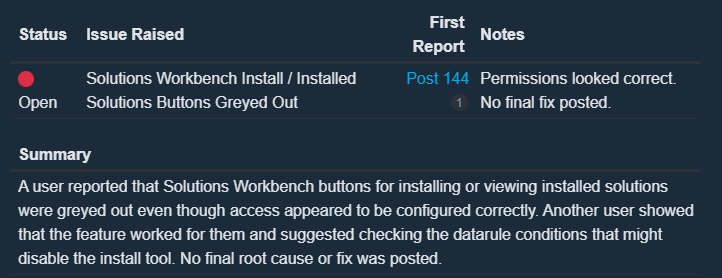
Solutions Workbench Install / Installed Solutions Buttons Greyed Out
A user reported that Solutions Workbench buttons for installing or viewing installed solutions were greyed out even though access appeared to be configured correctly. Another user showed that the feature worked for them and suggested checking the datarule conditions that might disable the install tool. No final root cause or fix was posted.
Status
Issue Raised
First Report
Notes
PRB
Quote Entry Worksheet Material Unit Cost Balloons Exponentially
Case CS0005515956, PRB PRB0317702. Fixed-in-release later listed as 2026.100.7, 2026.100.9, and 2026.1.
Summary
Multiple users confirmed a serious Quote Entry Worksheet defect where Material Unit Cost and related worksheet calculations grew into extremely large values after changing Quote Quantity, quantity breaks, or Unit Cost. The issue affected customers with and without Advanced UOM, so AUOM was ruled out as the sole cause. Several users called it a show-stopper because estimating teams use the worksheet daily. Epicor eventually linked the issue to PRB0317702, with fixed-in-release versions later updated to 2026.100.7, 2026.100.9, and 2026.1.
Delete line, re-enter, use print function for correct values. See Post 202.
Summary
While the Quote Worksheet display and calculations could blow up, one user observed that the Quote Form appeared to retain correct values. Later, a workaround was described: delete the affected quote line, re-enter it, and use the print function to get correct values. This was only a temporary workaround and not considered sufficient for production use by teams relying heavily on the worksheet.
Users discovered the row limit field can be manually typed higher.
Summary
A user noticed that running a BAQ with the “ALL” option only returned 10,000 rows. Other users clarified that the execution setting can remove the test row limit, and that the visible row limit field can be manually overwritten with a larger number. This was treated more as an unintuitive UI behavior than a confirmed bug.
Later traced to a custom BPM on OrderRel. See Post 177.
Summary
A user initially reported that breaking down releases in Sales Order Entry no longer worked and threw an unexpected error. Others could not reproduce the base issue. Epicor later came back to the reporter, and the issue was traced to a BPM on the OrderRel table, originally added by Epicor Professional Services. This appears to be upgrade-related custom BPM fallout rather than a base product defect.
Status
Issue Raised
First Report
Notes
Open
Layer Dataview Disappears After Populate / Get Event
A user reported that a layer would randomly “eat” one of its own dataviews after a populate/get event. The dataview existed before the get event, the event ran without error, and then the dataview disappeared. No one posted a confirmed cause, workaround, or case number in the thread.
Status
Issue Raised
First Report
Notes
Open
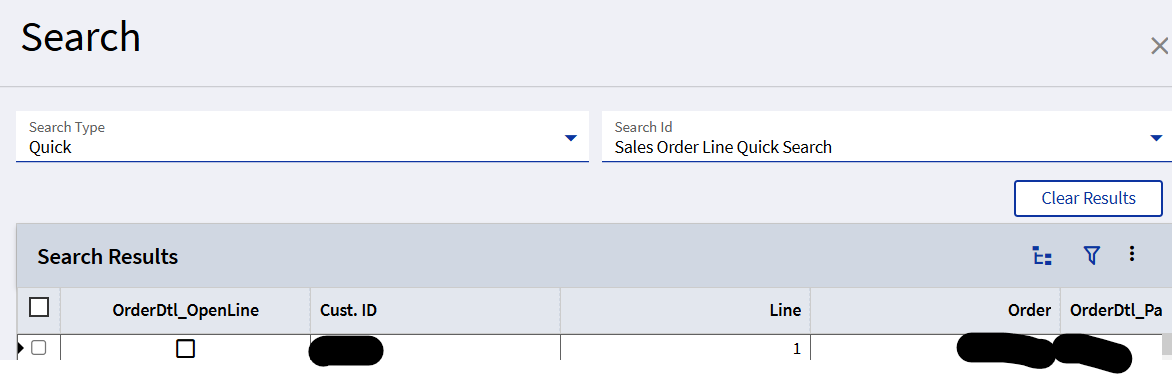
Quick Searches Return Records But Do Not Populate Application Window
Support ticket submitted. Similar issue reportedly submitted by another customer June 4.
Summary
A user reported that Quick Searches worked in Live 2025.2.16 but not in Pilot 2026.100.5. Later testing showed that the Quick Search did return records, but selecting a record did not populate the application window. The same behavior was seen in Job Status Maintenance and Stage Ship Confirm. A support ticket was submitted, and the user noted that another customer had reportedly submitted the issue on June 4, but it had not yet been accepted by Epicor Application Support.
Status
Issue Raised
First Report
Notes
PRB
Part Transaction History Tracker Part Description Not Populating
Users reported that Part Description was not populating on the Part Transaction History Tracker in 2026.100.5. One user confirmed the issue on a vanilla PTHT screen and opened CS0005520088. Another user compared 2025.2 and 2026.100 event behavior and found that a new event after ColumnChanged_PartNum did not populate the PartPlant dataview, even though the description field was bound to it. The issue was later recognized as PRB0318903.
A user reported a positive fix after upgrading Pilot to 2026.100.6: a bug with MRQ material-tags for the STK-MTL transaction type was resolved. The original underlying issue was not deeply discussed in this thread, but the fix was explicitly confirmed.
High-Risk Items to Track
Risk Area
Issue
Link
Status
Security / Site Access
Customer Shipment Entry ignores site-level visibility and edit restrictions
Customer Shipment Entry showing packs from all sites
CS0005516403
Sales Analysis SSRS rendering issue
CS0005515956
Quote Worksheet calculation issue
CS0005520088
Part Transaction History Tracker description not populating
PRB0318806
Customer Shipment Entry site security issue
PRB0317702
Quote Worksheet calculation issue
PRB0318903
Part Transaction History Tracker description not populating
Patch / Release Notes Mentioned by Users
Version
Mentioned Fixes / Notes
2026.100.6
Fixed APR/routing/emailing for Quote Form, Order Acknowledgement, PO Form, and AR Invoice in at least one Pilot. Also fixed MRQ material-tags for STK-MTL transaction type.
2026.100.7
Quote Worksheet PRB0317702 listed as fixed. Reader closed / APR issue also reportedly marked resolved in 2026.100.7 before hotfix confirmation.
2026.100.9
Also listed as a fixed-in-release version for PRB0317702.
2026.1
Also listed as a fixed-in-release version for PRB0317702.
Final Summary
This thread covered several categories of upgrade impact:
InvalidOperationException and concurrency-style failures
Existing BPMs needing copy/recompile or code changes
Operationally critical defects
Customer Shipment Entry site security issue
Quote Worksheet calculation explosion
APR/routing/emailing failures
Quick Searches not populating forms
Part Transaction History Tracker missing descriptions
The most important open items to continue tracking are PRB0318806, remaining dashboard/provider model issues, Quick Search population failures, and any unresolved EF Core BPM/function compatibility problems.
This is a huge PITA the only workaround we’ve found is to use BAQ parameters which have the slideout when the dashboard is opened. Our users hate it but until this is fixed it’s the best we can do.
Looks like CS0005508591 (Customer Shipment Entry all-sites) AND CS0005515956 (Quote Worksheet) are resolved…didn’t do a LOT of testing but enough to get a good impression.
I am seeing an error when opening a fiscal period.
Here are a few lines of the error I received after saving ‘Close Period Entry’ and opening another app:
[CDATA[Ice.Api.Exceptions.ApiException: Parameter ds is not found in the input object
   at Epicor.RESTApi.DataSources.InputParamResolverBase.ResolveParameterValue(ParameterInfo parameter) in C:\_releases\ICE\ICE5.2.100.0\Source\Server\Framework\Epicor.RESTApi.Common\DataSources\Main\InputParamResolverBase.cs:line 70
   at System.Linq.Enumerable.ArraySelectIterator`2.ToArray()
   at Epicor.RESTApi.DataSources.CustomMethodCaller.CallMethodWithDynamicData(String serviceId, String methodName, IInputParamResolver inputResolver, Action`1 headersPublisher, Action`1 verifyMethod) in C:\_releases\ICE\ICE5.2.100.0\Source\Server\Framework\Epicor.RESTApi.Common\DataSources\Main\CustomMethodCaller.cs:line 67
   at lambda_method362526(Closure, Object, Object[])
   at Microsoft.AspNetCore.Mvc.Infrastructure.ActionMethodExecutor.SyncActionResultExecutor.Execute(ActionContext actionContext, IActionResultTypeMapper mapper, ObjectMethodExecutor executor, Object controller, Object[] arguments)
   at Microsoft.AspNetCore.Mvc.Infrastructure.ControllerActionInvoker.InvokeActionMethodAsync()
   at Microsoft.AspNetCore.Mvc.Infrastructure.ControllerActionInvoker.InvokeNextActionFilterAsync()
I submitted a case, but it hasn’t been assigned yet.
After doing some additional testing, it looks like it saves the changes correctly. There are no issues if I click home after I save the changes. It only throws the error when I try opening another app (it apparently tries to make another update call without any parameters).
We went live with 26.100.7 on Monday and (so far) the only issue I have had to resolve was the custom Report Style for Proforma Invoice was broken - complaining about the Ourbank fields - I resolved it by checking OrderHed in the RDD - it seems that the Linked Table for “OurBank” had been unticked in the update so I had to simply tick it and then tick all the Bank fields that were missing and save.
Very strange that it should have done that but an easy fix.
 Resolved / explained
 Workaround known
 Case / PRB known
 Open / unresolved
 Informational / behavior change