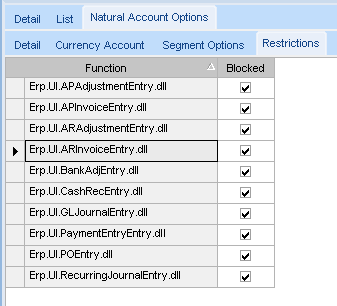
If there are no manual GL transactions against the account and the AP Clearing account is not on any other GL Control Code, then there are 2 ways other ways this could get out of whack. First, all control accounts like Cash accounts tied to Bank Accounts, A/R Trade, Unapplied Cash, All Inventory accounts (including WIP), A/P Pre-Payments/Advance Payment, A/R Invoiced Deposits/Pre-Payments, A/P Trade, A/P Clearing, and Retained Earnings, should have Restricted Functions tied on those Account Segment Values on the Natural Account Options > Restrictions sheet:
Second, check to see if anyone in A/P is using the “New Unreceived Line” option in A/P Invoice Entry. With this option, you can enter an invoice for a PO Line(s) that hasn’t yet been received. This will Debit A/P Clearing and Credit A/P Trade, thus potentially resulting in a debit balance in the A/P Clearing account. If that is done, then someone needs to also go into the Invoice/Receipt Match screen, in A/P General Operations, and match receipts, when they finally do come in, with the invoice that was already entered. I briefly discuss this option when training customers on A/P Invoice Entry but discourage them from using it. I don’t like it because it creates extra work and allows for things to go wrong. My logic is, why would you pay an invoice for something you haven’t received yet? It’s better to enter it as an Advanced Payment.
If you put in Account Restrictions and ensure that they’re not using the Unreceived Lines option, I think you’ll have better controls in place.