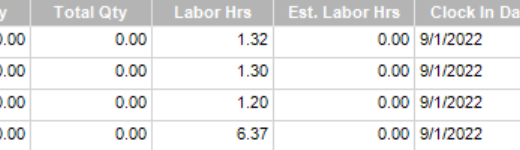
I have a BAQ for evaluating job efficiency. I am attempting to divide a field by a calculated field, both decimals, but when analyzed there are zero rows returned. I have been unable to find a solution for this issue.
select
	[LaborDtl].[JobNum] as [LaborDtl_JobNum],
	[JobHead].[PartNum] as [JobHead_PartNum],
	[LaborDtl].[EmployeeNum] as [LaborDtl_EmployeeNum],
	[LaborDtl].[OpCode] as [LaborDtl_OpCode],
	[JobHead].[ProdQty] as [JobHead_ProdQty],
	(LaborDtl.LaborQty + LaborDtl.ScrapQty) as [Calculated_TotalQty],
	[LaborDtl].[LaborHrs] as [LaborDtl_LaborHrs],
	(TotalQty/ JobHead.ProdQty* LaborDtl.LaborHrs* 1.0) as [Calculated_Shouldhavetaken],
	[LaborDtl].[ClockInDate] as [LaborDtl_ClockInDate],
	**((LaborDtl.LaborHrs- Shouldhavetaken)/ Shouldhavetaken) as [Calculated_effpercent]**
from Erp.LaborDtl as LaborDtl
inner join Erp.JobOper as JobOper on
	LaborDtl.Company = JobOper.Company
	and LaborDtl.JobNum = JobOper.JobNum
	and LaborDtl.AssemblySeq = JobOper.AssemblySeq
	and LaborDtl.OprSeq = JobOper.OprSeq
inner join Erp.JobOpDtl as JobOpDtl on
	JobOper.Company = JobOpDtl.Company
	and JobOper.JobNum = JobOpDtl.JobNum
	and JobOper.AssemblySeq = JobOpDtl.AssemblySeq
	and JobOper.OprSeq = JobOpDtl.OprSeq
inner join Erp.JobHead as JobHead on
	JobOpDtl.Company = JobHead.Company
	and JobOpDtl.JobNum = JobHead.JobNum
where (LaborDtl.ClockInDate = dateadd (day, -1, Constants.Today))
Also, if your “Shouldhavetaken” is ever = 0, then there will be an error. Either ensure your “shoulda” value is set to never = 0, or place a conditional to return something other than error if there is a 0 in there.
Look at the expression editor for the calculated field: Calculated_effpercent. You can edit the text in that expression editor to include the Caluclated_ prefix.
It is not just zeros, also if there is a null it will give an error. Olga’s link has information on using a condition to ensure you don’t get those divide by zero errors.
Yes, or no error, just doesn’t work as expected.
So I have gotten into the habit of checking for Nulls when I do division.
Maybe something like this for your BAQ?
(case
when ISNULL(ShouldHaveTaken,0) <> 0
and ISNULL(LaborDtl.LaborHrs, 0) <> 0
then ((LaborDtl.LaborHrs - ShouldHaveTaken)/ShouldHaveTaken)
else 0
end)