I believe the problem with the search chip for BAQ Reports is twofold:
- validateFilter is broken, as you note
– validateFilter default fails for the epBinding prop ReportParam.Filter1, when it could instead use the search-show Like prop Customer.CustID - missing a search-value-set action after search-show
– that value-set widget in the built-in event isn’t even an action that exists, afaik.
This can be fixed like so:
Overide onSearch:
- Copy the event ReportParam.Filter1 and name it onSearchReportParam.Filter1
- Change the trigger to OnSearch
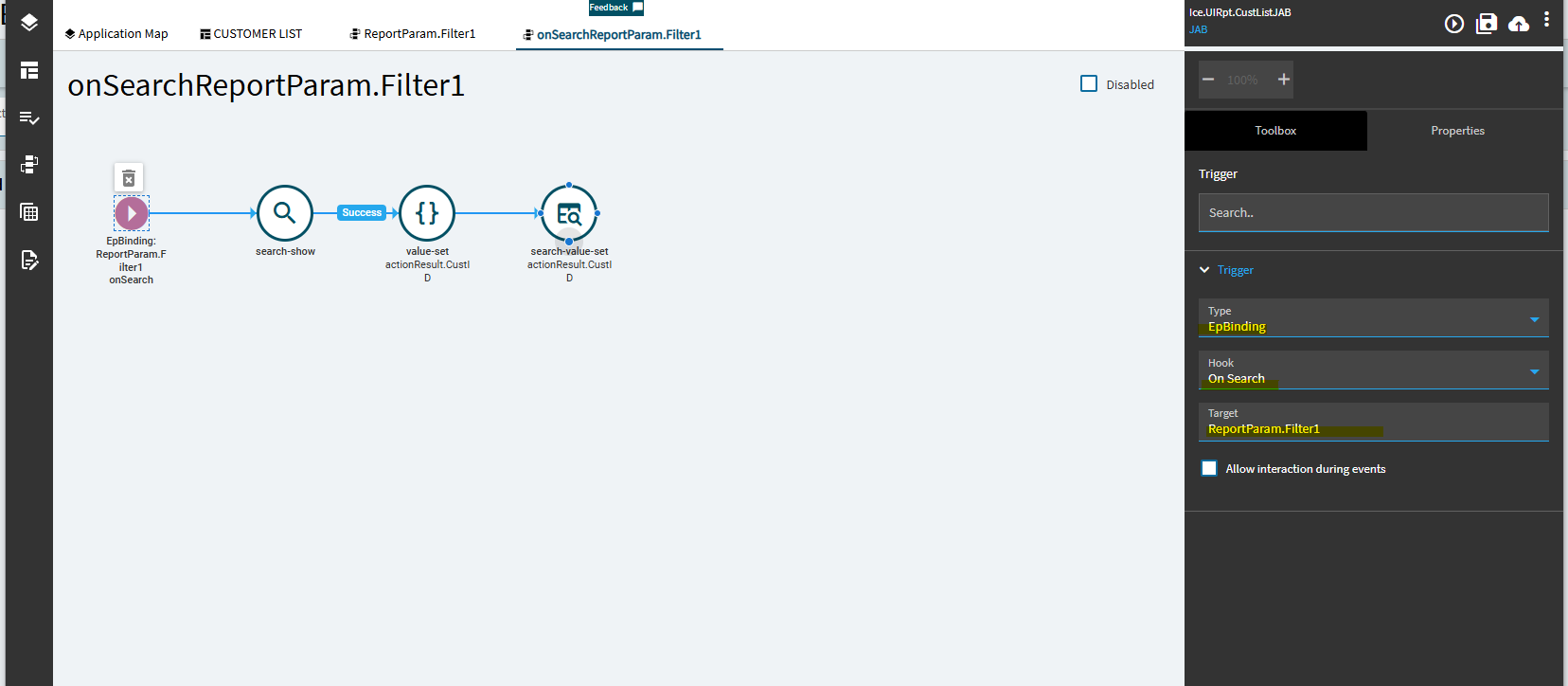
- Set search-show Validation prop to respective filter:
{
	"validateFilter": "CustID = '%value%'",
	"errorMessage": "Invalid Customer"
}

- Add a search-value-set action and set properties:
epBinding: ReportParam.Filter1
value: actionResult.CustID

Then it should work as it should: type + enter, multi paste, and multi select search.
like this: