I guess I’m very needy lately, but maybe this is a fun challenge.
We use Egnyte as our file storage platform, which creates mapped drives on our users system. An users be users they live and die by their mapped drives in Explorer (or Finder in Mac). Windows 11 has the Copy as Path option. I can formulate the Egnyte web path based on the “Copy as Path”. I created a UD Column where the sales user can paste a link to the project files folder. I intend to use this Copy as Path to create that web path.
Their path will include either a drive letter “S:” (for windows) or “Volumes {blah blah blah} Customer Folder” for Mac users. With a block of code I can either find remove any quotation marks, find the drive letter “S:” or “Customer Folders” then append the appropriate "https:\reallycoolpath" + {whatever comes after one of those two things in the value above}
i.e.
Path in windows "S:\D\DAN004\Dansville School for Gifted Students"
I would calculate "https:\reallycoolpath\D\DAN004\Dansville School for Gifted Students" as a URL to open.
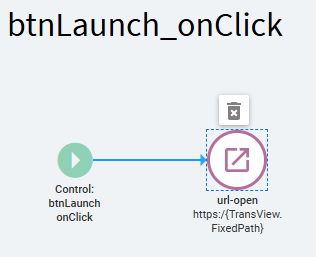
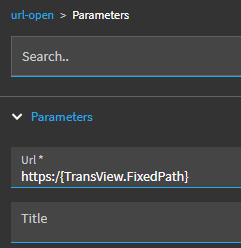
Then I hope to do a url-open to that url.
Thanks for the concerns, but that part isn’t part of my problem. Indeed we could do a replace " " with “%20”, but I’ve had luck sending it with spaces and not having issues on other platforms. Usually the browser fills in the %20.
My concern is how do I run code to formulate the link? Is this something that can be done in Events in Application Studio?
I’d go with a BPM on the Update method for said form (SalesOrder.Update for example) and that BPM would check to see if the data in the UD field has changed. If so, it’d call a Function to do that conversion and send back the correct URL and store it.. in another UD field? or whatever your plan was.
Doing it this way would make the function universal for all forms you need this instead of the conversion logic being done the BPM.
Yes, but just to update (correct) the URL value. I’m not sure how/when you’re actually launching the page.
If you wanted to SAVE the “fixed” URL, you wouldn’t bind that field to TransView… bind that to a UD column or something, and then you can save it for realz.
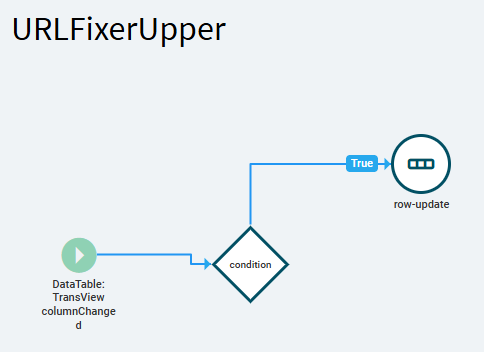
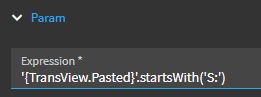
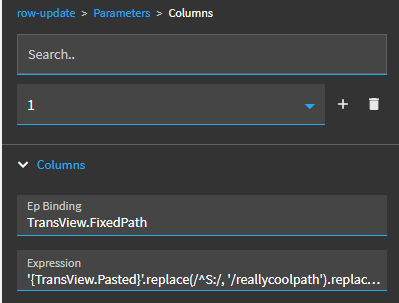
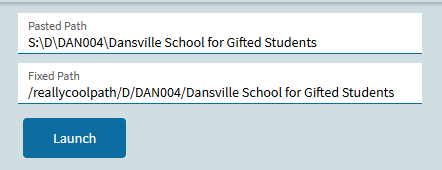
I figured I’d actually test this out… I made a few tweaks:
I attempted this last night, but I think I missed something. Specifically your “fields” TransView.Pasted and TransView.FixedPath Do those need to be added somewhere before I can even start? I attempted your code above but never really added those TransView fields anywhere other than as a reference to a textbox on my page. I may have missed somethin as I said.
ALSO I am testing and not publishing the layer if that is a matter of interest. I am pasting in a value into “Pasted” and hitting TAB, nothing happens and then I tried to click SAVE to see if that makes a difference.
The TransView dataview is just a temporary dataview for that particular session. Nothing you put in there will be saved long term… just as long as you’re on that form.
If you’re working on a standard Epicor form, like Order Entry, Part Entry, etc. the TransView dataview will already exists.
If you’re working on a custom dashboard, you need to create your own temporary dataview for stuff like this. It doesn’t HAVE to be name TransView… I just always do because that’s the epicor standard temp dataview name and I bow down and conform.
If you bind to TransView.MyHappyPlace and the TransView dataview doesn’t exist… nothing is going to happen. So… that could be going on in your case. You’re binding your value to a dataview that doesn’t exist so it just gets lost to the aether.
So, if this IS a custom dashboard and you don’t have a temporary dataview… add one.
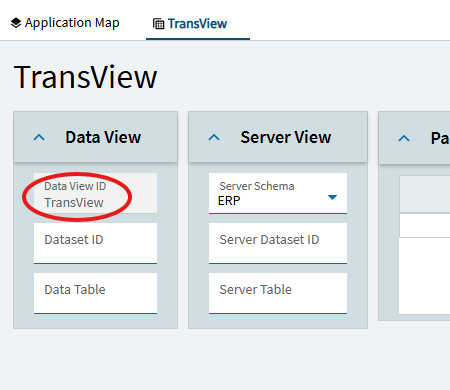
Just go into your dataview in App Studio, click new, and give your dataview a name:
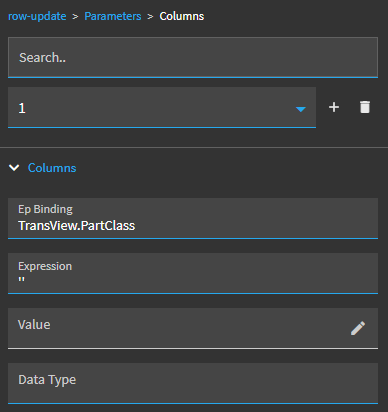
The only other thing you need to do is initiate it at run time. To do that, you just need an event with a row update where you update a random TransView column to… anything. Its just a way to kick the dataview awake.
For example, below I initiate this one by row-update TransView.PartClass to an empty string (‘’).
Once your temp dataview is alive and kicking… you can add columns on the fly. I don’t “define” TransView.Pasted anywhere… but I bound a text box to it. So, then when I paste a value in there and tab out of it… that value is saved to TransView.Pasted. That column gets created automatically as soon as a value is entered into it.
Sorry… long winded. Let me know if this doesn’t make any sense
I appreciate the row-update, I more or less follow that. However what event am I triggering from? Does the field need to exist that I am making ‘’? TransView does exist, but there are no fields. It seems that is OK.
 "
"