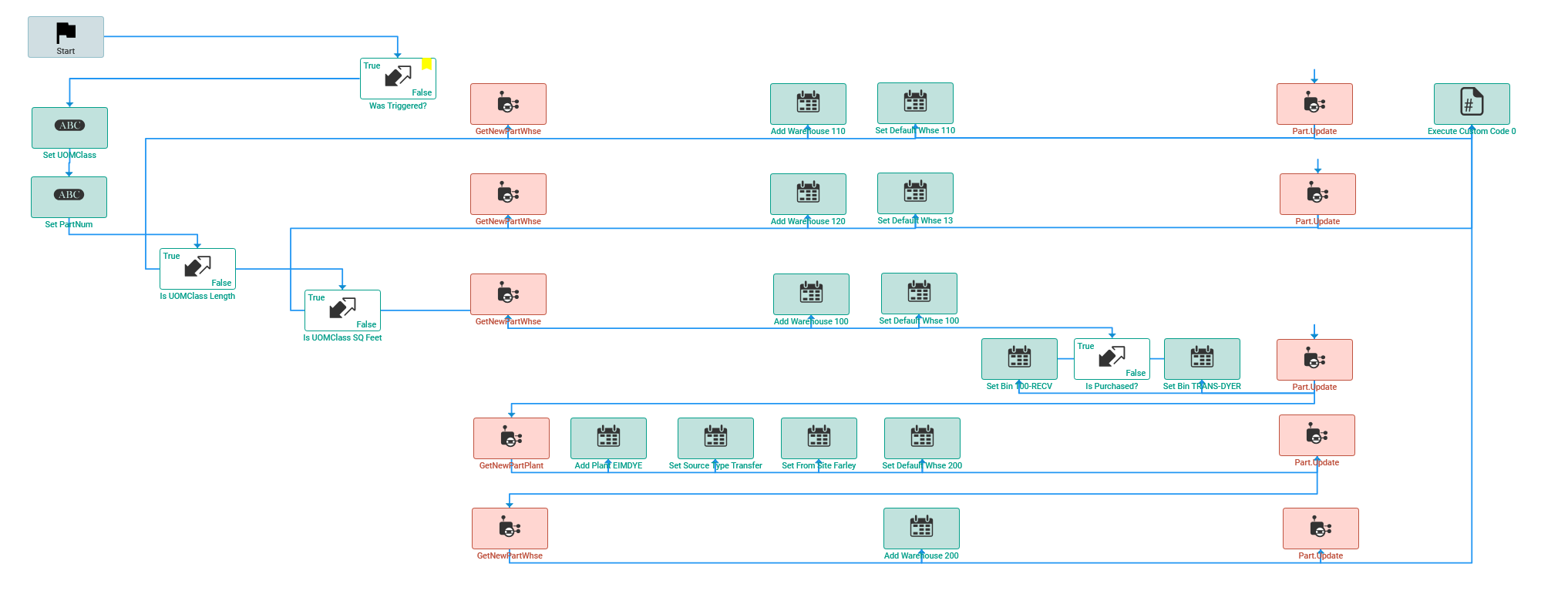
A while back @gpayne posted a BPM to automate the addition of PartPlant and PartWhse records on new part creation. The intent of this BPM is that if you add a new part, it gets certain plant and warehouse default according to its UOMClassID. I modified it into a monster, and now that monster haunts me.
See the red? yeah… it turns red for no reason sometimes. This is from the DB where this BPM is functional. This BPM was used in production for months, and nothing changed. Then, two days ago, we started receiving an error. Every time we add a new part, with UOMClassID COUNT (bottom-most flowchart branch) the first part.update fails. It didn’t used to fail. Nothing changed.
Re-importing the BPM from a stored copy fixes the issue. There is no difference between the imported BPM and the live one.
Does anyone know why this is happening? Why do those GetNew and Update methods turn red periodically? Why does it wear down, decay, stop working every few months? The last time it broke down, the whole BPM became read only, and it wouldn’t let me modify it. The solution last time was to delete and re-import it.
Should I turn this into three separate BPMs, one for each UOMclassID?
This is my first BPM of this nature, and surely the largest map of widgets I’ve ever stolen from Greg made.
Here is the BPM and a map of what our Warehouses mean:
100 Main general warehouse (UOMClassID = COUNT)
110 Saw department warehouse (UOMClassID = Length)
120 Burn to shape department warehouse (UOMClassID = SQ FT)
EIMDYE Site- this is a shipping location elsewhere and 200 is the warehouse.
There are two BPMs, a pre to trigger and a post which does the business. They’re both in Part.Update.
Absolutely nothing. If you click a red widget, open up the configuration slide out, DO NOTHING, then hit save, it turns green. Then, after a period of time, it will be red again…
If it’s haunting you, but that critical, I’d talk to someone about developing code to do it. Since it’s something that’s used every day, I think you can justify the spend.
Given you’ve already done the logic in its entirety AND the code exists for all those widgets on your server… you could summarize this and hand it over to a consultant if you would not like to do it in house. I’m imagining with that, they could get it done and tested in 2-5 hours.
The other thing is that you could add logging to it so that you can understand at what point it’s breaking down, which widget or whatever… maybe output the dataset at that point.
Well thats the thing, I know which widget it failing this time, its the last Part.Update widget on the bottom right. it gives me an error “A Primary Warehouse is mandatory and cannot be directly removed.“
So I started looking into it and I think I’ve got a handle on it now, but why would it have changed? why do the widgets become red? is it going to fail again?
Yeah, the kinetic designer is definitely not an ally here. But seeing as how this BPM is only fired on adding a new part, and only touches the PartPlant and PartWhse tables, and those haven’t changed. If I had a logic error, it should have shown itself last August when I stole this BPM from Greg
It’s one of those things that should just ship with the ERP, a workflow that you have to follow when creating a part… you have to give it a site, a cost, etc.
Dump Sources is a feature that does like it sounds. The code Epicor generates from your BPM is dumped to disk. Here’s your whole package: Erp.BO.Part.Update-PartWhse.zip (15.2 KB)
its nothing compared to when @klincecum converts the whole thing to a function. /jk
@zvanmeter this happens every time I review a function/BPM I have deployed. At that time, as you said just go in and do nothing.
As far as I am aware the BPM or Function will still run before you open it - even if after you open it some widgets are red.
I have similar workflows with all Widgets and maybe one segment of C# code.
Are you on Prem or Cloud? We are on Prem and even on upgrades I have not had to touch my workflows but if I want to make a change then I have to have saved a picture of the entire workflow to remap everything
We’re on Prem. I got my BPM working again by adding a few extra fields. still have plenty of red widgets, so I can confirm that them being red isn’t whats causing or breaking the code… What puzzles me is that it just… Broke. Seemingly for no reason.
I wrote software to backup all our BPMs and custom code years ago, but I think I might update it to copy the dump sources file, that way I can diffcheck on that as well. I don’t know what else there is to do. Hopefully it doesn’t break again.