Does anyone know if there’s a way to Dump Sources in cloud?
Ask someone who is on prem perhaps 
No seriously
@GabeFranco perhaps one for the tools?
In SaaS the only way I know of is through Server File Download, but Epicor have to enable access to the server directories via EpicCare first.
I requested this and was told it had been completed, however the directory still doesn’t appear. I assume this may fall into the classic Epicor support workflow where the ticket gets closed first and the fix happens… well… theoretically at some point afterwards.
Once the access is actually enabled on the environment, the server directory should appear in Server File Download and you can pull the dumped sources from there.
This has to be enabled in the web.config host.config file on the server. I do not know if they will do that.
In addition, the default paths for where these are dumped, are outside of where you can normally access, but that could also be changed.
I may bite the bullet and see if this is a change the cloud team would be willing to make.
DO IT!
Done.

2 Likes
Or someone can create an idea to make this cloud friendly 
Curious, if the feature can be turned on and dump dir set in config, is it not already cloud friendly? besides the inability for a customer to toggle it.
If you don’t ask.
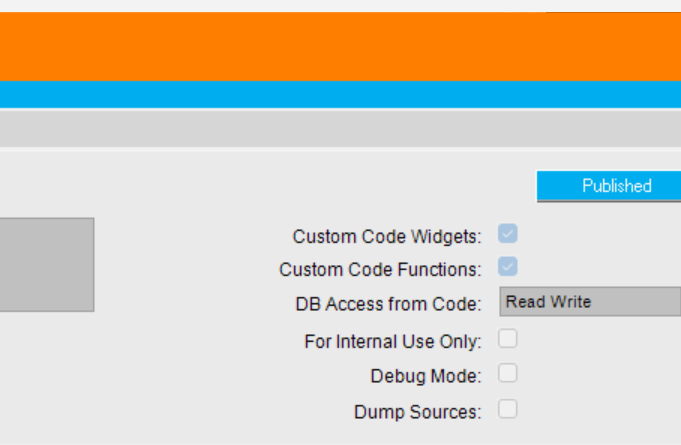
The checkbox does nothing unless it’s enabled in the web config host.config.
It also by default goes to a place where cloud has no access.
It does for me, I check that and trigger a Save on EFX or BPM atleast, it writes it when having default web.config but I am on-prem.
Correction, not web.config, host.config.
Now the question is where does it write to for Cloud folks the Host.config.template shows
  <customizationSettings
    disabled="false"
    intermediateFolder="TEMP"
    loadPdb="false">
While on-prem it writes to Server\BPM because the IntermediateFolder has the BPM Path. Not sure to where the Cloud writes to if they use TEMP its %TEMP% of the IIS user… But its as easy as them changing it to your EpicorData path, restarting/recycling app pool and it should work.
Do you all have official docs on host.config? Anything may help to push it past front line support. And for idea when/if support rejects our request.
@hkeric.wci do you have a types section like so? If so does it include #Efx ?
  <customizationSettings disabled="false" intermediateFolder="TEMP" loadPdb="false">
    <externalsStorage provider="FileSystem" settings="" />
    <types>
      <add name="BPM.BO" folder="BO" />
      <add name="BPM.DT" folder="DT" />
      <add name="BPM.Ubaq" folder="Ubaq" />
      <add name="GenericImport" folder="EF" />
      <add name="EDI" folder="OM\UD" />
      <add name="ElectronicInterface" folder="EI" />
      <add name="Expressions" folder="ECF" />
      <add name="Posting" folder="PE" />
      <add name="ProductConfigurator" folder="PC" />
    </types>
  </customizationSettings>
If they Use TEMP then they would write to either %TEMP% or
C:\Windows\ServiceProfiles\NetworkService\AppData\Local\Temp
Yes I have types just like you… but the intermediateFolder=“TEMP” decides their outcome. Here is mine:
I enable dumpSources by default, but if you dont you can still use the Dump Sources checkbox!
  <customizationSettings disabled="false" intermediateFolder="C:\inetpub\wwwroot\KineticServer\Server\BPM" loadPdb="false">
    <externalsStorage provider="FileSystem" settings="C:\inetpub\wwwroot\KineticServer\Server\Customization\Externals" />
    <types>
      <add name="BPM.BO" folder="BO" dumpSources="true" />
      <add name="BPM.DT" folder="DT" dumpSources="true" />
      <add name="BPM.Ubaq" folder="Ubaq" dumpSources="true" />
      <add name="GenericImport" folder="EF" dumpSources="true" />
      <add name="EDI" folder="OM\UD" />
      <add name="ElectronicInterface" folder="EI" />
      <add name="Expressions" folder="ECF" />
      <add name="Posting" folder="PE" />
      <add name="ProductConfigurator" folder="PC" />
    </types>
  </customizationSettings>
Ok, so what we need to have happen, is the cloud team modify the host.config file from:
<customizationSettings disabled="false" intermediateFolder="TEMP" loadPdb="false">
to
<customizationSettings disabled="false" intermediateFolder="/epi/storage/epicordata/[YourCOMPANYNUMBER]/Companies/[YourCOMPANY]" loadPdb="false">
or something like this and put it in the azure file share
<customizationSettings disabled="false" intermediateFolder="/epi/fs" loadPdb="false">