Oh well I can confirm there is no customization on the Kinetic at all… this is our first exposure to it and I haven’t change a single form yet. Yes we have old customizations on the Classic views, but from what I can see, none of that get’s converted to the Kinetic screens.
Also the fact that I went to version 2024.2.17, upgraded the same old DB, and they all work as they should really makes me question version .28
Spun up the old Appserver and DB that was showing this problem and it’s still there. I’ve rebuilt the site and re-deployed it as well during that process so it still appears to be something related to the .28 version at this time. I will re-connect with support so I can now show them the issue.
Possibly it was the 2023.2 to 2024.2.28 upgrade that I did, but they don’t say to upgrade in steps, they say to go from your current version directly to the latest patch level of the release your moving to.
I also went from the same 2023.2 version to 2024.2.17… no pitstops in between, and that works fine.
See that’s the hunch I’ve always had with some of the issues that are being reported across the user base… just how long have they been on the cloud? What upgrades have they been through? And you can see given your testing above that the path they have taken may matter.
I’m going to bring up my .17 version to .26, which is the version the tech support team is on and they said they still see context menus coming up as expected. Then I will probably attempt to bring that up to .28 and see if they go away.
I could also do another upgrade from 2023.2 to 2024.2.28 and see if I get the same result… I doubt its because of the upgrade path, but who knows at this point. Anything is suspect.
I hate to wish failure on companies or people but I just validated that if you are at version 2024.2.26 and upgrade to 2024.2.28 your context menus vanish. (at least mine do ) I brought my .17 version up to .26 everything was fine and I just upped it to .28 and the context menus are no longer working.
As much of a pain that this is… I have at least validated myself in finding that there is something wrong and it happens when it goes to version .28
I will be calling support back today, they left a VM when I was out, and I will be able to show them this issue.
That’s what I have been noticing/hypothesizing as I read the different issues that different people are reporting. We are all on the same version, yet experiencing different issues and I didn’t think it was a data problem, but rather the fact that we all joined cloud/upgraded at different times starting at different versions/releases- some going through a cloud conversion tool, others cutting over clean and re-implementing.
We re-implemented when we went to 9.05. We did not want to bring over our Vantage system since it was so dissimilar. Ever since that we’ve done the standard version upgrades, as directed. I would expect something like this to happen from something that I’ve messed with, but context menus have been left untouched. I honestly never thought to manipulate them and no one ever asked for any changes to them.
Spin up a test environment for that 2024.2.11 data in your profile and try out .28
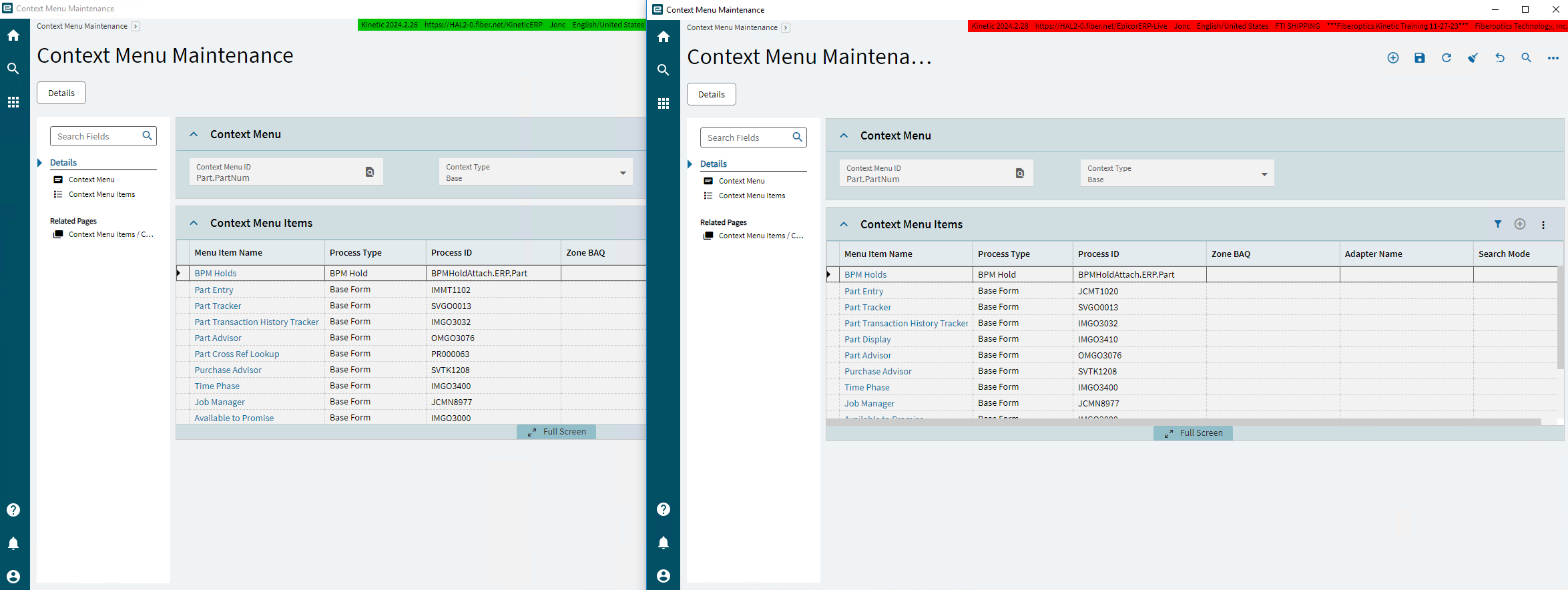
Some more info… Context menu maintenance side by side. Version .26 on the left, version .28 on the right. There are differences in some of the Process ID’s and I’ve never changed any of this. notice they are both set at “Base”
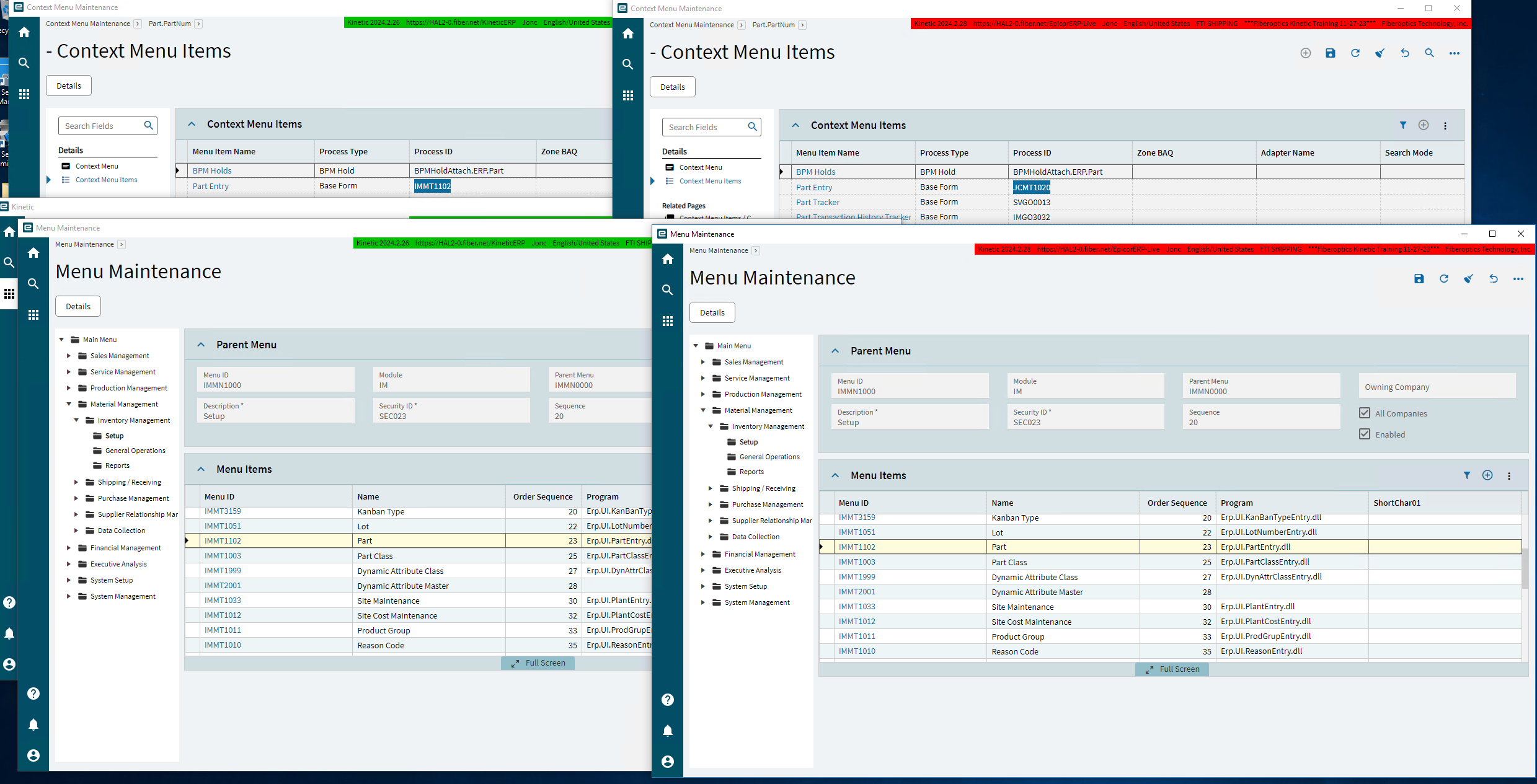
More conformation that some conversion process changed the context menus and did it incorrectly. The working version is all the green tagged windows, left, non working is the red, right.
On my broken release, the process ID listed in the context menu maintenance does not match the ID that the application “Part” has in the standard Menu Maintenance.
I have the same problem in 2024.1.35. Support told me they weren’t going to fix it, because it’s fixed in later major releases, but there is a workaround. Go into Context Menu Maintenance, click the field you want the menu on, select Copy to Customization on the overflow menu, and the context menu comes back. I did this for the fields my users were complaining about.
I escalated the support case, and they’re still looking at it.
So I got a ticket update today… They upgraded their 2024.2.26 version to 2024.2.29 and told me there isn’t a problem and they can’t recreate the issue I’m having on 2024.2.28… Well yeah you skipped the version I’m having a problem with… UGH…
Now I’m going to install .29 upgrade my .28 DB and see if it’s fixed, and if that doesn’t fix it, I’ll take my .26 DB and bring that up to .29 and see if that avoids the problem from happening all together.
I love being their test mule and paying them support fee’s…
So basically you have to customize the menu’s that aren’t showing up to get them to come back? They tried telling me that it was because some were already listed as “customize” from a quick search entry. So then they tried deleting all of the customize ones and putting them all back to base, when the main one I was having issues with was already base, and of course that didn’t fix anything.
I’m going to try the .29 release for 2024.2 now. Maybe they will have a .36 patch for 2024.1 to fix your problem… but not if they can’t come to an agreement that there actually is an issue.
I’m amazed that now two people who are on 2024.1 have the same issue, and have been told Epicor wont fix it is not a discoverable ticket by the individual I’m working with.
.29 update against my .28 database did not fix the issue.
However
Holy crap… that works… I just did it to Part.PartNum and all I did was told it to Copy to Customize saved it and closed Context Menu Maintenance opened Part Tracker and VOILA Context menu was back. For testing purposes I went back and deleted the customize option and reset it back to base and it was broken once again.
Now time to try updating my .26 version to .29 and see if this issue never happens.
They had me submit a HAR file (a trace) to see what is happening, why it doesn’t work (though they’ve already fixed it in later versions), they’re still working on the case.
Do you have a case number I can give them so they don’t think I’m the only one with this problem? AKA pointing the finger at my DB as they love to do.
Thanks.
Oh this was what they told me when I said someone else has this issue on the user group… Prior to knowing about you.
This was Tech supports response to your case number when I provided it.
And regarding CS0005226516, the Tech Team submitted a Kinetic 2024.1 Update Request for that Customer, however, that Customer reported the Context Menu issue no longer occurred after installing the current Update for Kinetic 2024.1
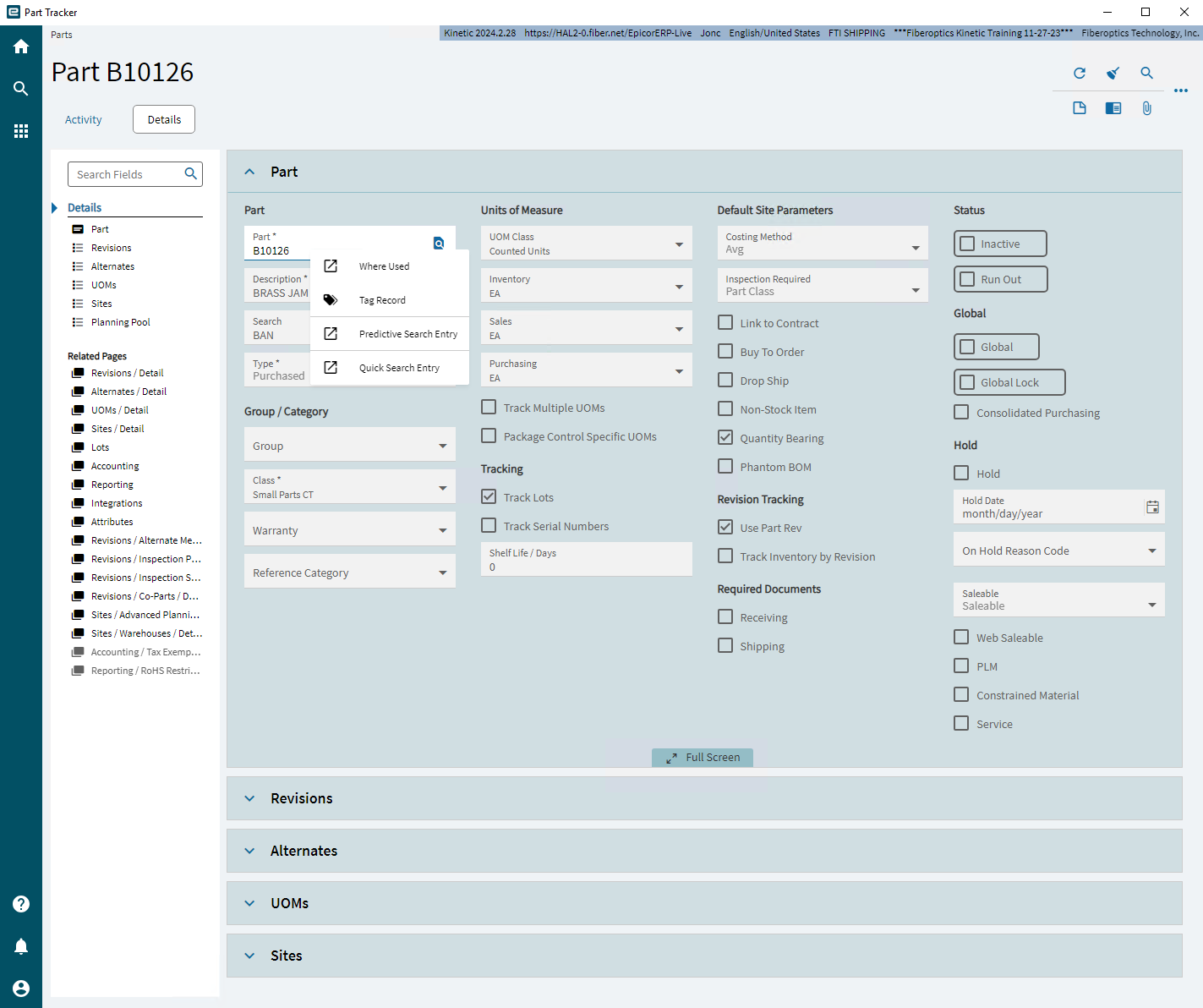
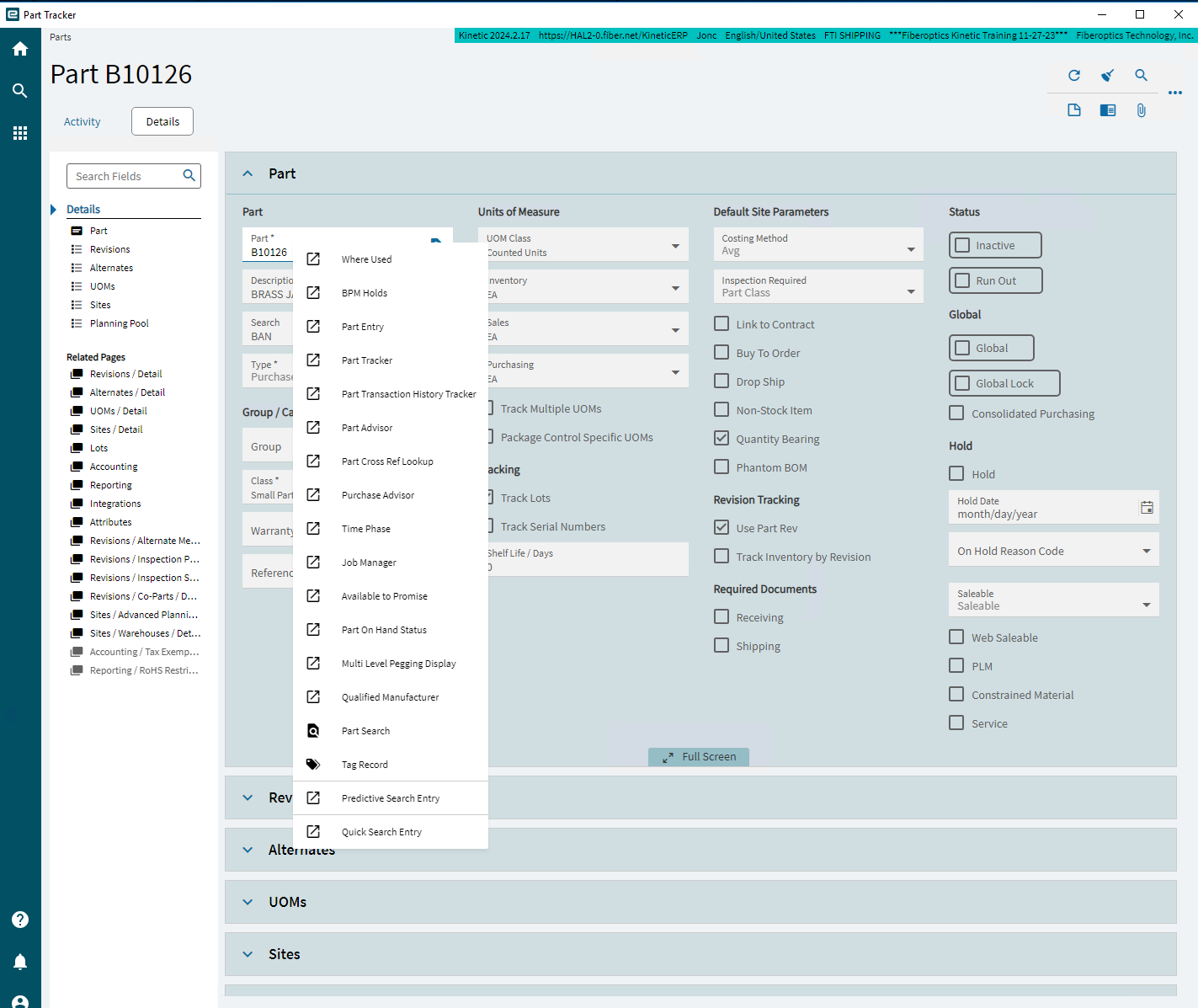
 ) I brought my .17 version up to .26 everything was fine and I just upped it to .28 and the context menus are no longer working.