Figured it out. I had the button put on the Production Tab. This caused it be considered a native and not a custom. That got figured out what I tried to delete the button and it said you can only delete custom and not native. So, I removed the customization and this time did it with a new sheet. This got me to the next step.
Nope, EpiBinding can be left blank.
Last question and I do appreciate your help in this. How do you deploy the customization for the MES? I can see it and use it when in customization mode, but not in normal mode. When I had done customizations for the main Epicor I had to add it to the menu maintenance for it too work. Is there something similar for this?
Ha, I knew that question was coming. You have to modify the sysconfig file to look for it. You will need to add the customization to that processes menu to get a menu ID (the one I referenced earlier in the thread). Then on the machine you want to have the customization go to the client folder.
C:\Epicor\ERP10.2Client\Client
Find the config editor
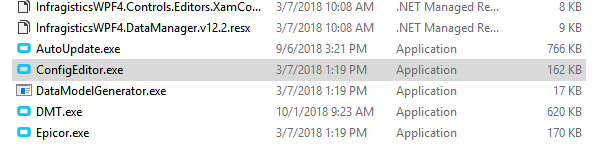
Pick the sysconfig you want to modify, then in the MESCustomMenuID put your menu ID there. You will have to do this for every machine. If you can modify the master one on the server before you install the next time you upgrade it will help do you don’t have to go around and touch every machine. It still get’s us every time.
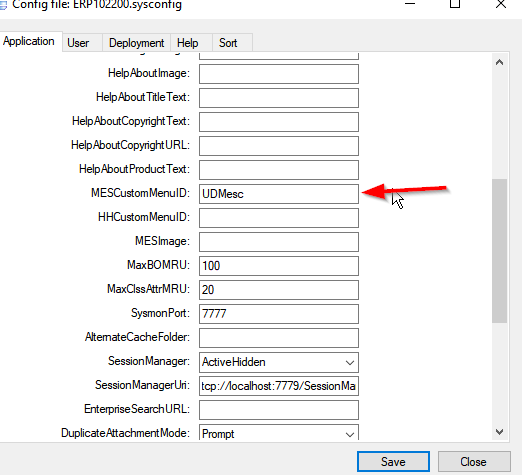
When you hit save, it doesn’t look like it does anything, but it did save. Now re-open the MES from your normal shortcut and it should open the customization.

I don’t have the Custom MES, I guess I just add it, correct?
Correct.
Ok, did that. This dashboard was built for one dept and they can only access MES via RDP. So, would that mean i would need to modify the server one to get to show up for them?
I think so. We have thin clients, and I only have to go to one, then all of them have it. (I don’t know how all of that works exactly…) But I have to go to all of the actual PC’s and modify the the sysconfig on them.
Fair enough. Your help has been great! This last little hump will be trial and error mostly.
Thanks!
@MiguelS I appreciate your help as well! The info was good and very easy to follow. If you have any info on the RDP question, or even ideas, I am open. Thank you for helping!
Yes, update the sysconfig on the Terminal Server for the correct environment.
I have one version of MES for all my MES stations. Dont forget to update the sysconfig on the server and ReleaseClient.zip for new installations.
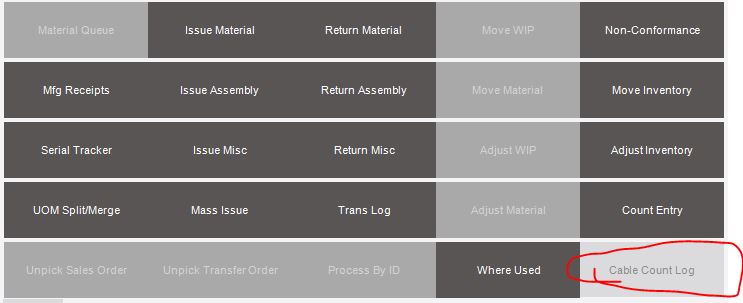

When using a dashboard in the MES screen, does it use a DataCollection license or a Default User license?