Is there a way to check if a field has changed in the custom code for a data directive without having to read the original record from the database? Something like a ttOriginalRecord?
use the field change from x to y condition.
Assuming I don’t use the condition for some reason. Is there another way inside a custom code?
Dear Vilasack,
If you’d like to compare fields before and after, there are some transactions, not all, where the temp table contains both the before and after versions of the records. If you’ll get the record where you’re checking for the update code…
var ttLaborDtl_xRow = (from ttLaborDtl_Row in ttLaborDtl
where ttLaborDtl_Row.RowMod == “U”
select ttLaborDtl_Row).FirstOrDefault();
… then do the same for RowMod == “” (or maybe you should put a space in there; it’s been a few years) then the latter one will hold the “before” field values. Then after verifying you got a non-null record for both, you can compare individual fields. Test extensively; I’ve had trouble making it work in the past.
It worked. Thanks. I was reading from the database using Db.LaborDtl.
I wasn’t aware that the tt instance contains two records one for the before and one for the after.
Thanks again.
you can always see what Epicor does for its conditional check. Use that code as an example like below.
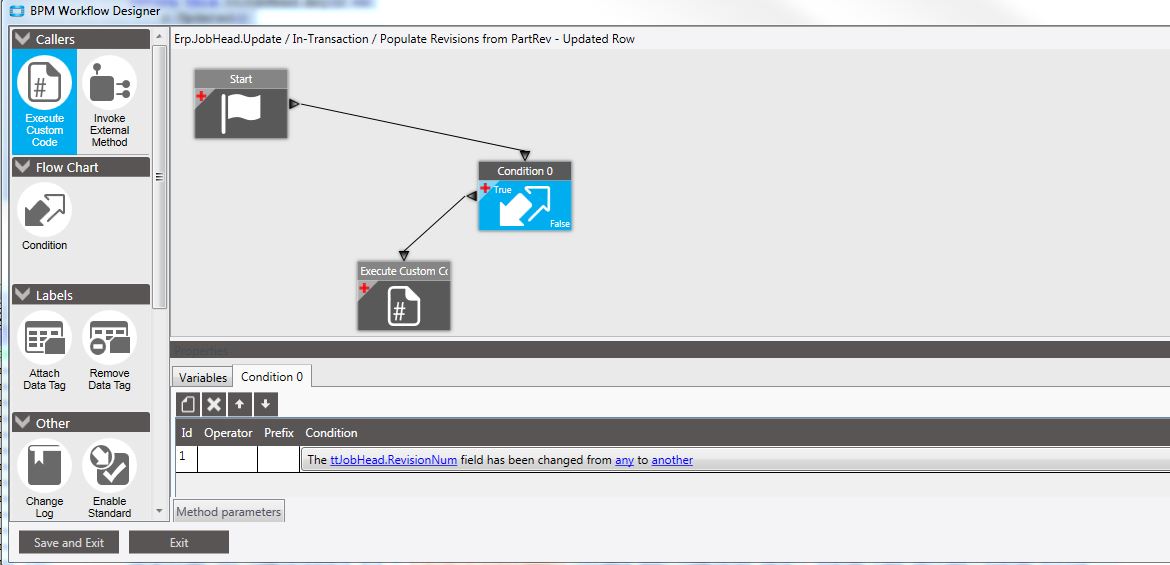
\EpicorServer\c$\inetpub\wwwroot\Live101400\Server\BPM\Sources\DT\ERP.JobHead.Triggers\43
Which equals: It might save you a few lines in your code.
private bool C001_FieldChangedCondition(object currentRow = null)
{
    if (currentRow == null)
    {
        return this.ttJobHead.Any(r =>
            r.Updated()
            && this.ttJobHead.Any(r1 =>
                r1.SysRowID == r.SysRowID && r1.Unchanged() && !string.Equals(r1.RevisionNum, r.RevisionNum, StringComparison.OrdinalIgnoreCase)));
    }

    var typedRow = currentRow as Erp.Bpm.TempTables.JobHeadTempRow;
    if (typedRow == null) return true;

    return typedRow.Updated()
        && this.ttJobHead.Any(r1 =>
            r1.SysRowID == typedRow.SysRowID && r1.Unchanged() && !string.Equals(r1.RevisionNum, typedRow.RevisionNum, StringComparison.OrdinalIgnoreCase));
}Just one MAJOR caveat - be careful to never trust client ‘before values’. That’s a great source of both security issues and data corruptions.
For normal processing, your internal UIs sure you can get away with it. If you get an integration or expose to exploitable clients, you open yourself up to having bad ‘before’ data sent from the client. If you reference the bad before data as the validation check, a hacker or just bad client / integration code can skip a validation check or update server data against your intentions.