Does anyone else use ECM Attachments for all of their attaching needs? We switched about a year ago and I thought we would be ok after the Linux migration (famous last words), but since the upgrade, nobody has been able to view or attach as ECM attachments. I’m not sure what went wrong and I submitted a ticket earlier today, but have not heard back.
Sounds like your attachment type maintenance may not have the ECM user/password correctly configured. Do you receive an error when your team attempts to open an attachment?
We use ECM for all our attachment needs. Starting today with version 2026.100.7, you can no longer drag/drop attachments onto the Epicor Panel card. You have to click paperclip, add, select document type, search for file. There is a PRB0318934 associated with this problem and a fix coming with the next patch release.
I wondered if this was the case, but I just logged into ECM directly with those credentials so thinking it might be something else. When our users try to open attachments, it takes a while and then they get this error
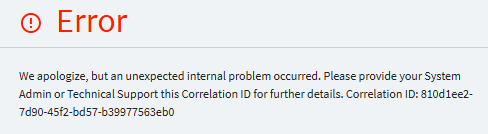
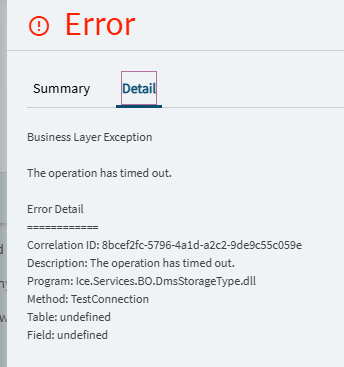
Also when I try to Test the Connection within Attachment Type, it takes forever and then says something like “Operation timed out”. However, if I copy the “Base Uri” and paste it straight into a new browser tab, it opens up just fine.
check the server log for the exact error
Is your ECM in the cloud or local? We’re local and quite a few versions behind and are having issues today trying to attach after the migration to Linux.
After the upgrade to 2026.100.x, we started having issues with deleting attachments. The system can’t communicate with the index service. Restarts don’t help. Event Log says the ECM databases don’t exist, but they do.
Sounds like your system is on-prem, maybe the ECM domain is unreachable on the Kinetic computer, you could get a public certificate for ECM instance or look at installation of the ECM client on the same computer where Epicor is hosted. Sign into the ECM client and validate that the ECM instance is reachable on this server.
Our Epicor instance is on the Cloud, but our ECM instance is on prem. Weird that attachment viewing would have issues now though because we can still process invoices through ECM and send them over to Epicor just fine.
Sounds like we are in the same boat that @RBeaghan is in… I know EpicCare was probably swamped today. Still have yet to hear back from them on this ticket. What version of ECM are you on? We are still on v23.2.64
We are setup the same, Kinetic in the Cloud but ECM is on-prem. We can view existing attachments but now can’t add or delete any. We are running ECM 22.2.128.
Interesting. Just tested and we cannot add new ones or do anything with existing ones (view or delete). Hoping they get to the bottom of this soon!
Same. Came in this morning and we can no longer view documents where we could yesterday.
We found the Eclipse DCM service was not running this morning. We restarted that and continued troubleshooting. Eventually found that viewing attachments had been restored, presumably from restarting that service.
The ECM instance being on-prem would require the ECM client to communicate with the cloud.
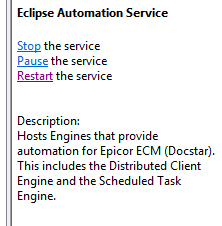
Make sure you restart the EclipseAutomation service daily.
Test your attachment type in Kinetic cloud to validate that the cloud can reach out to the ECM server. Whichever user links ECM to the attachment type, make sure the password is not changed and click test connection.
There are more ways to test all of the infrastructure but at the core of most problems is the EclipseAutomation service, which I create a scheduled task to restart daily.
If the restart is not effective, I would schedule the server that hosts this service to restart weekly. The ECM client is easily the most disagreeable client that you will run into. Make sure the version is matching to the ECM cloud this is another problem if the client is not matching and will cause some problems. "I mixed up ECM Cloud and On-prem for the client portion of this paragraph, the main thing is to allows match the ECM Cloud with the ECM Client for SaaS implementations and for on-prem ECM, make sure any upgrade of ECM to a newer version has a resulting upgrade done to each on-prem ECM client."
Version 23.2 is a fairly old version. I would suggest upgrading your system to a newer release, I have found an upgrade should be done one version at a time. Check your SQL environment specs and do a backup of each (app/SQL) server before attempting an upgrade. I do find not all upgrades work the same on each server, validate that the indexing is working and the services install/are running. I know of companies that upgrade themselves and others that don’t, the biggest problem with upgrades can be installing the latest version over an earlier version and the upgrade does not update correctly.
We are ECM on prem and Kinetic/Quick Ship Cloud. I have had issues with IDC since going to cloud in April still not working. And EMC is acting weird but only recently. I just discovered it so I haven’t figured out what is going on yet.
I tried restarting that service, but no luck… I’ve tried testing the connection for the ECM user and that Attachment type and it just takes forever before timing out. Although if I use those credentials to log in to ECM directly, they work fine.
Thank you for all the suggestions though! I had planned on updating a long while ago, but when I originally thought about it, I was told by support to hold off on that since it was buggy. Then I’ve been swamped with so many other things that I haven’t been able to get to it. Also have to admit I was a little nervous about applying an update myself since I never had to do that with IDC or Epicor.
I just escalated my case with them so hopefully this gets solved. I know it’s an extreme inconvenience to our users.
If a recent change, update, etc. was made and things are now timing out, that would suggest to me that the Ice.Services.BO.DmsStorageType.dll isn’t functioning as it should or it isn’t negotiating the connection correctly. Do you happen to have the Kinetic DevTool extension installed for Chrome? Even the Network tab in DevTools could provide some more detail as to what is happening when it attempts to make a connection. Effectively, it would be beneficial to run some sort of trace to gather more details.
If you configure a File Server attachment type and test that method, do you get the same error? This could help identify if it is an ECM connection issue or an overall attachment issue.
Have you restarted the ECM IIS app pools?
I do have the Kinetic DevTool extension. I can’t believe I didn’t think to use it on this (been using it frequently with some other post 2026.1 upgrade issues).
I’m getting a 500 error saying “Slow response” for the “DocStarDownloadFile” operation.
I would try the IIS restart on the app pools since there are numerous times this has resolved an unexplainable problem.