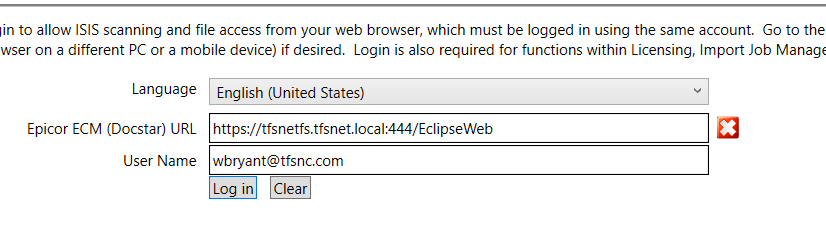
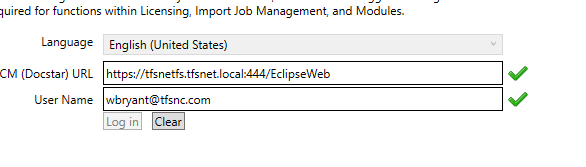
We’re in the process of implementing ECM – still somewhat early stages. I wanted to be able to do some work remotely so I installed the ECM Client on my laptop so that I could use that to set up some batch imports based on folders, etc. The issue I’m having is that whenever I try to login to the client - I get a little red X beside the field for the URL. Normally, I may think I had typed something incorrectly or gotten dyslexic… but the URL is exactly the way it should be. I’m able to put the same URL in a browser and open ECM.
I’ve checked Event viewer for errors that may correlate but I’m really not finding anything that makes any sense. I’m able to login to the client on my desktop workstation, on the server where ECM is installed, just not on my laptop - which is connected to our network and domain.
I’m truly at a loss since I don’t actually get an “error message” – just that little red X… Any thoughts or suggestions or just random sympathy for my plight are all appreciated!
Are you accessing the network remotely via a VPN? If so, the ECM Client may need to be setup to tunnel through this, too, if all of your network traffic isn’t already setup to do this.
I don’t know if they fixed this but we use HTTP in the ECM client even though it’s HTTPS. IIRC there was an issue with HTTPS in the ECM client. We’ve had ECM since it was DocStar so that may not be a thing anymore. But, could still be. Might try it with HTTP.
I’m wondering the same thing. With cloud instances you need the https:// prefix, but on premise installations have so many other possible configurations with servers, networks, ports, permissions, etc.
We are on-prem. We use public CA certs (so they are fully valid) and still have to use http in the client. I think it tries to take over doing SSL and when you use https it gets messed up.
@chaddb@vleveris --I did try without the 444… I’m not really sure why we have that either – I wasn’t involved on that end. I did try the URL without the 444…
The URL in the client on my desktop is same as the laptop and it’s fine.
Your IT dept may be doing some filtering on the Wi-Fi network that doesn’t happen on the other network your desktop is on. Or there is a firewall rule on the ECM server that isn’t the same between the two networks. Lot of different things could be impacting that.
Agreed. While actually on the network there aren’t these issues while accessing remotely has something preventing the same access. Seems like your IT department may be needed to provide this access as I don’t think changing the URL will help much, sadly.
I did try with just http…no dice. We’re on prem also and since we are a .local we have self signed certs which are sometimes a pain but I’ve gotten used to that and (knock on wood) everything is working as it should for the moment with Epicor.
I’m batting a big ole ZERO at this point – no luck with any of the variations I’ve tried.
At the moment, my laptop is right beside my desktop so I’m not connected via VPN – I’m just in house and on the network like any other machine. I will check with my IT guy to see if there is some additional filtering on the WIFI - hadn’t really thought of that… I don’t think I have an ethernet connection on the laptop…
Strangeness abounds. For comparison, my on-prem, local client on my PC uses the https:// prefix and NO port number. (We have legit Digi-cert wildcard certs with multiple SANs)
In reading all of this 3 times over, there doesn’t seem to be a logical reason why it doesn’t work, unless it’s having a problem with you having multiple clients logged in with the same username. I don’t have this situation, so I can’t be sure. Try a different login and if I get a chance I will try it.