TLDR: I noticed something weird with a BPM, and I’m wondering if anyone has seen this before, or maybe if it is something I should submit as a bug. I was getting a BPM Exception using an Invoke Function widget, but no error using this.InvokeFunction() in a Custom Code widget.
Longer:
We have an internal audit department, and one of the things they didn’t like was that we have a few gaps in our AR Invoice Sequence (certain InvoiceNums are “skipped”) due to deleted (unposted) invoices.
The company is still relatively new to Epicor, and usually these are from a misc invoice being deleted before it was posted because an RMA or Cancellation invoice is more appropriate. Rather than implementing Legal Number, which would add more complexity than I want, I created a fairly simple BPM & Function to log any invoice deletions to a UD Table.
The BPM is on ARInvoice.DeleteMaster (pre-proc). It opens a DataForm to ask the user why they’re deleting an invoice. Then it takes some details from InvcHead and Invokes a Function that logs everything to a UD Table.
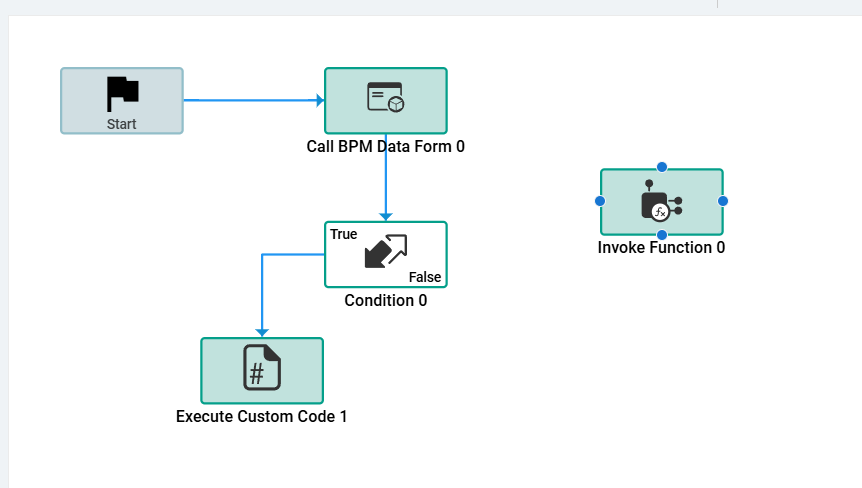
When I built this late last year, it worked perfectly. At some point recently (not sure exactly when), it starting throwing an error.
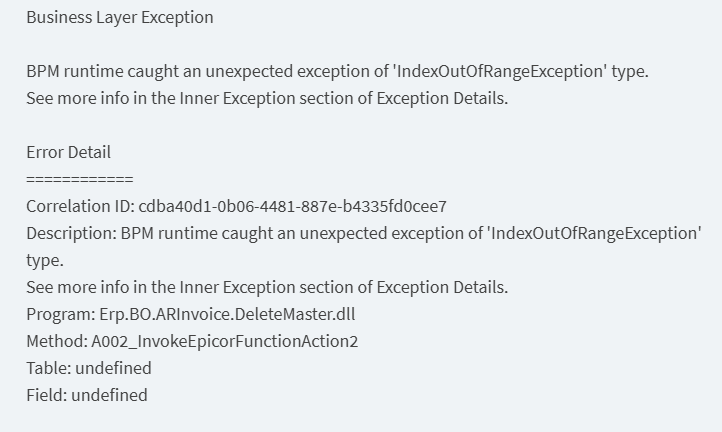
The function actually still executes, but DeleteMaster fails and the Invoice is not deleted.
I couldn’t find anywhere I actually used indexing, and the whole function is wrapped in try/catch.
I added some debug messages before the Invoke Function widget, but the error came up without throwing any of the debug messages. Since I didn’t know where to start debugging, I replaced the “Invoke Function” widget and invoked the function via a custom code block (code below). All the parameters are the same variables / expressions as I configured in the Invoke Function widget. I figured I might be able to get more detail on the error if I put try / catch around the actual function call.
When I did this, the error went away. It never got to the catch block. It worked exactly as expected. Why would an Invoke Function widget work differently than this.InvokeFunction()?
string lib = "DeletedARInvoiceLog";
string efx = "DeletedInvoiceLog";

try {
    var response = InvokeFunction(
                      lib, efx, InvcNum, PackNum, InvcType, CreateDate, DateTime.Today,
                      callContextClient.CurrentUserId, LogMessage, CredMemo );

    ErrorMsg = (string)response[0];

} catch (Exception ex) {

    ErrorMsg = "Function call failed:\n\n" + ex.ToString();
}