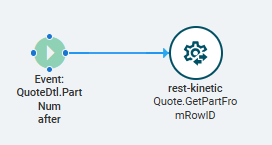
I’m struggling to migrate a classic customization to Kinetic. For this one, I need to create a foreign key view that shows the customer comment on the quote header panel. And another one that shows an extended part description as I click through the lines grid for that specific line’s part.
How do I figure out what event ID to hook into? And what action I do?
I opened up the Dev Console, but nothing happens on the network tab as I click through the rows in the Quote Lines grid, so I’m not sure what’s happening to trigger with.
I did the ‘Building Data Views in Application Studio’ ELC course, but I really could use something more targeted. Happy to pay someone to teach me… Was there an Insights course I missed, that could be in my notes? Youtube only has stuff on Classic FKV’s.
I’m gonna start by saying I’ve never used classic so I won’t be able to draw comparisons, but this is how to do it in kinetic.
For the customer comment, I’d use the dataview wizard to create a Customer dataview based off of Erp.Bo.Customer.GetByID and bind it to the customer on the quote. The wizard will create a dataview and event like BO_Customer_GetByID.
I’d create a new event where the trigger is after BO_Quote_GetByID and then use an event-next widget to call your BO_Customer_GetByID. Now you have the customer dataview populated based on the quoted customer and you can add a text area and bind it to Customer.comment (or whatever your field is named).
For the Part description, I would do a similar process for creating the dataview, but instead of triggering off of the quoteHed_GetByID. You can trigger off of the row changing of the quotedtl dataview. Just looked and see that there’s already an event for RowChanged_QuoteDtl, so you’d either have to copy and override the existing event or trigger after that existing event to call your part_getbyID event.
If most of that is greek to you let me know and I can add some screen shots.