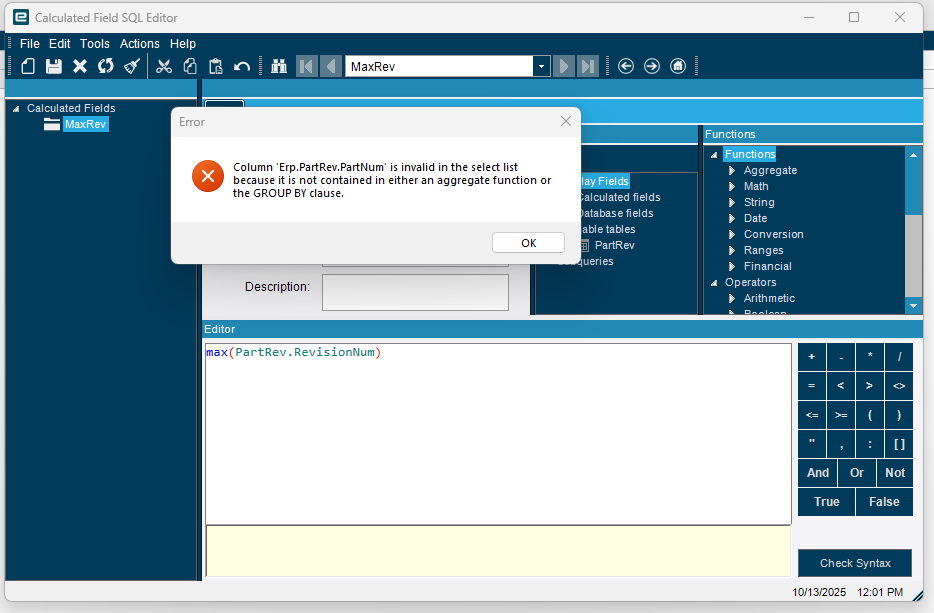
So I’m not well versed in query language, so forgive my ignorance but I’m so lost with the whole Group By and Aggregate function thing. I’m just trying to make a BAQ that gives me a list of all my parts and part rev data but only for the latest rev.
So I assumed that I can create a calculated function that gets the MAX part rev and group by the part rev. I did that in a subquery because there is a bunch of other stuff I need from other tables. and just keep getting that PartRev.PartNum isn’t in an aggregate function or group by, but if I include it in the group by I get multiple entries in my subquery and not the latest rev only.
Does anyone have any resources to help get a better grasp of what the aggregate stuff is and what it means as well as help to get a deeper understanding of what the group by clause does? I feel like I’m not understanding the core functionality/concepts of those which is throwing me.
Yeah, that was my thought! But the issue is that once I add PartNum to the Group By, I end up with multiple entries (2 entries) for the same part instead of it just showing a singular entry for the latest rev.
What all fields are you displaying, just the partnum and calculated max rev and what tables are you including? You should only need the partrev table itself to get this. If you are trying to pull more information, you need to put this into a subquery to feed into the top as once you add in other fields, you will get more rows per part.
You’ve got quite a bit of learning to do! What you want to do is definitely doable, but a bit hard to explain. I do have this recording that explains a bunch of different techniques that might be a good place for you to get to a better place where at least you can understand enough to be able to ask the right questions.
Unfortunately there are a TON of fields I’m bringing in from multiple tables…such as the following (and more):
Non-stock
VMI
Part Class
Lot Size
Backflush
Rev
Track by Rev
IUM
PUM
SUM
Phantom BOM
Purchase to max
Track Lots
Costing Method
Track Serial #
Run Out
Inactive
Primary Warehouse
Primary Bin
etc…
Essentially I need stuff from part, partplant, and partrev(so far) and need the data to be consolidated by the latest rev only, The other struggle is that we have 2 different sites and I’m getting the sense that folks want to not show both as well.
One is the windowing functions filtering technique that I show in the video.
The other is to make a subquery with only your selection fields (Company, part number, max(rev) etc.) that ONLY has what you need to ID the proper record. Then you bring that into your top level and re-join it to your table so that selection sub filters the info table so you can get the other extraneous data that you need without the pesky problems with the extra fields making group by not work because of non-matching data
I would probably recommend the latter, as it’s a bit simpler to create, and probably more efficient.