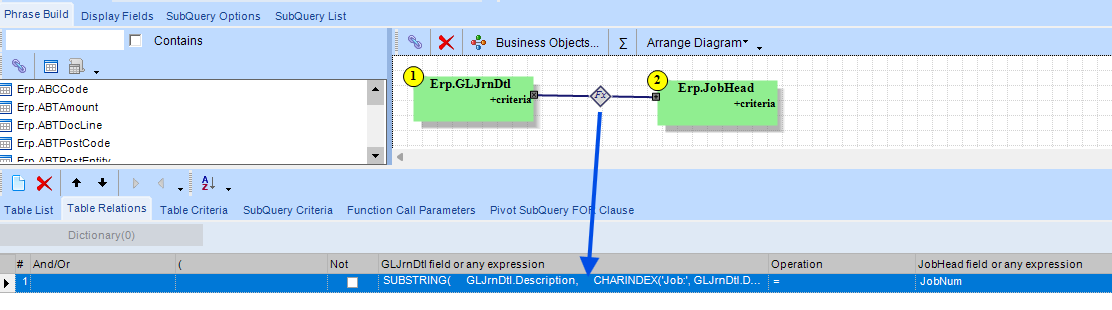
JobNum:
CASE
  WHEN CHARINDEX('Job:', GLJrnDtl.Description) > 0
     AND CHARINDEX('/', GLJrnDtl.Description, CHARINDEX('Job:', GLJrnDtl.Description)) > 0
  THEN SUBSTRING(
     GLJrnDtl.Description,
     CHARINDEX('Job:', GLJrnDtl.Description) + 4,
     CHARINDEX('/', GLJrnDtl.Description, CHARINDEX('Job:', GLJrnDtl.Description)) -
     CHARINDEX('Job:', GLJrnDtl.Description) - 4
     )
  ELSE NULL
END
PartNum:
CASE
  WHEN CHARINDEX('Part:', GLJrnDtl.Description) > 0
  THEN RTRIM(
    LTRIM(
      SUBSTRING(
        GLJrnDtl.Description,
        CHARINDEX('Part:', GLJrnDtl.Description) + 5, -- Start after "Part:"
        CASE
          -- Find the nearest of the next known fields (Job, PO, Ext.Cost, Order, Pack, Cust, PS, DS)
          WHEN CHARINDEX('Job:', GLJrnDtl.Description, CHARINDEX('Part:', GLJrnDtl.Description) + 5) > 0
              AND CHARINDEX('Job:', GLJrnDtl.Description, CHARINDEX('Part:', GLJrnDtl.Description) + 5) > CHARINDEX('Part:', GLJrnDtl.Description)
          THEN CHARINDEX('Job:', GLJrnDtl.Description, CHARINDEX('Part:', GLJrnDtl.Description) + 5) - CHARINDEX('Part:', GLJrnDtl.Description) - 5

          WHEN CHARINDEX('PO:', GLJrnDtl.Description, CHARINDEX('Part:', GLJrnDtl.Description) + 5) > 0
              AND CHARINDEX('PO:', GLJrnDtl.Description, CHARINDEX('Part:', GLJrnDtl.Description) + 5) > CHARINDEX('Part:', GLJrnDtl.Description)
          THEN CHARINDEX('PO:', GLJrnDtl.Description, CHARINDEX('Part:', GLJrnDtl.Description) + 5) - CHARINDEX('Part:', GLJrnDtl.Description) - 5

          WHEN CHARINDEX('Ext.Cost:', GLJrnDtl.Description, CHARINDEX('Part:', GLJrnDtl.Description) + 5) > 0
              AND CHARINDEX('Ext.Cost:', GLJrnDtl.Description, CHARINDEX('Part:', GLJrnDtl.Description) + 5) > CHARINDEX('Part:', GLJrnDtl.Description)
          THEN CHARINDEX('Ext.Cost:', GLJrnDtl.Description, CHARINDEX('Part:', GLJrnDtl.Description) + 5) - CHARINDEX('Part:', GLJrnDtl.Description) - 5

          WHEN CHARINDEX('Order:', GLJrnDtl.Description, CHARINDEX('Part:', GLJrnDtl.Description) + 5) > 0
              AND CHARINDEX('Order:', GLJrnDtl.Description, CHARINDEX('Part:', GLJrnDtl.Description) + 5) > CHARINDEX('Part:', GLJrnDtl.Description)
          THEN CHARINDEX('Order:', GLJrnDtl.Description, CHARINDEX('Part:', GLJrnDtl.Description) + 5) - CHARINDEX('Part:', GLJrnDtl.Description) - 5

          WHEN CHARINDEX('Pack:', GLJrnDtl.Description, CHARINDEX('Part:', GLJrnDtl.Description) + 5) > 0
              AND CHARINDEX('Pack:', GLJrnDtl.Description, CHARINDEX('Part:', GLJrnDtl.Description) + 5) > CHARINDEX('Part:', GLJrnDtl.Description)
          THEN CHARINDEX('Pack:', GLJrnDtl.Description, CHARINDEX('Part:', GLJrnDtl.Description) + 5) - CHARINDEX('Part:', GLJrnDtl.Description) - 5

          WHEN CHARINDEX('Cust:', GLJrnDtl.Description, CHARINDEX('Part:', GLJrnDtl.Description) + 5) > 0
              AND CHARINDEX('Cust:', GLJrnDtl.Description, CHARINDEX('Part:', GLJrnDtl.Description) + 5) > CHARINDEX('Part:', GLJrnDtl.Description)
          THEN CHARINDEX('Cust:', GLJrnDtl.Description, CHARINDEX('Part:', GLJrnDtl.Description) + 5) - CHARINDEX('Part:', GLJrnDtl.Description) - 5

          WHEN CHARINDEX('PS:', GLJrnDtl.Description, CHARINDEX('Part:', GLJrnDtl.Description) + 5) > 0
              AND CHARINDEX('PS:', GLJrnDtl.Description, CHARINDEX('Part:', GLJrnDtl.Description) + 5) > CHARINDEX('Part:', GLJrnDtl.Description)
          THEN CHARINDEX('PS:', GLJrnDtl.Description, CHARINDEX('Part:', GLJrnDtl.Description) + 5) - CHARINDEX('Part:', GLJrnDtl.Description) - 5

          WHEN CHARINDEX('DS:', GLJrnDtl.Description, CHARINDEX('Part:', GLJrnDtl.Description) + 5) > 0
              AND CHARINDEX('DS:', GLJrnDtl.Description, CHARINDEX('Part:', GLJrnDtl.Description) + 5) > CHARINDEX('Part:', GLJrnDtl.Description)
          THEN CHARINDEX('DS:', GLJrnDtl.Description, CHARINDEX('Part:', GLJrnDtl.Description) + 5) - CHARINDEX('Part:', GLJrnDtl.Description) - 5

          WHEN CHARINDEX('IV:', GLJrnDtl.Description, CHARINDEX('Part:', GLJrnDtl.Description) + 5) > 0
              AND CHARINDEX('IV:', GLJrnDtl.Description, CHARINDEX('Part:', GLJrnDtl.Description) + 5) > CHARINDEX('Part:', GLJrnDtl.Description)
          THEN CHARINDEX('IV:', GLJrnDtl.Description, CHARINDEX('Part:', GLJrnDtl.Description) + 5) - CHARINDEX('Part:', GLJrnDtl.Description) - 5

          -- If no other field exists, take the entire remaining string
          ELSE LEN(GLJrnDtl.Description) - CHARINDEX('Part:', GLJrnDtl.Description) + 1
        END
      )
    )
  )
  ELSE NULL
END

 and I needed to remain on the JrnlDtl level for me not to timeout when summing… Maybe the ABTUID is indexed better. Then you also have Multi-Books etc…