How to Check Whether a File Exists in a SharePoint Folder from a Kinetic Function?

Hi Everyone,

We’re working with Epicor Kinetic Cloud and have a requirement to check if a file exists in a SharePoint Online folder from within a Kinetic Function / BPM before proceeding further in our process.

So far, I’ve tried looking into Ice.BO.AttachmentSvc methods, and I see there’s a SpFileExists method that looks like it could be used for this purpose. The method signature expects the following parameters:

SpFileExists_input {
   docTypeID*   string   // Document type or empty if default
   parentTable* string   // Table where attachment belongs
   fileName*    string   // Path to the file on the server/SharePoint
}

:magnifying_glass_tilted_right: Questions:

  1. Has anyone successfully used any method to check a fileExists in sharepoint location from kinetic function ?
  2. Has anyone successfully used AttachmentSvc.SpFileExists for SharePoint Online document types?
  3. For docTypeID, do we pass the Attachment Type ID configured in Attachment Type Maintenance (with SharePoint Online auth)?
  4. What should parentTable be if we just want to check file existence without linking it to a specific record?
  5. Any code snippets or working examples of calling this from a Kinetic Function would be really helpful.

Goal:
:backhand_index_pointing_right: From a Kinetic Function, Check FileExists SharepointLoaction Example(https://XXXXX.sharepoint.com/sites/EpicorData/Folder1/File1.pdf":wink: and return a simple true/false if a file exists in a given SharePoint folder path.

Thanks in advance! :folded_hands:

Are you using sharepoint as your Epicor document file storage?

This only works for that, you can’t check arbitrary sharepoint files with that function. They have to be tied to an Epicor table or record

I totally get your point — I had the same doubt initially.
To clarify how this works, I did a little digging and testing on my end:

:white_check_mark: I attached a file to Epicor with a SharePoint-based Document Type ID.
:white_check_mark: Took a trace of the process and analyzed it.
:white_check_mark: What I found is that before uploading the file, Epicor is actually calling SpFileExists to check if a file with the same name already exists in the SharePoint location.
:right_arrow: If the response is false, only then does it proceed to call the upload method.
I also tried tweaking parameters on the SpUpload call to confirm this behavior, and the results were consistent.

You can also infer this from common sense: when a file upload happens, Epicor has two choices for checking existence:

  1. Verify using Epicor’s own data only – which would miss files already present in SharePoint but not uploaded through Epicor, leading to conflicts.
  2. Verify against the actual storage (SharePoint) – which ensures the check reflects the true state of the storage.

Given the traces and the design implications, it’s clear Epicor went with option 2. Otherwise, it would create unnecessary conflicts.

This may come across a little rude but I don’t know a nicer way to say this. I do not apprciate the Copy paste answer from an chatbot. It comes across super condesending at best.

Regardless the SPFileExists only works for attachments that are defined in Epicor you must provide a DocTypeID, and FileName which it uses to grab the URl and Credentails needed to query share point.

So if you have defined a DocType ID with a sharepoint storage then you can use the SPFileExists to check it. It doesn’t look like the parentTable matters much (for this call) it uses the DocType ID solely for the purposes of grabing the SharePoint configuration.

Firstly, I really thank you for your valuable Insights,
And my apologies, If my previous reply disappointed you.
I understand your concerns over copying answers from chatbot.
Just to clarify, I used chatbot to express myself clearly.
As a challenge , I am writting this post in my own language.

AS you mentioned , I am using DocTypeID along with parentTable and fileName as param for SPFileExists method, through which I was able to check file exist inside Current companyID path
(i.e: https://XXXX.Sharepoint.com/Sites/EpicorData/CompanyID)

But my current scenario, I need to check file exists in the different path
URL: https://XXXX.sharepoint.com/sites/EpicorData/Folder-X/File-Y
Is there any possible way to achieve this.I doubt whether epicor might even allow such operations.

Hope I SomeHow communicate whats in my mind without any aid from chatbot.

No unfortunately.

The code to work with sharepoint manually is on here somewhere. I think I shared it.

Following up on my earlier post,

I confirmed that SPFileExists works when the file inside immediate folder under the CompanyID path,
e.g.:
https://XXXX.sharepoint.com/sites/EpicorData/CompanyID/FolderX/FileY.pdf

Parameter for SPFileExists method:
DocTypeID: DoctypeID
ParentTable: FolderX
FileName: FileY

However, it does not work when the file is inside a nested folder, e.g.:
https://XXXX.sharepoint.com/sites/EpicorData/CompanyID/FolderX/FolderY/FileY.pdf

It seems like only one folder level is supported.
Is there any supported way in Epicor Cloud to check file existence in nested SharePoint folders, or is this a limitation of SPFileExists?

I also tried changing Base URL in Document Type Maintenance, no luck then

Additional Info:

I am trying to check a file in Sharepoint location from epicor cloud.

I think if you go back and read the entire post that started this thread (Function Library - Working With Sharepoint), you will find the answer to this question.

tl;dr

In the original File System attachment scheme, there was a root folder on the server (on-prem only at that time. We shouldn’t store files on application servers anymore and we can’t in SaaS), the root folder contains a folder for each company. Within each company folder is a folder for each attachment table (OrderHed, Part, Customer, etc.). All attachments were stored in these folders and there is no way for the user to alter this file structure. Period.

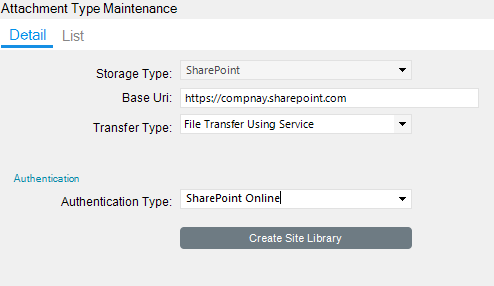
When SharePoint attachments arrived (both on-prem and online - and recent history discourages SharePoint on-prem!), the exact same folder structure came with the File System storage type. When one creates a Storage Type of SharePoint, and you can only create one, there is a button that says, “Create Site Library”

This creates one document library for all attachments for all companies in that instance, just like the File System storage type. Kinetic allows only one SharePoint Attachment Type, so there is only one Document Library. It has the same restrictions as the File System storage type in that you cannot create sub-folders or access files outside of this folder structure.

When one adds meta-data, that ONE document library gets all metadata columns for all Kinetic Document Types. Unlike ECM, the document type in SharePoint is kept in the Category column and is not a real SharePoint Document Type. This makes security, retention policies, etc. less effective than SharePoint can give you.

Unless something has changed in 2025.1 that I’m not aware of, you will not be able to use SPFileExists in the solution path you are on. As mentioned in the previous post, if you want to use the full capabilities of SharePoint with attachments, enable the Unique Document ID service for the libraries you want to track attachments with and then use the Link attachment type. The friction here is the user has to upload the file to SharePoint first and then enter the URL for the document. If you were to go this route, you would use the Graph API to check for the document’s existence.

Thanks for the detailed breakdown!
Cleared up a lot of things for me.
Hopefully this helps others in the community too.