In Kinetic 2026.1.9, Dashboard Doesn't Run Guided Setup

Hey there,

In 2026.1.9, when I create a dashboard, instead of running through the guided setup to create a dataview, grid, etc., it just opens the base layer.

If I add anything to the base layer and then create a customization layer, the customization layer doesn’t see any of the changes to the base.

I’ve created another dashboard on this environment where it worked like I expected but that might have been on 2026.1.5 or some such.

Does this sound familiar?

Thanks,

Joe

Now it works. I created a new dashboard this morning with the same issue.

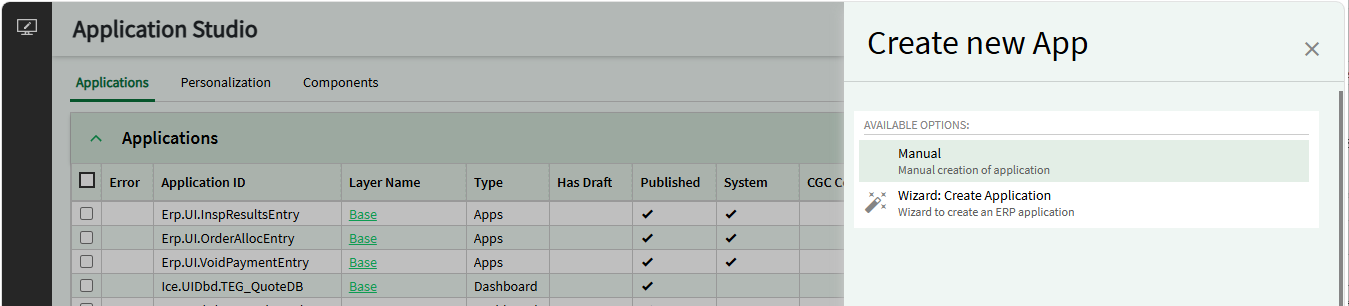
But now I get this when I create a new app:

I guess it skips this page/selection and goes straight to manual.

I have found this to be extremely finicky. My best chance to get the wizard: Go to main home screen, then run application studio in the current tab (do not try to open in a new tab)

I find if I run application studio any other way or open in a new tab I don’t get the dashboard. Don’t run it from a favorite, from a button on your home screen, from any other screen except the home page. Always run it from the menu.

Weird issue, but this seems to work for me every time on 2026.100.14.
For me it run only once if i need it second time i do whole browser page refresh for app studio. Mostly this helped.