I don’t know if its a version issue, menu settings issue, or just user error, but this does not work for me. It either comes up and the preference is disabled or it doesn’t come up at all.
This worked for me on a SaaS 2023.2 customer, but only from the embedded browser, not from Chrome.
I am seeing this not working now on 2023.2.11… it used to work in this environment… I put in a ticket
I’m confused. This says we did an announcement at Insights 2024, but as near as I can tell, Insights 2024 hasn’t happened yet. Is this planned to be announced this year or was this announced last year and I missed it.
We were discussing the end of the modern version in our IT meeting today and when it could be expected as we need to make plans on whether to rewrite all our customizations for Kinetic or consider other options. I was under the impression that we had at least a couple years but this seems to intimate that it may be within the next year.
It was announced last year. Also here:Sign In
You are confused. Sunset has not been announced for classic client, and they have guaranteed at least 1 year from announcement.
He is only talking about the “Modern” menu.
Thank you for the clarification.
and classic menu
Sorry… 2024.1 was a typo (I type 2024.1 999999 times a day right now)… it should have said 2023.1. I will correct the original post.

Maybe this will help answer the question as to what goes away in 2024.1…
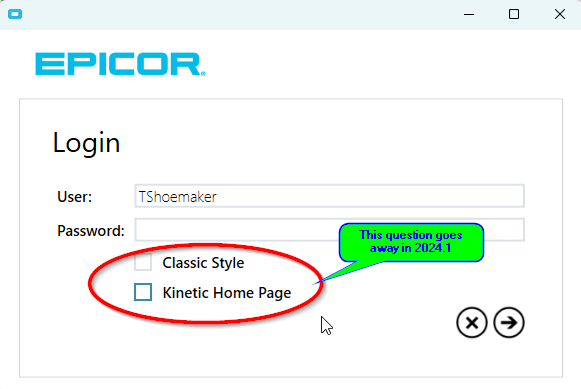
If you want to see what is happening in 2024.1 RIGHT NOW in your version, you can do the following test. Log in via the smart client, and when you do, check the bottom box on the login screen that says “Kinetic Home Page”. As of Kinetic 2024.1, The Kinetic Home Page is the only home page available. BUT you can still run smart client, and smart client apps, even from the kinetic home page.
What did these check boxes do? There were three possible options:
- click “Classic Style” and you get the menu that was used in 2006 and beyond.
- leave both checkboxes unclicked, and you get the “modern” (aka “Metro”) menu/homepage
- Click the Kinetic Home Page, and you will get the forward-going home page and menus.
ALL THREE of these options supported both Classic and Kinetic screens
As of 2024.1, we are taking away these options and defaulting to the Kinetic Home Page.
BUT we STILL offer both classic and Kinetic Screens.
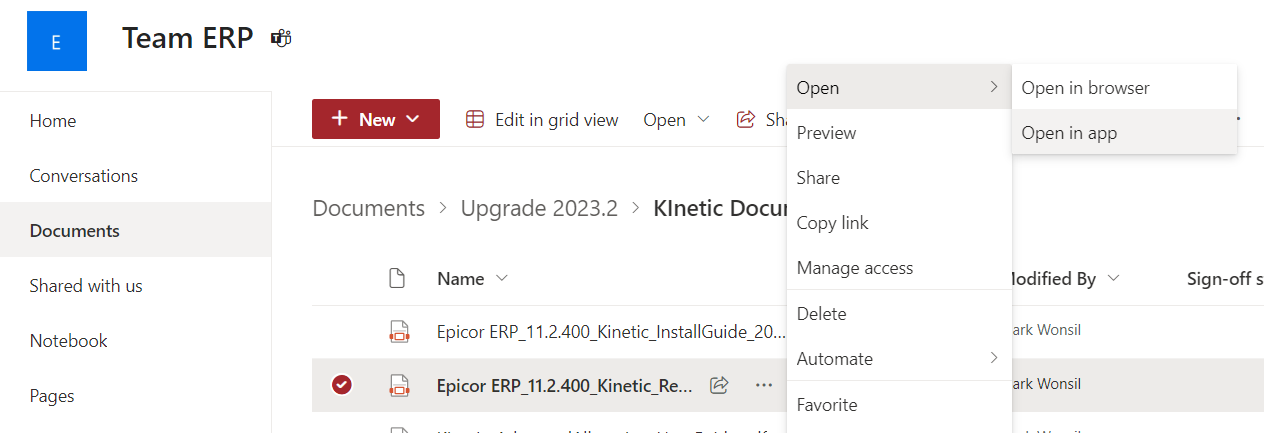
PLUS you can now run Kinetic from a browser, AND launch Classic screens from a browser (as of 2023.1)
PLUS you can now run Kinetic from a browser, AND launch Classic screens from a browser (as of 2023.1)
If the Browser is EDGE.
OH… another confusion… It is NOT “If the Browser is EDGE”… it is “If you have installed the EDGE AGENT”…
The Edge agent is a tool that is different from Microsoft Edge (such confusion)… Google Chrome and Microsoft Edge can both launch classic screens as long as you have installed the EDGE AGENT on your system. The edge agent is needed for lots of things besides just this.
1 Like
I was testing yesterday Kinetic in a Chrome Browser and could not right click on a menu item and get the Classic Menu option. In EDGE i could. Today Chrome is working so I can not duplicate the issue. I do have the EDGE Agent installed. I will monitor and turn in a support ticket if the issue repeats. For those transitioning to the Kinetic Home Page it has worked very will for the past couple of years now.
1 Like
Is there any chance that Epicor won’t make edge agent a dependency for MES type work? We’d love to use tablets for MES work in the destructive environment of the shop floor, but the requirement on expensive Windows tablets has eliminated that option so far.
@kananga is right. The Edge Agent adds all the effort of having the thick client without using a thick client and removes one the benefits of using the browser. Stephen E. hinted a while ago about some talk about using Service Workers (which work in all browsers) but it sounds like we’re doubling down on a Windows Service. Do you envision putting time and effort into an Windows-Only solution for printing and file access?
1 Like
So, “Edge” is NOT “Required” to use the screens… but it is required to do things within a browser that tries to tell your computer to do something. For example, browsers cannot order your computer to open a file directly (like an attachment). or launch an application (such as Excel). This is a security limitation of Browser… but if you have an Edge agent that is running on your computer, the browser CAN give instructions to the edge agent to execute things by proxy.
What types of things are you trying to do with your tablets in the MES type work in Data Collections?
1 Like
To be clear, browsers can and do open downloaded files and launch applications - just not files on the local network. There should be no issues with opening files from ECM, SharePoint, DropBox, Box, GDrive, etc.
The Edge Client for Server printing is a perfectly valid use case but having to touch every workstation is a lot of work.
2 Likes
That is not technically true. The browser or the os has to be configured to do it, but it can and is done. In fact I’ve demonstrated it on this forum somewhere.
2 Likes
That’s not accurate - services look for edge agent first, and refuse to launch at all if it isn’t found, regardless of core requirement on edge agent features.
This should instead be handled by checking that edge agent at that critical moment is responding and functional when an action is requested which requires edge agent. Checking in advance is irrelevant and error prone, since client processes aren’t immutable.
Which would prevent this error I’ve been able to produce:
- Launch an epicor service that performs an initial check for edge agent.
- Kill the edge agent process.
- Do something that requires edge agent.
- The web client has been cheerfully assuming that it correctly found a correctly functioning immutable instance of edge agent, and faceplants.
1 Like