Important Read (EF 6 to EF Core)
Test all the BPM and Functions you can to ensure they’re compatible with EF Core.
Thank you Haso. I will take a look at this to see what there is to see. So weird having an upgrade after knowing what to do after upgrades for over 4 years and feeling like a newbie again. Appreciate the information.
Have a nice day!
Thanks Randy! I will add this to my new list of what to do after upgrades. This Kinetic Web is a whole new world for us:>)

3 Likes
I just tested all of our Customer Facing and critical documents to verify they print. Everything printed fine.
Also, i don’t know if I got Lucky - but the printing seems much faster to me - And the “Active Tasks” actually show my WIP Recon task 
I have a ticket in for my PowerTools that does not run for some reason.
DaveO
Does anyone know where theme maintenance landed? We had a theme that wasn’t enabled, but it’s now enabled for everyone and the theme options from Settings/Preview Features are missing now.
Has anyone found the new easy way in 2026.1 to install Power Tools? I thought Tim implied there would be a menu item or something for that.
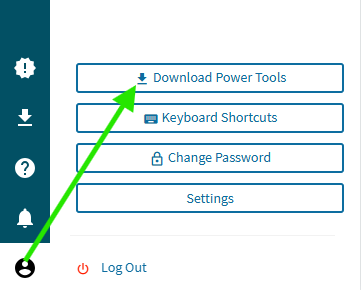

You can do it right from the browser client in the bottom left corner.
Anyone notice sliders aren’t rendering w company theme color?
Try applying Filters on PO Suggestions; Change PO Suggestions…
Filter Icon has been removed…
Operation via 3 Vertical buttons doesn’t make sense…
No Filters:
Let’s put advanced Filters on:
No Filters…?
But the option now is to switch the Grid Filters Off…
Which I do, and I have partial filters:
And now I have the option to apply Basic Filters:
Which is NO Filters!!
To get what anyone would really want:
And then go through the rigmarole again of Advanced Filters/Grid Filters Off…
CS0005507326
Not sure why Epicor can’t get it together with visibility issues. This is completely unacceptable. After battling support for months over the invisibility of bpms in the kinetic bpm designer, and being told to submit an idea, I’m not even going to bother with this one, but it is just ludicrous and violates every standard of UI design.
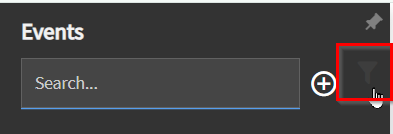
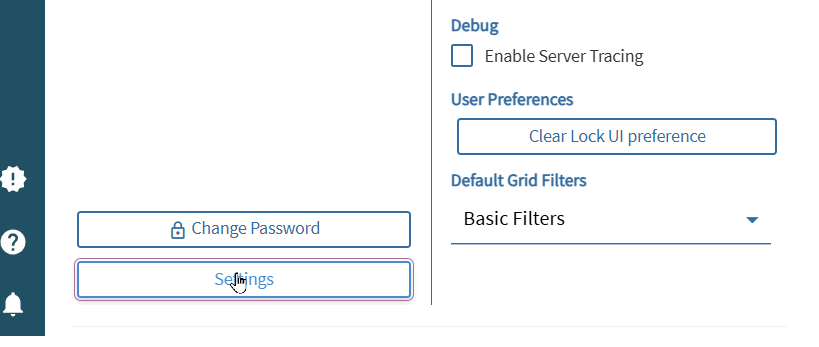

I reported that years ago. Like maybe 4 years ago? They insist its impossible to fix.


Check the overflow menu
Has anyone else had trouble logging into the REST API Help screen following the most recent updates? I’ve started getting the error:
The authenticated user is not mapped to a valid ERP user. Please contact your system administrator.
Just me?