JobEntry Display a Field from a UD table

I just ran VisualStudio debugging and I am getting an error:

System.IndexOutOfRangeException: 'Index -1 is either negative or above rows count.'

On this line:

int OJI = System.Convert.ToInt32(edvOJI.dataView[edvOJI.Row]["Number01"]);

Full Code For Refernce:

// **************************************************
// Custom code for JobEntryForm
// Created: 1/29/2018 10:55:01 AM
// **************************************************

extern alias Erp_Contracts_BO_Project;
extern alias Erp_Contracts_BO_Part;

using System;
using System.ComponentModel;
using System.Data;
using System.Diagnostics;
using System.Windows.Forms;
using Erp.Adapters;
using Erp.UI;
using Ice.Lib;
using Ice.Adapters;
using Ice.Lib.Customization;
using Ice.Lib.ExtendedProps;
using Ice.Lib.Framework;
using Ice.Lib.Searches;
using Ice.UI.FormFunctions;
//using System.Reflection;

public class Script
{
	// ** Wizard Insert Location - Do Not Remove 'Begin/End Wizard Added Module Level Variables' Comments! **
	// Begin Wizard Added Module Level Variables **

	private UD06Adapter _ud06Adapter;
	private EpiDataView _edvJobHead;
	private DataTable UD06_Column;
	private EpiDataView _edvUD06;
	private string _Key1UD06;
	private string _Key2UD06;
	private string _Key3UD06;
	private string _Key4UD06;
	private string _Key5UD06;
	private DataView JobHead_DataView;
	// End Wizard Added Module Level Variables **

	// Add Custom Module Level Variables Here **

	public void InitializeCustomCode()
	{
		// ** Wizard Insert Location - Do not delete 'Begin/End Wizard Added Variable Initialization' lines **
		// Begin Wizard Added Variable Initialization

		InitializeUD06Adapter();
		this._Key1UD06 = string.Empty;
		this._Key2UD06 = string.Empty;
		this._Key3UD06 = string.Empty;
		this._Key4UD06 = string.Empty;
		this._Key5UD06 = string.Empty;
		this.baseToolbarsManager.ToolClick += new Infragistics.Win.UltraWinToolbars.ToolClickEventHandler(this.baseToolbarsManager_ToolClickForUD06);
		this.JobEntryForm.BeforeToolClick += new Ice.Lib.Framework.BeforeToolClickEventHandler(this.JobEntryForm_BeforeToolClickForUD06);
		this.JobEntryForm.AfterToolClick += new Ice.Lib.Framework.AfterToolClickEventHandler(this.JobEntryForm_AfterToolClickForUD06);
		this.JobHead_Row.EpiRowChanged += new EpiRowChanged(this.JobHead_AfterRowChangeForUD06);
		this.JobHead_DataView = this.JobHead_Row.dataView;
		this.JobHead_DataView.ListChanged += new ListChangedEventHandler(this.JobHead_DataView_ListChangedForUD06);
		this.JobHead_Row.BeforeResetDataView += new Ice.Lib.Framework.EpiDataView.BeforeResetDataViewDelegate(this.JobHead_BeforeResetDataViewForUD06);
		this.JobHead_Row.AfterResetDataView += new Ice.Lib.Framework.EpiDataView.AfterResetDataViewDelegate(this.JobHead_AfterResetDataViewForUD06);
		// End Wizard Added Variable Initialization

		// Begin Wizard Added Custom Method Calls

		// End Wizard Added Custom Method Calls
		//FieldInfo fInfo = _edvJobHead.GetType().GetField("hasChildren", BindingFlags.Instance | BindingFlags.NonPublic | BindingFlags.SetField);
		//if ( fInfo != null ) { fInfo.SetValue(_edvJobHead, false); }

	}

	public void DestroyCustomCode()
	{
		// ** Wizard Insert Location - Do not delete 'Begin/End Wizard Added Object Disposal' lines **
		// Begin Wizard Added Object Disposal

		if ((this._ud06Adapter != null))
		{
			this._ud06Adapter.Dispose();
			this._ud06Adapter = null;
		}
		this._edvUD06 = null;
		this._edvJobHead = null;
		this.UD06_Column = null;
		this._Key1UD06 = null;
		this._Key2UD06 = null;
		this._Key3UD06 = null;
		this._Key4UD06 = null;
		this._Key5UD06 = null;
		this.baseToolbarsManager.ToolClick -= new Infragistics.Win.UltraWinToolbars.ToolClickEventHandler(this.baseToolbarsManager_ToolClickForUD06);
		this.JobEntryForm.BeforeToolClick -= new Ice.Lib.Framework.BeforeToolClickEventHandler(this.JobEntryForm_BeforeToolClickForUD06);
		this.JobEntryForm.AfterToolClick -= new Ice.Lib.Framework.AfterToolClickEventHandler(this.JobEntryForm_AfterToolClickForUD06);
		this.JobHead_Row.EpiRowChanged -= new EpiRowChanged(this.JobHead_AfterRowChangeForUD06);
		this.JobHead_DataView.ListChanged -= new ListChangedEventHandler(this.JobHead_DataView_ListChangedForUD06);
		this.JobHead_DataView = null;
		this.JobHead_Row.BeforeResetDataView -= new Ice.Lib.Framework.EpiDataView.BeforeResetDataViewDelegate(this.JobHead_BeforeResetDataViewForUD06);
		this.JobHead_Row.AfterResetDataView -= new Ice.Lib.Framework.EpiDataView.AfterResetDataViewDelegate(this.JobHead_AfterResetDataViewForUD06);
		// End Wizard Added Object Disposal

		// Begin Custom Code Disposal

		// End Custom Code Disposal
	}

	private void InitializeUD06Adapter()
	{
		// Create an instance of the Adapter.
		this._ud06Adapter = new UD06Adapter(this.oTrans);
		this._ud06Adapter.BOConnect();

		// Add Adapter Table to List of Views
		// This allows you to bind controls to the custom UD Table
		this._edvUD06 = new EpiDataView();
		this._edvUD06.dataView = new DataView(this._ud06Adapter.UD06Data.UD06);
		this._edvUD06.AddEnabled = true;
		this._edvUD06.AddText = "New UD06";
		if ((this.oTrans.EpiDataViews.ContainsKey("UD06View") == false))
		{
			this.oTrans.Add("UD06View", this._edvUD06);
		}

		// Initialize DataTable variable
		this.UD06_Column = this._ud06Adapter.UD06Data.UD06;

		// Initialize EpiDataView field.
		this._edvJobHead = ((EpiDataView)(this.oTrans.EpiDataViews["JobHead"]));
		Erp.UI.FrameWork.JobLib.EpiDataViewRelation jobHeadUD06Relation = new Erp.UI.FrameWork.JobLib.EpiDataViewRelation(this._edvUD06);
		Erp.UI.FrameWork.JobLib.EpiDataViewRelation UD06Relation = new Erp.UI.FrameWork.JobLib.EpiDataViewRelation(this._edvJobHead);

		// Set the parent view / keys for UD child view
		string[] parentKeyFields = new string[3];
		string[] childKeyFields = new string[3];
		parentKeyFields[0] = "JobNum";
		childKeyFields[0] = "Key2";
		parentKeyFields[1] = "PartNum";
		childKeyFields[1] = "Key1";
		parentKeyFields[2] = "RevisionNum";
		childKeyFields[2] = "Key3";
		
		jobHeadUD06Relation.SetParent(UD06Relation, parentKeyFields, childKeyFields);
		
		// Magic Here
		Erp.UI.FrameWork.JobLib.EpiDataViewFilterManager x = new Erp.UI.FrameWork.JobLib.EpiDataViewFilterManager(this.oTrans);
		x.AddRelation(jobHeadUD06Relation);

		if ((this.oTrans.PrimaryAdapter != null))
		{
			// this.oTrans.PrimaryAdapter.GetCurrentDataSet(Ice.Lib.Searches.DataSetMode.RowsDataSet).Tables.Add(this._edvUD06.dataView.Table.Clone())
		}

	}

	private void GetUD06Data(string key1, string key2, string key3, string key4, string key5)
	{
		if ((this._Key1UD06 != key1) || (this._Key2UD06 != key2) || (this._Key3UD06 != key3) || (this._Key4UD06 != key4) || (this._Key5UD06 != key5))
		{
			// Build where clause for search.
			string whereClause = "Key1 = \'" + key1 + "\' And Key2 = \'" + key2 + "\' And Key3 = \'" + key3 + "\' And Key4 = \'" + key4 + "\'";
			System.Collections.Hashtable whereClauses = new System.Collections.Hashtable(1);
			whereClauses.Add("UD06", whereClause);

			// Call the adapter search.
			SearchOptions searchOptions = SearchOptions.CreateRuntimeSearch(whereClauses, DataSetMode.RowsDataSet);
			this._ud06Adapter.InvokeSearch(searchOptions);

			if ((this._ud06Adapter.UD06Data.UD06.Rows.Count > 0))
			{
				this._edvUD06.Row = 0;
			} else
			{
				this._edvUD06.Row = -1;
			}

			// Notify that data was updated.
			this._edvUD06.Notify(new EpiNotifyArgs(this.oTrans, this._edvUD06.Row, this._edvUD06.Column));

			// Set key fields to their new values.
			this._Key1UD06 = key1;
			this._Key2UD06 = key2;
			this._Key3UD06 = key3;
			this._Key4UD06 = key4;
			this._Key5UD06 = key5;
			
			//MessageBox.Show("Made it here!");
		}
			//MessageBox.Show("Made it here too!");
			EpiDataView edvOJI = (EpiDataView)(oTrans.EpiDataViews["UD06View"]);
			int OJI = System.Convert.ToInt32(edvOJI.dataView[edvOJI.Row]["Number01"]);
			MessageBox.Show("Got OJI! " + OJI.ToString()); 
			txtOJI.Text = OJI.ToString();
	
	}

	private void GetNewUD06Record()
	{
		DataRow parentViewRow = this._edvJobHead.CurrentDataRow;
		// Check for existence of Parent Row.
		if ((parentViewRow == null))
		{
			return;
		}
		if (this._ud06Adapter.GetaNewUD06())
		{
			string jobnum = parentViewRow["JobNum"].ToString();
			string partnum = parentViewRow["PartNum"].ToString();
			string revisionnum = parentViewRow["RevisionNum"].ToString();

			// Get unique row count id for Key5
			int rowCount = this._ud06Adapter.UD06Data.UD06.Rows.Count;
			int lineNum = rowCount;
			bool goodIndex = false;
			while ((goodIndex == false))
			{
				// Check to see if index exists
				DataRow[] matchingRows = this._ud06Adapter.UD06Data.UD06.Select("Key5 = \'" + lineNum.ToString() + "\'");
				if ((matchingRows.Length > 0))
				{
					lineNum = (lineNum + 1);
				} else
				{
					goodIndex = true;
				}
			}

			// Set initial UD Key values
			DataRow editRow = this._ud06Adapter.UD06Data.UD06.Rows[(rowCount - 1)];
			editRow.BeginEdit();
			editRow["Key1"] = jobnum;
			editRow["Key2"] = partnum;
			editRow["Key3"] = revisionnum;
			editRow["Key4"] = string.Empty;
			editRow["Key5"] = lineNum.ToString();
			editRow.EndEdit();

			// Notify that data was updated.
			this._edvUD06.Notify(new EpiNotifyArgs(this.oTrans, (rowCount - 1), this._edvUD06.Column));
		}
	}

	private void SaveUD06Record()
	{
		// Save adapter data
		this._ud06Adapter.Update();
	}

	private void DeleteUD06Record()
	{
		// Check to see if deleted view is ancestor view
		bool isAncestorView = false;
		Ice.Lib.Framework.EpiDataView parView = this._edvUD06.ParentView;
		while ((parView != null))
		{
			if ((this.oTrans.LastView == parView))
			{
				isAncestorView = true;
				break;
			} else
			{
				parView = parView.ParentView;
			}
		}

		// If Ancestor View then delete all child rows
		if (isAncestorView)
		{
			DataRow[] drsDeleted = this._ud06Adapter.UD06Data.UD06.Select("Key1 = \'" + this._Key1UD06 + "\' AND Key2 = \'" + this._Key2UD06 + "\' AND Key3 = \'" + this._Key3UD06 + "\' AND Key4 = \'" + this._Key4UD06 + "\'");
			for (int i = 0; (i < drsDeleted.Length); i = (i + 1))
			{
				this._ud06Adapter.Delete(drsDeleted[i]);
			}
		} else
		{
			if ((this.oTrans.LastView == this._edvUD06))
			{
				if ((this._edvUD06.Row >= 0))
				{
					DataRow drDeleted = ((DataRow)(this._ud06Adapter.UD06Data.UD06.Rows[this._edvUD06.Row]));
					if ((drDeleted != null))
					{
						if (this._ud06Adapter.Delete(drDeleted))
						{
							if ((_edvUD06.Row > 0))
							{
								_edvUD06.Row = (_edvUD06.Row - 1);
							}

							// Notify that data was updated.
							this._edvUD06.Notify(new EpiNotifyArgs(this.oTrans, this._edvUD06.Row, this._edvUD06.Column));
						}
					}
				}
			}
		}
	}

	private void UndoUD06Changes()
	{
		this._ud06Adapter.UD06Data.RejectChanges();

		// Notify that data was updated.
		this._edvUD06.Notify(new EpiNotifyArgs(this.oTrans, this._edvUD06.Row, this._edvUD06.Column));
	}

	private void ClearUD06Data()
	{
		this._Key1UD06 = string.Empty;
		this._Key2UD06 = string.Empty;
		this._Key3UD06 = string.Empty;
		this._Key4UD06 = string.Empty;
		this._Key5UD06 = string.Empty;

		this._ud06Adapter.UD06Data.Clear();

		// Notify that data was updated.
		this._edvUD06.Notify(new EpiNotifyArgs(this.oTrans, this._edvUD06.Row, this._edvUD06.Column));
	}

	private void baseToolbarsManager_ToolClickForUD06(object sender, Infragistics.Win.UltraWinToolbars.ToolClickEventArgs args)
	{
		// EpiMessageBox.Show(args.Tool.Key);
		switch (args.Tool.Key)
		{
			case "EpiAddNewNew UD06":
				GetNewUD06Record();
				break;

			case "ClearTool":
				ClearUD06Data();
				break;

			case "UndoTool":
				UndoUD06Changes();
				break;
		}
	}

	private void JobEntryForm_BeforeToolClickForUD06(object sender, Ice.Lib.Framework.BeforeToolClickEventArgs args)
	{
		// EpiMessageBox.Show(args.Tool.Key);
		switch (args.Tool.Key)
		{
			case "SaveTool":
				SaveUD06Record();
				break;
		}
	}

	private void JobEntryForm_AfterToolClickForUD06(object sender, Ice.Lib.Framework.AfterToolClickEventArgs args)
	{
		// EpiMessageBox.Show(args.Tool.Key);
		switch (args.Tool.Key)
		{
			case "DeleteTool":
				if ((args.Cancelled == false))
				{
					DeleteUD06Record();
				}
				break;
		}
	}

	private void JobHead_AfterRowChangeForUD06(EpiRowChangedArgs args)
	{
		// ** add AfterRowChange event handler
		string jobnum = args.CurrentView.dataView[args.CurrentRow]["JobNum"].ToString();
		string partnum = args.CurrentView.dataView[args.CurrentRow]["PartNum"].ToString();
		string revisionnum = args.CurrentView.dataView[args.CurrentRow]["RevisionNum"].ToString();
		GetUD06Data(jobnum, partnum, revisionnum, string.Empty, string.Empty);
		MessageBox.Show("JobHead_AfterRowChangeForUD06");
	}

	private void JobHead_DataView_ListChangedForUD06(object sender, ListChangedEventArgs args)
	{
		// ** add ListChanged event handler
		string jobnum = JobHead_DataView[0]["JobNum"].ToString();
		string partnum = JobHead_DataView[0]["PartNum"].ToString();
		string revisionnum = JobHead_DataView[0]["RevisionNum"].ToString();
		GetUD06Data(jobnum, partnum, revisionnum, string.Empty, string.Empty);
		MessageBox.Show("JobHead_DataView_ListChangedForUD06");
	}

	private void JobHead_BeforeResetDataViewForUD06(object sender, EventArgs args)
	{
		// ** remove ListChanged event handler
		this.JobHead_DataView.ListChanged -= new ListChangedEventHandler(this.JobHead_DataView_ListChangedForUD06);
		MessageBox.Show("JobHead_BeforeResetDataViewForUD06");
	}

	private void JobHead_AfterResetDataViewForUD06(object sender, EventArgs args)
	{
		// ** reassign DataView and add ListChanged event handler
		this.JobHead_DataView = this.JobHead_Row.dataView;
		this.JobHead_DataView.ListChanged += new ListChangedEventHandler(this.JobHead_DataView_ListChangedForUD06);
		MessageBox.Show("JobHead_AfterResetDataViewForUD06");
	}
}
If you are just doing this you could use RowRule and BOReader or even simply GetByID After Adapter event to simply query UD06. I do the same for IntXPartNum. What you are doing linking an entire UD06 table and all the methods for no interaction sounds overkill.

Or even the GetByID Method Directive to fill in the UD06 value into some NumberXX Field

I agree completely! All those extra methods are pretty much useless for this case.

Thanks for this alternative approach! I will give these methods a shot and post back with what works.

I am trying to figure out how this works. Do I use the customization tools dialog to set this up? I followed the directions to setup a row rule from the customization manual. I think I would want to make a rules that updates txtOJI whenever the value in JobHead.JobNum changes. So I whipped up this bit of wizard code. It does not display my message box when loading the JobEntry form, or when pulling up a job.

private void JobHeadJobNumColumnValueChangesJobHeadJobNum_CustomRuleAction(Ice.Lib.ExtendedProps.RowRuleDelegateArgs args)
{
	// ** RowRuleDelegateArgs Properties: args.Arg1, args.Arg2, args.Context, args.Row
	// ** put custom Rule Action logic here
MessageBox.Show("Changed.");
}

I also tried using the form event wizard to setup an after adapter event. I tried using two different adapters from the list available. Neither of these return a value when updating the job number.

	private void oTrans_jobAdapter_AfterAdapterMethod(object sender, AfterAdapterMethodArgs args)
	{
		// ** Argument Properties and Uses **
		// ** args.MethodName **
		// ** Add Event Handler Code **

		// ** Use MessageBox to find adapter method name
		EpiMessageBox.Show(args.MethodName);
		switch (args.MethodName)
		{
			case "Update":
				break;
		}

	}

	private void oTrans_partSearchAdapter_AfterAdapterMethod(object sender, AfterAdapterMethodArgs args)
	{
		// ** Argument Properties and Uses **
		// ** args.MethodName **
		// ** Add Event Handler Code **

		// ** Use MessageBox to find adapter method name
		EpiMessageBox.Show(args.MethodName);
		switch (args.MethodName)
		{
			case "Update":
				break;
		}

	}

Assuming I do find the event that triggers on updating the job number on the job entry form, how do I:

Thank you so much for your time!

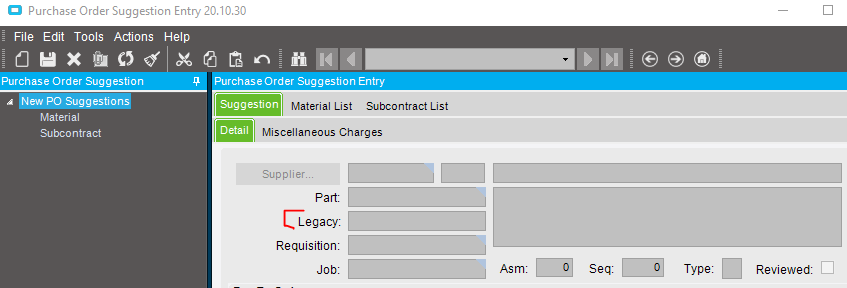
PO Suggestion - Example

Here I used a RowRule:

	private void CreateRowRuleSugPoDtlPartNumNotEqual_Empty()
	{
		// Description: GetInternalPartNum
		// **** begin autogenerated code ****
		RuleAction[] ruleActions = new RuleAction[0];
		// Create RowRule and add to the EpiDataView.
		// Dummy Context Object
		object contextObject = null;
		RowRule rrCreateRowRuleSugPoDtlPartNumNotEqual_ = new RowRule("SugPoDtl.PartNum", RuleCondition.NotEqual, "", new RowRuleActionDelegate2(this.SugPoDtlPartNumNotEqualEmpty_CustomRuleAction), contextObject);
		((EpiDataView)(this.oTrans.EpiDataViews["SugPoDtl"])).AddRowRule(rrCreateRowRuleSugPoDtlPartNumNotEqual_);
		// **** end autogenerated code ****
	}

	private void SugPoDtlPartNumNotEqualEmpty_CustomRuleAction(Ice.Lib.ExtendedProps.RowRuleDelegateArgs args)
	{
		// ** RowRuleDelegateArgs Properties: args.Arg1, args.Arg2, args.Context, args.Row
		txtLegacyPartNum.Text = GetInternalPartCrossRef(Convert.ToString(args.Row["PartNum"]));
	}

	// ---------------------------------------------------------------------------------------
	// Helpers
	// ---------------------------------------------------------------------------------------

	/// <summary>
	/// Helper to get the PartNum
	/// </summary>
	public string PartNum()
	{
		EpiDataView edvSugPoDtl = this.oTrans.Factory("SugPoDtl");
		return (edvSugPoDtl != null && edvSugPoDtl.dataView.Count > 0) ? edvSugPoDtl.dataView[edvSugPoDtl.Row]["PartNum"].ToString() : "";
	}

	/// <summary>
	/// Helper to lookup and set PartXRefInt.XRefPartNum
	/// </summary>
	private string GetInternalPartCrossRef(string sPartNum)
	{
		EpiDataView edvNoBoundField = ((EpiDataView)(this.oTrans.EpiDataViews["NoBoundField"]));
		string sValue = string.Empty;

		if (!string.IsNullOrEmpty(sPartNum))
		{
			bool recSelected;
			string whereClause = "PartNum = '" + sPartNum + "'";
			DataSet ds = SearchFunctions.listLookup(this.oTrans, "InternalPartCrossRefAdapter", out recSelected, false, whereClause);

			if (recSelected) {
				sValue = ds.Tables[0].Rows[0]["XRefPartNum"].ToString();
			}
		}

		return sValue;
	}

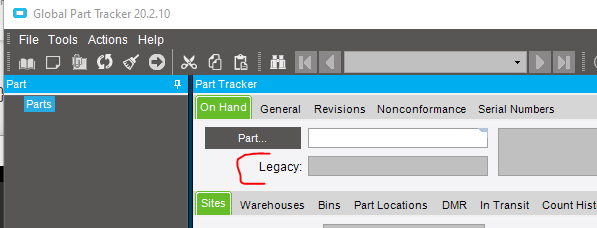
Part Tracker - Example

image

In the Tracker it was easier to just do it on GetByID

	private void oTrans_partAdapter_AfterAdapterMethod(object sender, AfterAdapterMethodArgs args)
	{
		// ** Argument Properties and Uses **
		// ** args.MethodName **
		// ** Add Event Handler Code **

		switch (args.MethodName)
		{
			case "GetByID":
				SetInternalPartCrossRef(this.PartNum());
				break;
		}

	}

	/// <summary>
	/// Helper to lookup and set PartXRefInt.XRefPartNum
	/// </summary>
	private void SetInternalPartCrossRef(string sPartNum)
	{
		EpiDataView edvPart = this.oTrans.Factory("Part");
		string sValue = string.Empty;

		if (!string.IsNullOrEmpty(sPartNum))
		{
			bool recSelected;
			string whereClause = "PartNum = '" + sPartNum + "'";
			DataSet ds = SearchFunctions.listLookup(this.oTrans, "InternalPartCrossRefAdapter", out recSelected, false, whereClause);

			if (recSelected) {
				sValue = ds.Tables[0].Rows[0]["XRefPartNum"].ToString();
			}
		}

		if (edvPart.dataView.Count > 0) {
			edvPart.dataView[0]["InternalPartNum"] = sValue;
		}
	}

Here is my version of what you did. I think this should tap into UD06 and link based on my three key fields. However I am not getting anything in my text box. My message box does show the correct job, part and rev.

private void JobHeadJobNumNotEqualEmpty_CustomRuleAction(Ice.Lib.ExtendedProps.RowRuleDelegateArgs args)
	{
		// ** RowRuleDelegateArgs Properties: args.Arg1, args.Arg2, args.Context, args.Row
		// ** put custom Rule Action logic here
	MessageBox.Show(Convert.ToString(args.Row["JobNum"]) + Convert.ToString(args.Row["PartNum"]) + Convert.ToString(args.Row["RevisionNum"]));	
	txtOJI.Text = GetOJI(Convert.ToString(args.Row["JobNum"]),Convert.ToString(args.Row["PartNum"]),Convert.ToString(args.Row["RevisionNum"]));	
	}

	private string GetOJI(string sJob, string sPart, string sRev)
	{
		// use the values pulled from the form to lookup the right value in UD06
		// what if multiple rows match?
			// return the first row from UD06.Number01 that matches 

		EpiDataView edvNoBoundField = ((EpiDataView)(this.oTrans.EpiDataViews["NoBoundField"]));
		string sValue = string.Empty;

		if (!string.IsNullOrEmpty(sJob))
		{
			bool recSelected;
			string whereClause = "Key2 = '" + sJob + "' && Key1 = '" + sPart + "' && Key3 = '" + sRev + "'";
			DataSet ds = SearchFunctions.listLookup(this.oTrans, "UD06Adapter", out recSelected, false, whereClause);

			if (recSelected) {
				sValue = ds.Tables[0].Rows[0]["Number01"].ToString();
			}
		}

		return sValue;
	}

I didn’t see why this bit was needed in your code. But I modified it to fit my needs and made these just in case:

public string PartNum()
	{
		EpiDataView edvJobHead = this.oTrans.Factory("JobHead");
		return (edvJobHead != null && edvJobHead.dataView.Count > 0) ? edvJobHead.dataView[edvJobHead.Row]["PartNum"].ToString() : "";
		// here return is like an if statment. (condition ? true : false)
	}

	public string JobNum()
	{
		EpiDataView edvJobHead = this.oTrans.Factory("JobHead");
		return (edvJobHead != null && edvJobHead.dataView.Count > 0) ? edvJobHead.dataView[edvJobHead.Row]["JobNum"].ToString() : "";
		// here return is like an if statment. (condition ? true : false)
	}

	public string RevisionNum()
	{
		EpiDataView edvJobHead = this.oTrans.Factory("JobHead");
		return (edvJobHead != null && edvJobHead.dataView.Count > 0) ? edvJobHead.dataView[edvJobHead.Row]["RevisionNum"].ToString() : "";
		// here return is like an if statment. (condition ? true : false)
	}

Can you say where these are used? Or if they are needed? I don’t see PartNum public string referenced in your code snippet.

You might need to change

EpiDataView edvNoBoundField = ((EpiDataView)(this.oTrans.EpiDataViews["NoBoundField"]))

to be JobHead instead.

I just used it as a helper

public string PartNum {
	get {
		EpiDataView edvPart = this.oTrans.Factory("Part");
		return (edvPart != null && edvPart.dataView.Count > 0) ? edvPart.dataView[0]["PartNum"].ToString() : "";
	}
}

I did this and still get the same result. I think the problem is with this line:

DataSet ds = SearchFunctions.listLookup(this.oTrans, "UD06Adapter", out recSelected, false, whereClause);

I either am not using the syntax correctly, or the where clause is not formatted correctly. When I debug in visual studio it stops on this line.

We got it! Thank you so much for your help Eric. I would never have figured this out without you!

The only change I had to make was to replace my && with AND in my where clause.

THANK YOU!!!

Is there a way to sum the values in Number01 if the query returns more than one row?

I accomplished this with a while statment:

private int GetOJI(string sPart)
	{
		EpiDataView edvNoBoundField = ((EpiDataView)(this.oTrans.EpiDataViews["JobHead"]));
		int sValue = 0;
		if (!string.IsNullOrEmpty(sPart))
		{
			bool recSelected;
			string whereClause = "Key1 = '" + sPart + "'";
			DataSet ds = SearchFunctions.listLookup(this.oTrans, "UD06Adapter", out recSelected, false, whereClause);
			if (recSelected) {
				int x = 0;
				while (x < ds.Tables[0].Rows.Count)
				{
					sValue = sValue + Convert.ToInt32(ds.Tables[0].Rows[x]["Number01"]);
					x++;
				}				
			}
		}
		return sValue;
	}

I would like to add another value into the Job entry form. I want to total the On Hand Quantity and put the value in a text box, just like I did with my UD06 data. I attempted this by modifying the code above, trying to utilize the JobEntryAdapter, and a custom where clause.

	private decimal GetOHQ(string sPart)
	{
		EpiDataView edvNoBoundField = ((EpiDataView)(this.oTrans.EpiDataViews["PartWhse"]));
		decimal sValue = 0;
		if (!string.IsNullOrEmpty(sPart))
		{
			bool recSelected;
			string whereClause = "PartNum = '" + sPart + "' AND ( (PartWhse.WarehouseCode = 'FG'  or PartWhse.WarehouseCode = 'L/F'  or PartWhse.WarehouseCode = 'INC' ) and PartWhse.OnHandQty > 0  )";
			DataSet ds = SearchFunctions.listLookup(this.oTrans, "JobEntryAdapter", out recSelected, false, whereClause);
			if (recSelected) {
				int x = 0;
				while (x < ds.Tables[0].Rows.Count)
				{
					sValue = sValue + Convert.ToDecimal(ds.Tables[0].Rows[x]["OnHandQty"]);
					x++;
				}				
			}
		}
		return sValue;
	}

However, this approach does not work. I get an error:

Application Error

Exception caught in: Ice.Lib.EpiClientLib

Error Detail 
============
Message: The process caller failed to invoke method InvokeSearch in Ice.Lib.Searches.EpiSearchEngine in Ice.Lib.EpiClientLib.dll
Inner Exception Message: Exception has been thrown by the target of an invocation.
Program: Ice.Lib.EpiClientLib.dll
Method: InvokeReflectedMethod

Client Stack Trace 
==================
   at Ice.Lib.Framework.PCallReflector.InvokeReflectedMethod(MethodInfo Method, Object Object, Object[] MethodParams, String className, String assemblyName)
   at Ice.Lib.Framework.PCallReflector.LaunchDotNet(String assemblyName, String className, Hashtable ctorList, String methodName, Hashtable methodList)

Inner Exception 
===============
Exception has been thrown by the target of an invocation.


   at System.RuntimeMethodHandle.InvokeMethod(Object target, Object[] arguments, Signature sig, Boolean constructor)
   at System.Reflection.RuntimeMethodInfo.UnsafeInvokeInternal(Object obj, Object[] parameters, Object[] arguments)
   at System.Reflection.RuntimeMethodInfo.Invoke(Object obj, BindingFlags invokeAttr, Binder binder, Object[] parameters, CultureInfo culture)
   at Ice.Lib.Framework.PCallReflector.InvokeReflectedMethod(MethodInfo Method, Object Object, Object[] MethodParams, String className, String assemblyName)


Inner Exception 
===============
A server error occurred. Review the server event logs for details.


   at Ice.Lib.Searches.EpiSearchEngine.invokeSearch(String AdapterName, SearchOptions opts)
   at Ice.Lib.Searches.EpiSearchEngine.InvokeSearch(String AdapterName, SearchOptions opts)

I made a temporary BAQ to pull the values. Should I save the BAQ and access it through code? Or can I regenerate the BAQ within the code?

select 
	[PartWhse].[PartNum] as [PartWhse_PartNum],
	(sum(PartWhse.OnHandQty)) as [Calculated_TotalOHQ]
from Erp.JobHead as JobHead
inner join Erp.PartWhse as PartWhse on 
	JobHead.PartNum = PartWhse.PartNum
	and ( (PartWhse.WarehouseCode = 'FG'  or PartWhse.WarehouseCode = 'L/F'  or PartWhse.WarehouseCode = 'INC' ) and PartWhse.OnHandQty > 0  )

group by [PartWhse].[PartNum]

Am I on the right track?
Thanks!
Nate

I was able to pull the totals using the adapter below. However, I am not sure how I would do the same thing for the assembly level part number, instead of the top level part number.

	private int GetOHQ(string sPart)
	{
		EpiDataView edvNoBoundField = ((EpiDataView)(this.oTrans.EpiDataViews["PartWhse"]));
		int sValue = 0;
		if (!string.IsNullOrEmpty(sPart))
		{
			bool recSelected;
			string whereClause = "PartNum = '" + sPart + "' AND (WarehouseCode = 'FG' or WarehouseCode = 'L/F' WarehouseCode = 'INC')";
			DataSet ds = SearchFunctions.listLookup(this.oTrans, "PartWhseSearchAdapter", out recSelected, false, whereClause);
			if (recSelected) {
				int x = 0;
				while (x < ds.Tables[0].Rows.Count)
				{
					sValue = sValue + Convert.ToInt32(ds.Tables[0].Rows[x]["OnHandQty"]);
					x++;
				}				
			}
		}
		return sValue;
	}

I think I solved this with the code below:


	public string AsmPartNum()
	{
		EpiDataView edvJobAsmbl = this.oTrans.Factory("CurrAsm");
		return (edvJobAsmbl != null && edvJobAsmbl.dataView.Count > 0) ? edvJobAsmbl.dataView[edvJobAsmbl.Row]["PartNum"].ToString() : "";
	}


private int GetAsmOHQ(string sPart)
	{
		EpiDataView edvNoBoundField = ((EpiDataView)(this.oTrans.EpiDataViews["PartWhse"]));
		int sValue = 0;
		if (!string.IsNullOrEmpty(sPart))
		{
			bool recSelected;
			string whereClause = "PartNum = '" + AsmPartNum() + "' AND (WarehouseCode = 'FG' or WarehouseCode = 'L/F' WarehouseCode = 'INC')";
			DataSet ds = SearchFunctions.listLookup(this.oTrans, "PartWhseSearchAdapter", out recSelected, false, whereClause);
			if (recSelected) {
				int x = 0;
				while (x < ds.Tables[0].Rows.Count)
				{
					sValue = sValue + Convert.ToInt32(ds.Tables[0].Rows[x]["OnHandQty"]);
					x++;
				}				
			}
		}
		return sValue;
	}

Please let me know if you see any problems with this.
Thanks!
Nate

Hi Everyone! It has been nearly a year since I started this, and I am finally ready to resolve it once and for all. The last part I need is to convert my lookup from a UD09 table, to a BAQ. This bit of code is what I use to pull the data from UD09. Can I use a similar approach to pull data from BAQ: getOJI?

	private int GetOJI(string sJob, string sPart)
	{
		EpiDataView edvNoBoundField = ((EpiDataView)(this.oTrans.EpiDataViews["JobHead"]));
		int sValue = 0;

		if (!string.IsNullOrEmpty(sJob))
		{
			bool recSelected;
			string whereClause = "Key4 = '" + sJob + "' AND Key1 = '" + sPart + "'";
			DataSet ds = SearchFunctions.listLookup(this.oTrans, "UD09Adapter", out recSelected, false, whereClause);

			if (recSelected) {
				sValue = Convert.ToInt32(ds.Tables[0].Rows[0]["Number01"]);
			}
		}

		return sValue;
	}

I am thinking instead of looing at the UD09Adapter, is there a BAQ adapter that I can use?
Thanks!
Nate

I think I already have the right code, I am just missing key part of syntax to pull the value from the query results. The query returns only one column, and should only return one row. So I just want to pull that one value into my sValue field. What is the syntax for sValue = ???
Thanks!

	private int GetOJI2(string sJob, string sPart)
	{
		int sValue = 0;
		DynamicQueryAdapter dqa = new DynamicQueryAdapter(oTrans);
		dqa.BOConnect();		
		QueryExecutionDataSet qeds = dqa.GetQueryExecutionParametersByID("OJI");
		qeds.ExecutionParameter.Clear();
		qeds.ExecutionParameter.AddExecutionParameterRow("part", sPart, "nvarchar", false, Guid.NewGuid(), "A");
		dqa.ExecuteByID("OJI", qeds);
		if (dqa.QueryResults.Tables["Results"].Rows.Count > 0)
		{
			sValue = ???
		}
		return sValue;
	}

Solved the above with this:

	private int GetOJI2(string sJob, string sPart)
	{
	DataTable results;		
	int sValue = 0;
	if (!string.IsNullOrEmpty(sPart))
	{
		DynamicQueryAdapter dqa = new DynamicQueryAdapter(oTrans);
		dqa.BOConnect();		
		QueryExecutionDataSet qeds = dqa.GetQueryExecutionParametersByID("OJI");
		qeds.ExecutionParameter.Clear();
		qeds.ExecutionParameter.AddExecutionParameterRow("part", sPart, "nvarchar", false, Guid.NewGuid(), "A");
		qeds.ExecutionParameter.AddExecutionParameterRow("job", sJob, "nvarchar", false, Guid.NewGuid(), "A");
		dqa.ExecuteByID("OJI", qeds);
		if (dqa.QueryResults.Tables["Results"].Rows.Count > 0)
		{
		sValue = Convert.ToInt32(dqa.QueryResults.Tables["Results"].Rows[0]["Calculated_OJITotal"]);;
		}
		
	}
	return sValue;
	}