I am in the midst of learning Application Studio and I ran into an issue that is going to bring me down hard if I don’t get it resolved.
In the classic client, I did a customization for a dashboard that will do a robust search of 2 separate columns at the same time.
If you type multiple words, it will search the field and return it if it has a match to all terms.
I have no idea how to translate that into kinetic dashboard.
I am hoping someone could look at the code I have and help me out.
The code in the script editor is:
    private void searchFilter()
	{
		var partEdv = (EpiDataView)(oTrans.EpiDataViews["V_SDH_Part_Desc_Search_1View"]);
		string filter = "";
		string[] partList = string.IsNullOrEmpty(txtPartNum.Text) ? Array.Empty<string>() : txtPartNum.Text.Split(' '); // Sets array as empty if site textbox is empty

		// Iterates through the partsNumList array and builds the partsNum section of the filter clause triggered at the end of this method.
		for(int i = 0; i < partList.Count(); i++){
			filter += "Part_PartDescription like '%" + partList[i] + "%'";
			if(i < partList.Count() - 1){ // If statement adds the 'AND' between each iteration of array except the last one.
				filter += " AND ";
			}
		}
		filter += " OR ";
		for(int i = 0; i < partList.Count(); i++){
			filter += "Part_MPD_Description02_c like '%" + partList[i] + "%'";
			if(i < partList.Count() - 1){ // If statement adds the 'AND' between each iteration of array except the last one.
				filter += " AND ";
			}
		}


		partEdv.dataView.RowFilter = filter; // Tells the dataview to be filtered by the string I built up.
	}
Why not just do it in a baq? And pass your filter values in as parameters? So much easier to build that expression in the data source than in the dashboard itself.
I’m not so sure I would do this in the UI. Have you considered writing a BAQ that UNIONS the two searches and then groups the results? Now you’re just doing a BAQ server-side reducing the number of records and the results fill the grid.
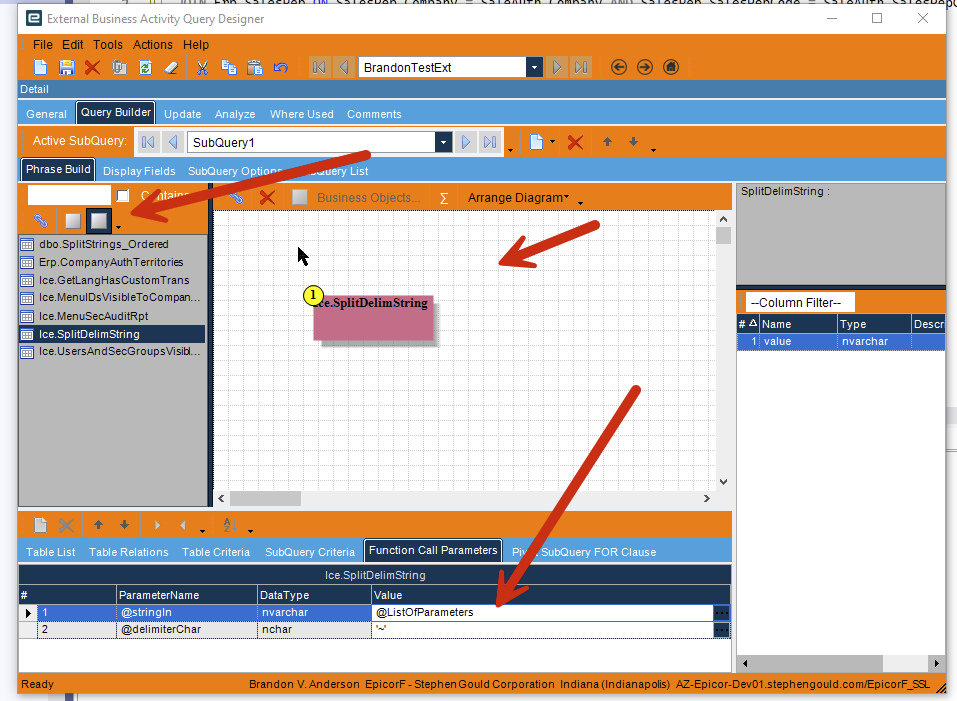
How can I build a BAQ that can take the parameter with multiple partials of words separated by spaces, parse it into separate strings, and dynamically create all the unions needed?
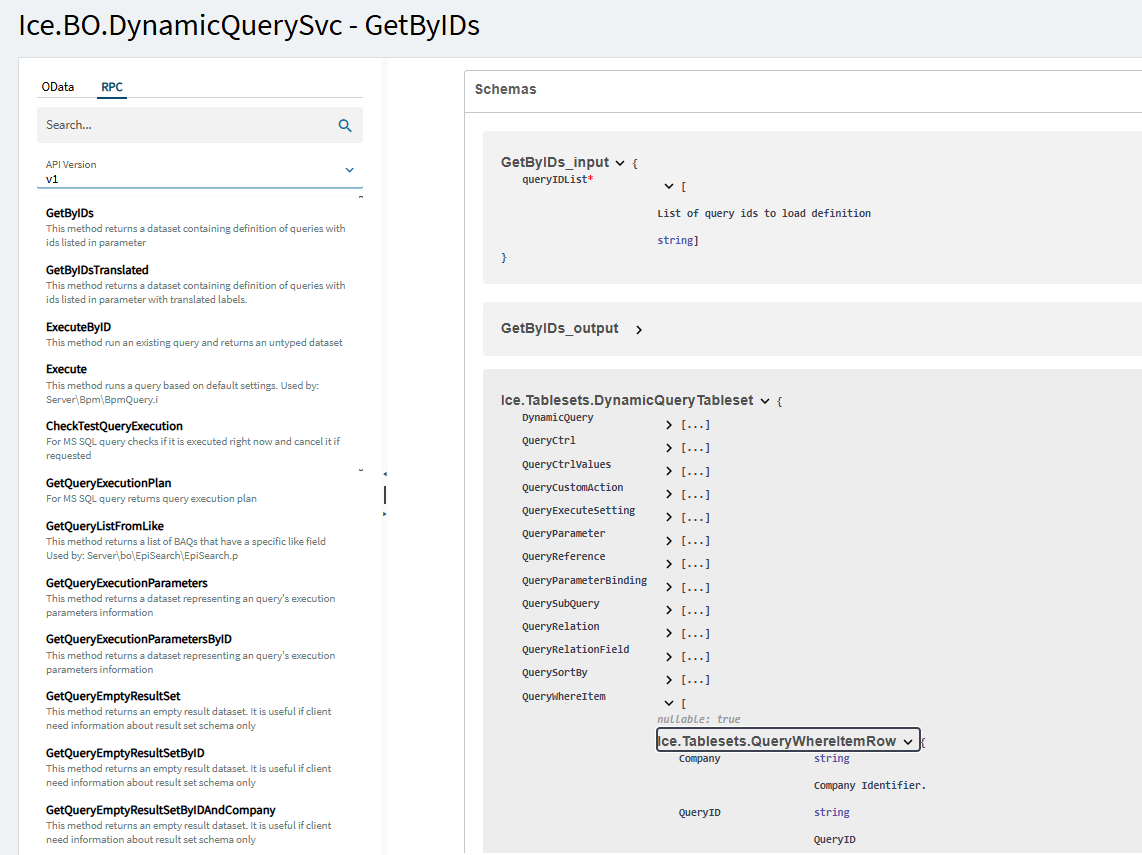
Here you would get the generic search that does the UNION between the two tables and then add your QueryWhereItem rows for the number of words you are looking for. Execute the query. Profit. (as Jose likes to say).
Ice.Tablesets.QueryWhereItemRow{
Company	string - Company Identifier.

QueryID	string - QueryID

SubQueryID	string($uuid) - SubQueryID

TableID	string - TableID

CriteriaID	string($uuid) - CriteriaID

Seq	integer($int32) - Sequence Number

FieldName	string
DataType	string - DataType

CompOp	string - Operator to use for relation between left value and right value.

AndOr	string

Neg	boolean

LeftP	string - LeftP

RightP	string - RightP

IsConst	boolean - Indicates that the ChildField is a contant rather than a database field. Example: Relationships to Reason requires a reasontype which would be entered as a constant.

CriteriaType	integer($int32) - CriteriaType

ToTableID	string - ToTableID

ToFieldName	string

ToDataType	string - ToDataType

RValue	string

ExtSecurity	boolean - ExtSecurity

SysRevID	integer($int64) - example: 0 Revision identifier for this row. It is incremented upon each write.

SysRowID	string($uuid) - example: 00000000-0000-0000-0000-000000000000
Unique identifier for this row. The value is a GUID.

BitFlag	integer($int32)

RowMod	string - RowMod
Returning a function result to a DataView is well-documented here on the list.
Are you cloud? If not and you can point an external datasource back to the database you can use a table valued function which will take a delimited list and give you rows.
If I understand the requirement correctly I would take a hybrid approach take that bit of code and replicate it in a function server side that would take in the search field and return your where clause. Which you can then use when calling the BAQ or whatever populates the grid.
So user enters the values into the search box, on blur have an event that calls the function and then can call the BAQ directly. Or set in a separate field to then use in the provider model of the grid.
Therefore you keep the baq logic in the Kinetic screen but use the power of functions to return your where clause, also allowing it to be reused in future developments.
The Epicor help pages have some decent guides on them to help you get started with the setup and security.
Epicor functions were introduced in 10.2.500 and I believe a big driver for them was the conversion to the Kinetc UI. To give people a place to put their custom logic from classic screens that is not possible or too complicated for the Kinetic UI.
They are in effect controlled unlinked BPMs that can be called from BPMs, REST, customisations and can also be scheduled.
For this you would need the Library and a raw C# function with defined request and response parameters.