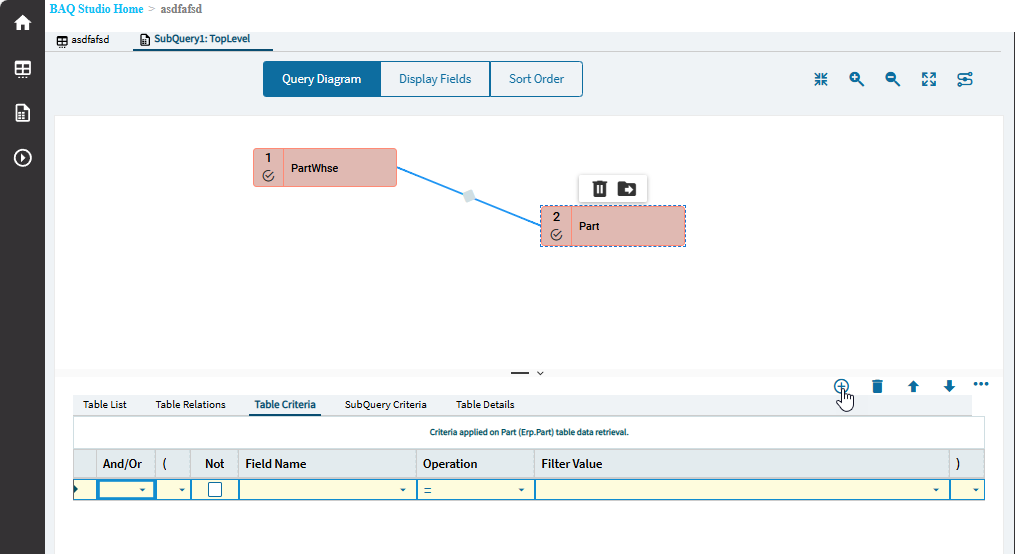
Is anyone else struggling with this issue in 2025.2? It seems like the baq designer isn’t seeing the two table widgets as unique. I have recorded what is happening since its hard to explain. Anybody already have a PRB for this? I can’t find a workaround, having to go back to classic BAQ designer, again, at 2025.2.
Time is running out before the classic sunset. Kinetic BAQ designer is still not ready for prime time. We need the classic baq designer, in power tools, now. Even if this bug got fixed tomorrow, that would not change anything. Just as this show stopper bug was introduced in 2025.2, any new show stopper can again be introduced in 2026.1 or future editions. The stability is simply not there with the kinetic development toolset.
It definitely seems to be intermittent. But like with this baq, I can close it and reopen it and the problem persists. Probably have to delete it and start over.
Could not reproduce in live - 2025.2.7 We are cloud. Often with bugs like this, I close or delete the offending BAQ, Dashboard, Event, or widget, then start over. I agree Kinetic sucks. No amount of Epicor begging us to think otherwise will help.
It’s never going to work right. It can’t. “Table criteria” isn’t a thing in SQL, it only exists in BAQ. The only way to do that is to add a subquery and apply subquery criteria in that context before joining the results.
And BAQ doesn’t do that. It hackily shoves “table criteria” into join conditions or the global WHERE conditions, imposing criteria in unexpected contexts. I recommend not using table criteria and intentionally selecting criteria context instead.
Add something in a join condition if the join should be constrained.
Add it in subquery criteria if the context should be the entire subquery.
Filter your table in a subquery if you want to constrain the volume of data before it’s joined. LaborDtl, for example, can benefit from filtering prior to a join.
I can tell you why - that came from Progress. Because how E9 queries were executed, suddenly after switch to the new version different result was returned.
Yes, it appears either the export or import process is reassigning the guids, not sure which one since I can’t look at it without importing again. ETA: Talking about the original issue. The left join issue remains either way.