Ooh no we don’t. Is that what would be needed?
That wouldn’t help in this case I don’t think. The emails still wouldn’t be in local sent items if they are using SendGrid from Epicor.
I agree, Chadd, I was just thinking like UD field x BPM to update that the PO was sent… but it’s hard to validate true email delivery… Queue EDI/IpaaS or something for better visibility.
I know that sendgrid can fail too and the only thing you can do to report a failed delivery is create a webhook on their platform and repsond to it via azure function or workato or whatever you want to develop… super limiting.
Maybe it’d be helpful to get a clear and concise list of goals from @ToryD about what his team needs… Is it knowing that the email successfully delivered? Or just knowing that the email of the acknolwedgement was kicked off to send?
Thanks guys. I am not 100% positive I know what the team is after, other than they want the email in their sent items. I guess I can ask that they are attempting to do when they look in their Sent Items.
APR is the module (referred to above) as using SSRS Breaking and Routing to automatically send the email when they do a Print Preview (remember when “Print to Fax” was a thing? this is “Print to Email”).
When I’ve had a requirement that the buyer HAD TO HAVE proof of being sent, I just added them as a second recipient of the email on the CC line.
EDIT: It won’t be in their Sent Items but they can have an Outlook rule to put them in a distinct folder.

Yes, I used the same solution. You want the email? Ok, I cc you.
We use SMTP AUTH with m365 and have an account that has “send by” permission for all the users it needs to send from. There is also a command on Exchange online you can set that puts the sent item into the inbox of the person it was ‘sent’ from, we have successfully manged to fill up many, many internal inboxe’s with this method transferring vast wealth to MS 
You’ll need to switch before October.
I know MS are killjoys. We have put the correct Graph details into Kinetic and tested it but havent applied it to live. The send as as put in the users folder still works regardless.
This is a good inbetween here @ToryD. We did the same thing for our AR invoices
We kept it simple…one sender address, copy yourself if you want it, I have access to the Sent Items folder in case we need to find something. We had SMTP originally but went with the Azure app/secret/yadayadayada when we went to cloud. Not major volume so it’s been manageable.
I got a better understanding of the “need” and it is far simpler than originally expected. I think the request was simply stated out of the experience from Peachtree.
They want to be able to email from Epicor in a way that when the vendor replies then hopefully the individual that did the sending gets their reply.
What does the "Use individual’s email From field mean? Is this from User Security setup? I did a little testing and it hasn’t seemed to work for me, but maybe my user isn’t set up properly.
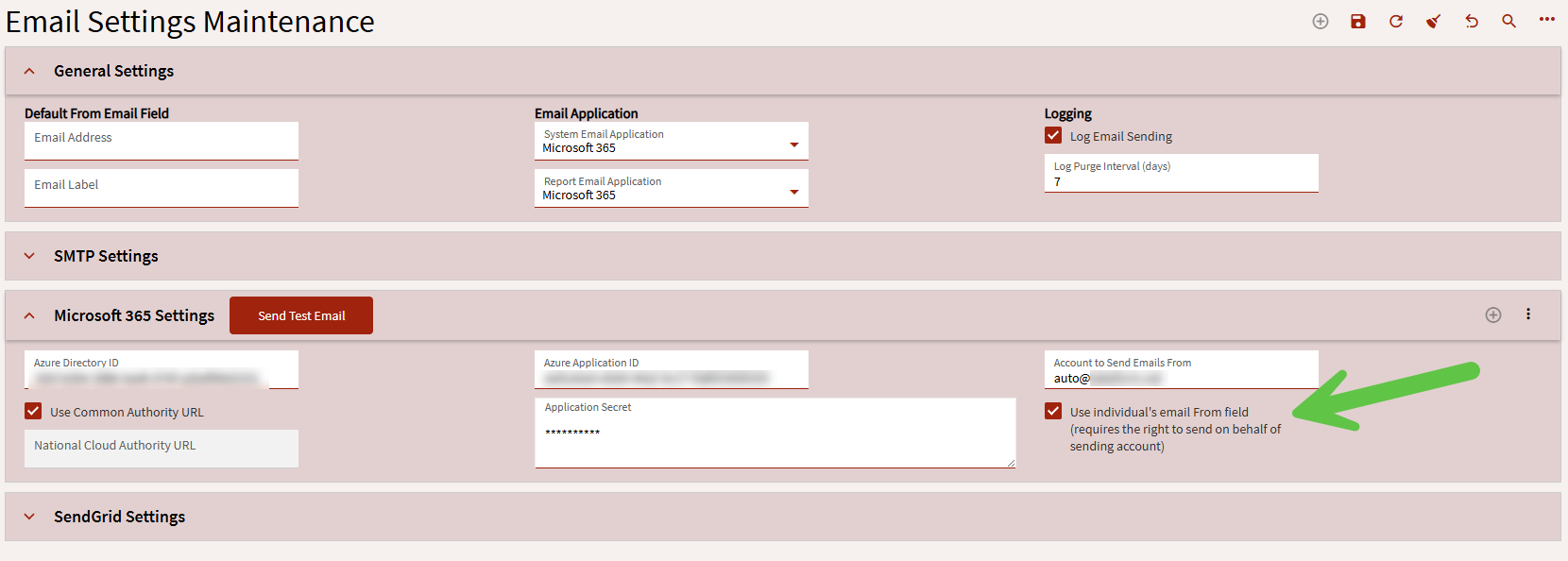
It lets you set different from addresses. If you don’t have that the emails come from whatever is configured in Email Settings Maint. Enabling that will require that the account configured for authentication have send on behalf for whatever account the email is coming from when triggered. Otherwise the emails will fail to send.
Sorry for long delay in responding. I am trying to send a PO with this setting on and it is still sending from the default sender “Account to send Emails from”. how will it allow you to set a different account? Should it show as a new field to be manually entered or should it draw from the logged in users’ email address?
Tory, are you using breaking and routing?
Nope 