Kinetic Components and Events are disappearing and getting modified automatically

So, there we were, minding our own business, tweaking custom layers when App Studio decided to throw a tantrum. It started deleting components and acting like it had a vendetta against us. At first, we thought, ‘Oh no, did we mess this up?’ But this time, we caught the sneaky App Studio red-handed—on full display, doing its own thing, deleting components and dataview actions from our custom layer like it was auditioning for a glitch horror movie.
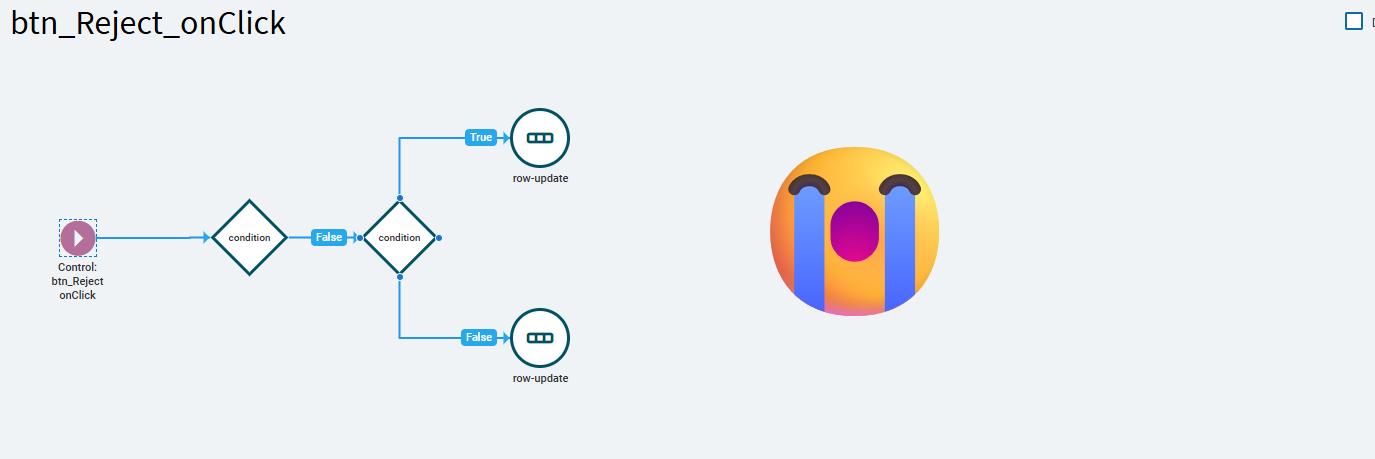
Thankfully, we had a backup (bless our paranoia), so we could spot the mismatches.
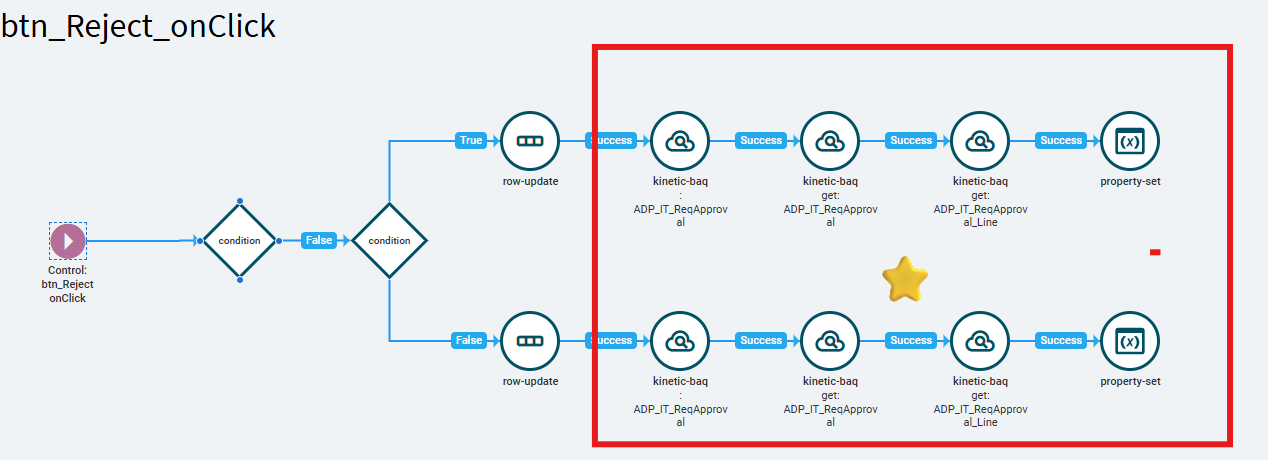
Turns out, someone had flagged a similar issue back in 2021, App Studio - Event corruption? and they claimed it was fixed. Spoiler alert: it wasn’t.

Now comes the real adventure—convincing Epicor support :confounded: and their illustrious development team that this is an actual bug. It’s like trying to convince a toddler they ate the last cookie: they’re not buying it. These days, we record screen videos of the chaos just to prove we’re not making it up. Honestly, it’s starting to feel like we’re starring in our own tech support reality show.

Am I alone in this club? We’re on SAAS 2024.2.4 and just trying to get some expert advice. How can I reproduce this? Or better yet, at what stage does App Studio decide to go completely off the rails?

Meme Reaction GIF by Tyler

12 Likes

You are not alone. You not only have to be able to reproduce it yourself, you also have to assist epicor support, who are not developers and do not know how to use the product, to reproduce it themselves to have any hope of getting it submitted to development. Because according to Epicor all bugs are reproducible. They don’t care about screen recordings even when they ask for them. May the odds be ever in your favor.

Constant export is the only way to preserve sanity imo because even the commit history becomes corrupted.

8 Likes

Um, like source control?

Suspicious Monkey GIF by MOODMAN

4 Likes

Exactly like that lol.

1 Like

This is actually biting me in the butt right now. I am unable to modify events in a layer without some other events getting deleted. It is really, really bad.

[edit]… and the question for me is, do Epicor developers not encounter this same issue? I cannot imagine building complex Kinetic apps at the rate/speed they must be expected to with how buggy Application Studio is.[/edit]

5 Likes

Hey Everyone,

Well, we did it! We managed to replicate the issue with a simple example, and—brace yourselves—Epicor support actually accepted it. We’ve confirmed it in 2024.2.4, 2024.2.5, and even the latest 2024.2.7. Despite providing them with a recorded video of the issue, they insisted that we recreate it on their server—because apparently, visual evidence just isn’t convincing enough🙄.

If anyone’s interested, we’re happy to share the CAB file with the replication steps.(Oh, and the funniest part? Solution Workbench, in all its glory, occasionally just forgets about some objects—especially layers. we will notify this :lady_beetle: later).

Honestly, we really need a dedicated space for discussing Bugs , where we can report critical ones in bulk and get Epicor to act faster. With proper replication steps, we can skip the endless back-and-forth and go straight to pinpointing the problem—saving us all a ton of time and frustration.
And who knows? Maybe one day, Epicor will bless us with a bug-reporting forum (like Epicor Ideas) where people can vote on issues—because clearly, democracy is the only way to get things fixed around here!

@klincecum @josecgomez @hmwillett

14 Likes

A “Bug Bounty Program” would be more interesting :sweat_smile:

Disappearing widgets and links in App Studio events has been haunting kinetic UX users since early versions of AppStudio… it is sad (and frustrating) that it is still happening in latest version.

7 Likes

Those days of our noob phase, we bravely embarked on R&D, confidently assuming every blunder was either our own fault :man_facepalming:, a glitch in our memory or maybe a teammate messing up. As Epicor annnounced the sunset of Classic we started migrating complex customizations only to trip over bugs and crash into roadblocks :pleading_face:

2 Likes

Do you have a PRB or Case for this? I’m running into as well. Almost pointless to try to customize right now when my events keep getting modified.

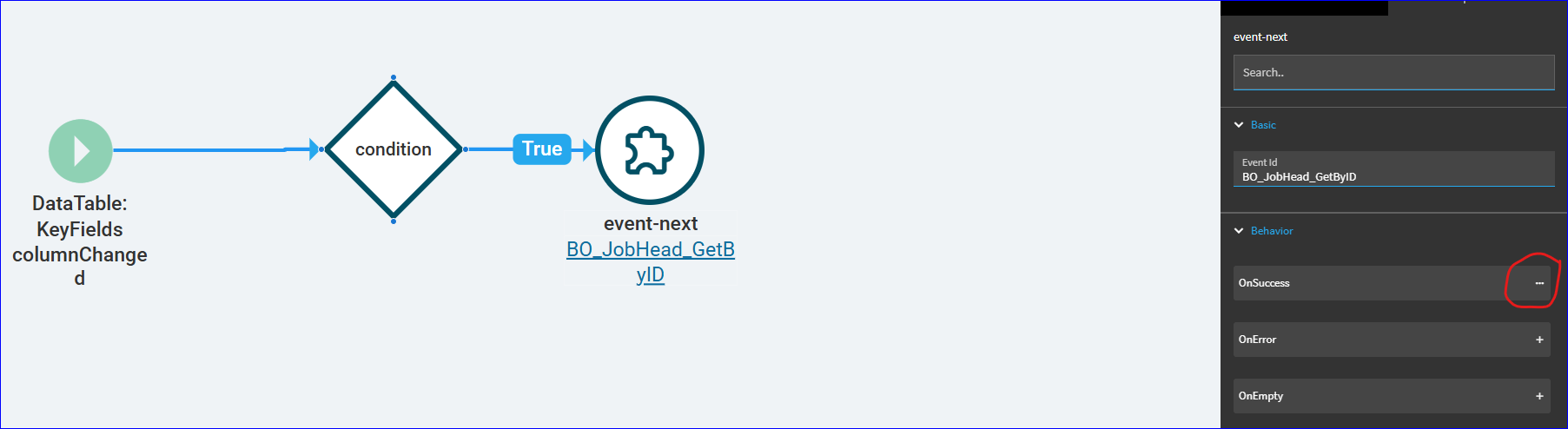
I had a string of components in this event that all got wacked. The first was an OnSuccess… the event remembers there is/was one, at least, that’s what the circled (…) typically indicates. If I click on it, nothing happens.

Is the “work around” right now to export the customization every five minutes so you can re-import it when this happens?

6 Likes

Thanks for sharing your story! If everyone keeps flagging it, maybe they’ll actually do something—fingers crossed! Day by day, we’re discovering more of App Studio’s interesting behaviors. Just the other day, everything was working fine in our pilot environment, but as soon as we exported, it lost its mind and deleted all the events. And the best part? Support told us to contact PS if we need quick help. Because nothing says “urgent fix” like passing the buck!

PRB0293626 – Not sure if sharing the PRB number here is ideal. I’ll remove it if it breaks any rules!

Same here! Trying to update the same missing event, but Kinetic keeps treating it like an unwanted guest - deleting it over and over.

That’s not even the craziest thing. This event is visible and working perfectly in the pilot environment. But the moment I export it from there and import it into live— poof —it just disappears :neutral_face:.

With Epicor announcing the ‘Classic Sunset,’ we’ve been working hard to migrate everything, but issues like this are making Kinetic feel less like the future and more like a glitch in the matrix. At this rate, our confidence in Kinetic is disappearing faster than our events! :sweat_smile:"

3 Likes

I don’t believe it is breaking any rules to share PRB numbers. It often helps, if someone is entering a new case, if they can reference an existing PRB. Support can then evaluate the new case vs. the existing PRB and link them together more easily if they’re deemed to stem from the same issue.

I’m sure there’s a better way to phrase it… but its similar to building a Class Action. Not to sound like we’re going in to litigation… but as you mentioned, the more people who flag the issue the better, and if we’re all referencing the same PRB, it helps add weight.

2 Likes

This just happened to me today after installing the cab with the layer into a different environment. Poof, all my events were gone. :frowning: what a PITA.

2 Likes

That could be useful! Ideally for support, they’d merge tickets and problems; reducing demands on their resources and tools, but they don’t have the resources or tools to do that. Being able to point support to the best answer to the same questions that get asked on every ticket would save everyone time and frustration. Or update a support person that they don’t need to reinvent all the work done on another ticket.

1 Like

I’ve reported this same issue today and given clear repro steps. I referenced the previously mentioned PRB. Wheee!

3 Likes

This has been a thorn in my side while developing kinetic apps. Through tracing and trial and error, I think i’ve got the trigger that causes this down to the usage of the “onSuccess” connector. Looking at @iarunkumark’s screenshots in OP, the disappearing events there are also tied to onSuccess.

For now, i’ve stopped using onSuccess where I can, and when I have to work on an event that contains an onSuccess, I seem to have the best luck with editing/saving it correctly if I open the layer to a fresh new tab, open only that event, modify only that event, and save only that event, then close the tab.

I’ve got a reliable repro scenario where the initial time the event is open it is rendered properly, edits properly, and saves properly. But if I close the event tab and open it again, all widgets after the ‘onSuccess’ connectors are obliterated.

I opened my case 10 days ago and Epicor has been silent thus far. Gave them clear repro steps and a login to my pilot environment to replicate. This is on 2024.2.10.

6 Likes

Great work, Gabe!

Their lack of response is a little frustrating. I know sometimes they take awhile to evaluate, but have they responded AT ALL? Was the case ever assigned to an individual?

You may want to escalate it and at least make sure your case has been evaluated. Time to verify the problem and time to identify a solution is understandable (we won’t speak about time to deliver said solution)… but if they’re not responding at all, I would escalate.

3 Likes

And curiously looking at the problem repository your problem is not there :angry:

I actually did get someone assigned, and a response on 02/04 saying they were able to repro… but nothing further, no PRB or anything… and i’ve replied twice since then with an additional repro scenario, and finally with the discovery that onSuccess is the likely culprit… radio silence since then… whee!

1 Like

I’ve run into a test case with Epicor’s out of box developed stuff, if someone could validate they see it too.

Load app studio, f12 to load dev tools.
In dev tools settings, make sure “Auto-open DevTools for popups” is enabled.
image

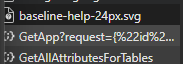
Open the base layer for SplitJobEntry, in the new devtools window, go to the Network tab and navigate to the GetApp call on the left.
image

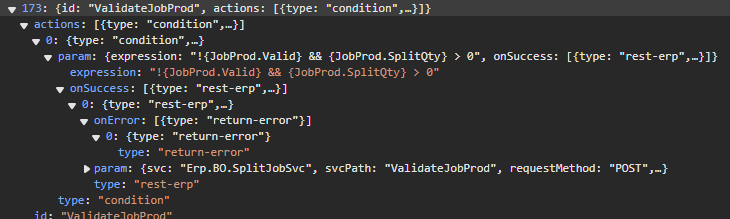
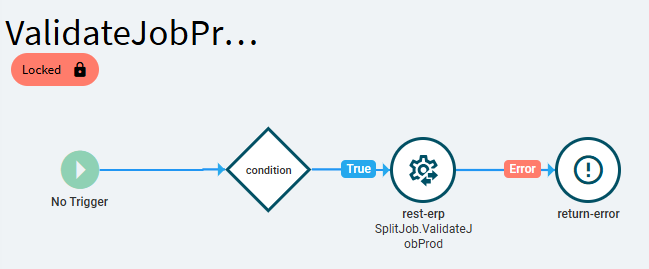
In the Preview tab of the GetApp call, expand the tree to the following node (this step is just to validate that the “return-error” widget is present in the ValidateJobHead event):
image
Events->173 (id: ValidateJobProd)
Events.173.actions.0.param.onSuccess.0.onError

In App studio window, navigate to Events → User Defined Actions → ValidateJobProd

The very first time you open it, you should see the event matches the json payload (there is an onError connector following the onSuccess → rest-erp):
image

Hit the “x” on the event tab, closing the “ValidateJobProd” event.
You should receive a prompt “Save Changes?” - this is the first sign of an issue, we changed nothing (and the event is also locked against changes) - reply “No” - looks like this is where the corruption is occuring, the rendering of events following onSuccess.

Now, open the “ValidateJobProd” event again.

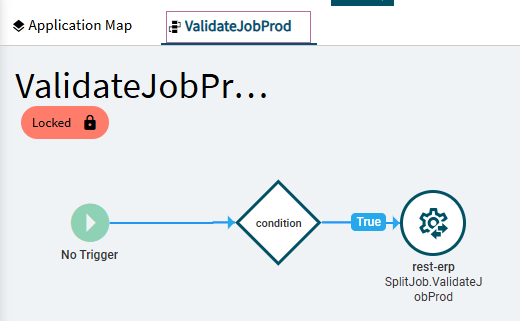
You should see the following:
image

The events post onSuccess have magically been nuked!

If we were to create a new layer and save now, with dev tools open, we would see that the “onError” branch does NOT get saved.