I have a custom kinetic dashboard where I would like to create an event when the user choose a row from the native grid. The grid is a regular dashboard based on a BAQ (technically it’s a UBAQ). When I click on the panel that contains the grid, and look at the behavior area, I only have on panel expand/collapse. I don’t see anywhere to trigger an event on the user choosing a record in the grid.
I’m working on uplift of a classic dashboard that has grids subscribed to a primary grid…
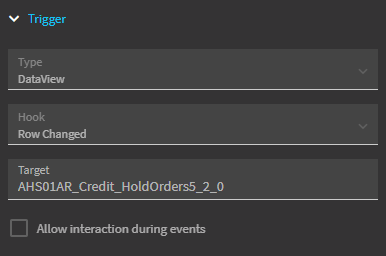
The event that detects that action is Data View > Row Changed > Target the dataview of the primary gid
3 Likes
I’ve read somewhere on here that it won’t fire when selecting the first row (since that one is already selected - so you’d have to key off of creating the grid or something else that happens when the data is first loaded
This was the ticket! Thank you! I guess I thought that the event should have been in a list for me to start. Instead, we have to create the even essentially from scratch. I used a row-update widget in the event after the trigger. The row-update targets TransView, and updates it with the data from the grid data view. This worked perfectly! Thanks!!
3 Likes