No! don’t fail me now soldier! 
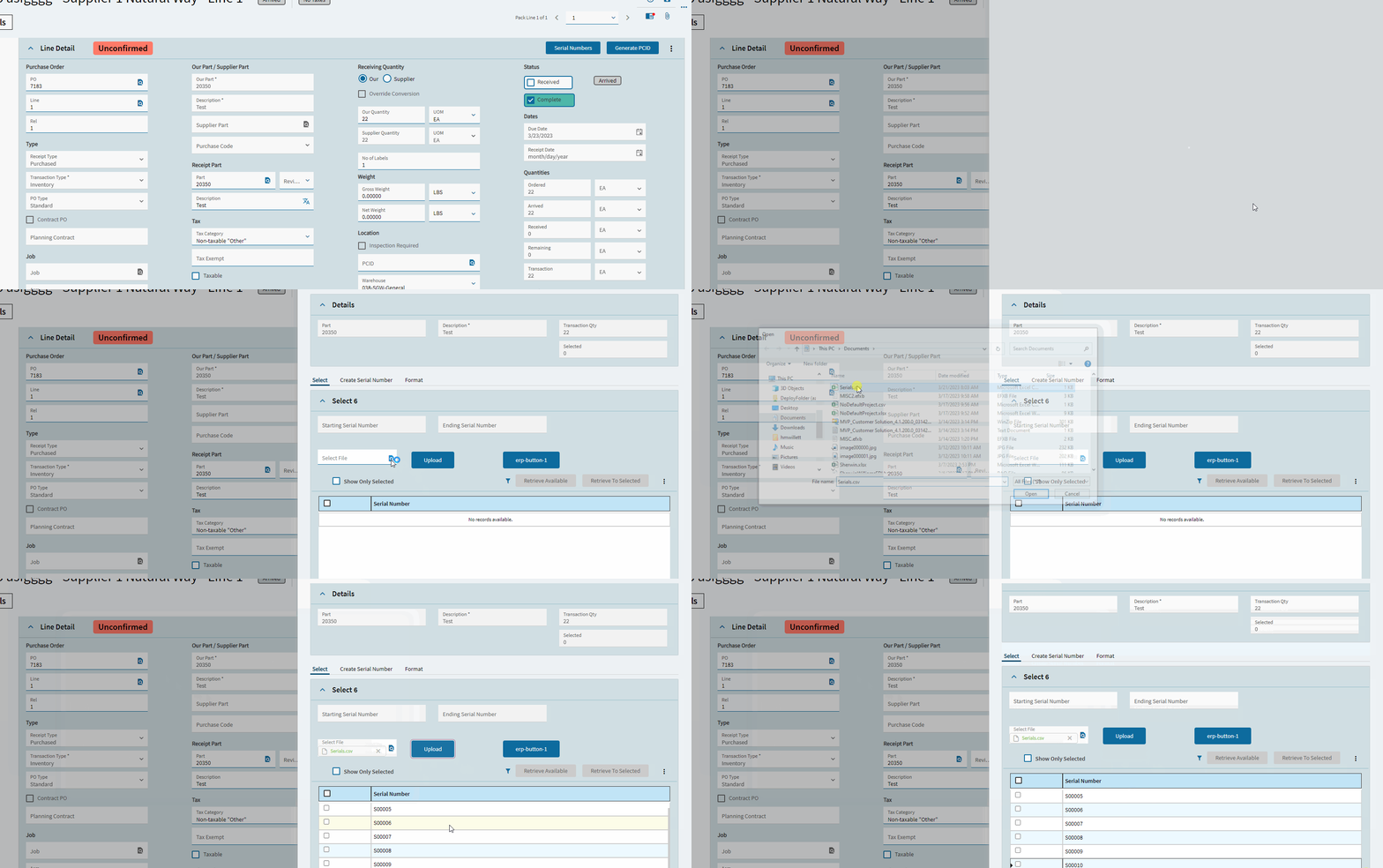
@josecgomez I know you want to chip in! Is it possible to do this from a function? Create a RcvDtl then Add Serial Numbers via https://xx/Erp.BO.ReceiptSvc/SelectedSerialNumbers
Yes you can do it from a function problem is gonna be the UX
You could do a custom panel that lets you select the serial numbers you want then send that as a dataset to a function along with the receipt and have the function so the select serial number bit
Frankly you could do it in the regular UX too but it will require a custom serial number list / picker panel
Sounds like a headache… @hmwillett did you have any luck?



1 Like

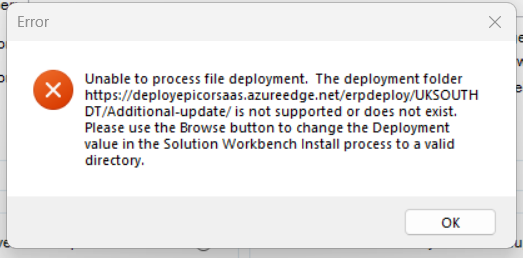
Any ideas?
Hit okay and ignore.
Your layer isn’t showing up 
Same here. I got the layer, but it has no content.
Well fine.
Hold for a bit. I’ll play with it when I get back from taking my kids to school.
1 Like
I was able to get my layer to show up by using the big hammer, and clearing my browser cache.
Her layer doesn’t seem to have any content (when imported) though.
Here is the content of her layer pulled out.
{
	"layout": {
		"Name": "layout",
		"Version": "3.0",
		"Diffs": [],
		"Operation": "Replace"
	},
	"SelectSerialNumbers": {
		"Name": "SelectSerialNumbers",
		"Version": "3.0",
		"Diffs": [{
			"Id": "461f40d9-3441-4ad8-af79-3058b0f0a8c1",
			"Path": "components",
			"Value": null,
			"Operation": "Remove",
			"Index": 0
		}],
		"Operation": "Replace"
	},
	"CreateSerialNumbers": {
		"Name": "CreateSerialNumbers",
		"Version": "3.0",
		"Diffs": [],
		"Operation": "Replace"
	},
	"SNFormat": {
		"Name": "SNFormat",
		"Version": "3.0",
		"Diffs": [],
		"Operation": "Replace"
	},
	"events": {
		"Name": "events",
		"Version": "5.0",
		"Diffs": [{
			"Id": "erp-button-461f4_onClick",
			"Path": "",
			"Value": {
				"trigger": {
					"hook": "onClick",
					"type": "Control",
					"target": "erp-button-461f4"
				},
				"actions": [{
					"type": "row-add",
					"param": {
						"dataview": "SerialNumberSelection",
						"values": {
							"Company": "C001",
							"SerialNumber": "S12345",
							"Scrapped": false,
							"Voided": false,
							"PartNum": "{SelectSerialNumbersParams.partNum}",
							"SNPrefix": "S",
							"SNBaseNumber": "S12345",
							"SourceRowID": "{SelectSerialNumbersParams.sourceRowID}",
							"TransType": "{SelectSerialNumbersParams.transType}",
							"PassedInspection": true,
							"Deselected": false,
							"RawSerialNum": "S12345",
							"KBLbrAction": 0,
							"PreventDeselect": false,
							"PreDeselected": false,
							"NotSavedToDB": true
						}
					}
				}],
				"id": "erp-button-461f4_onClick",
				"customizable": true,
				"mode": "D"
			},
			"Operation": "Replace",
			"Index": 127
		}],
		"Operation": "Replace"
	},
	"rules": {
		"Name": "rules",
		"Version": "3.0",
		"Diffs": [],
		"Operation": "Replace"
	},
	"tools": {
		"Name": "tools",
		"Version": "2.0",
		"Diffs": [],
		"Operation": "Replace"
	},
	"dataviews": {
		"Name": "dataviews",
		"Version": "4.0",
		"Diffs": [],
		"Operation": "Replace"
	}
}
Yeah, that’s not correct–it’s missing a lot. One second.
1 Like
Do me a favor and before you install the solution, delete your other layers, then try to install it.
Yeah, I was looking, and like, wait, where is the function call lol. This looks like a test button.
I did.
Me too 
Ugh, fine. We’ll do this the hard way.
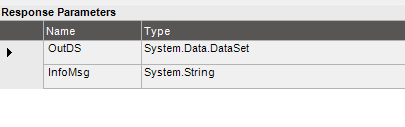
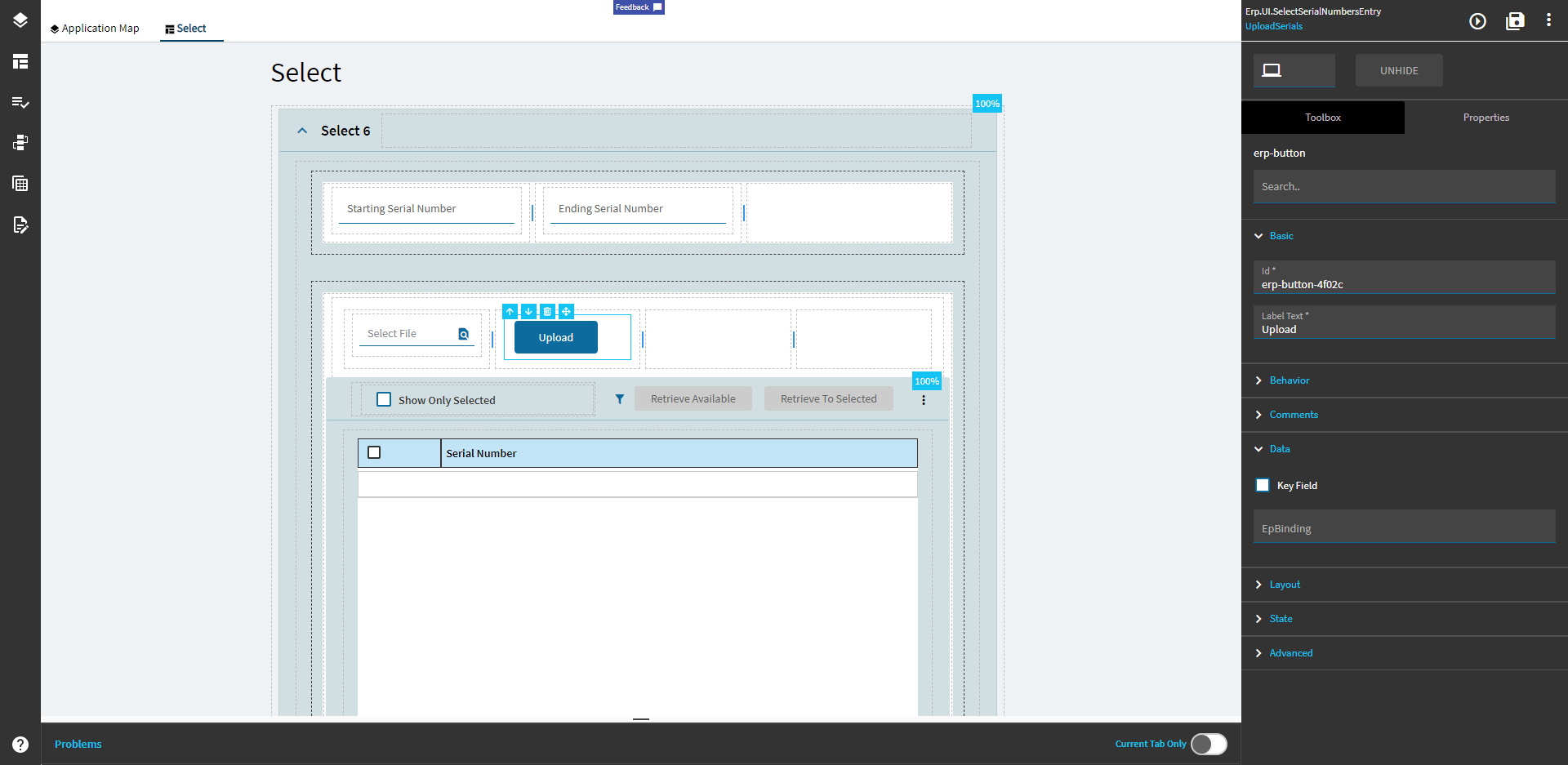
File Picker:
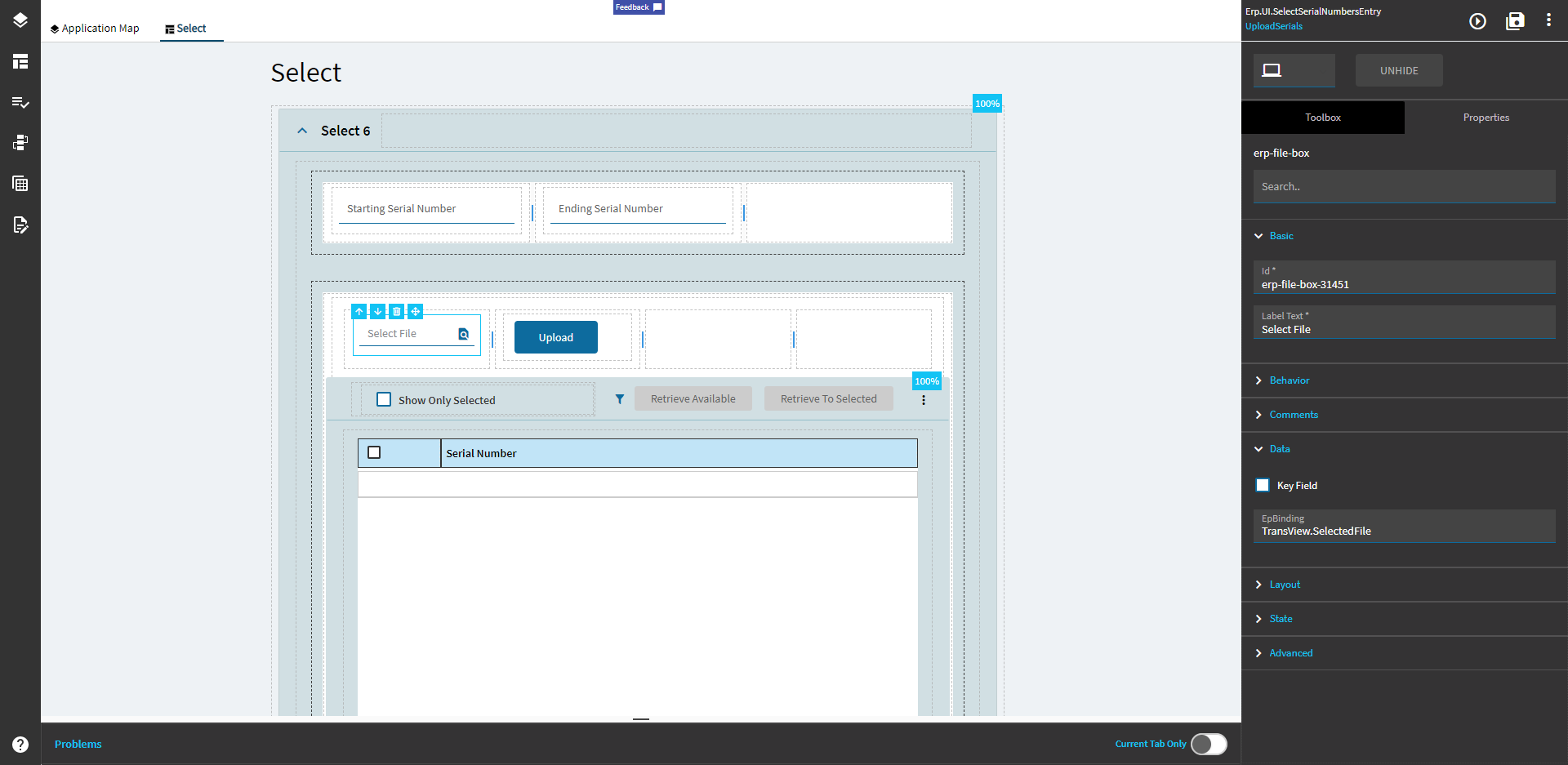
Upload Button:
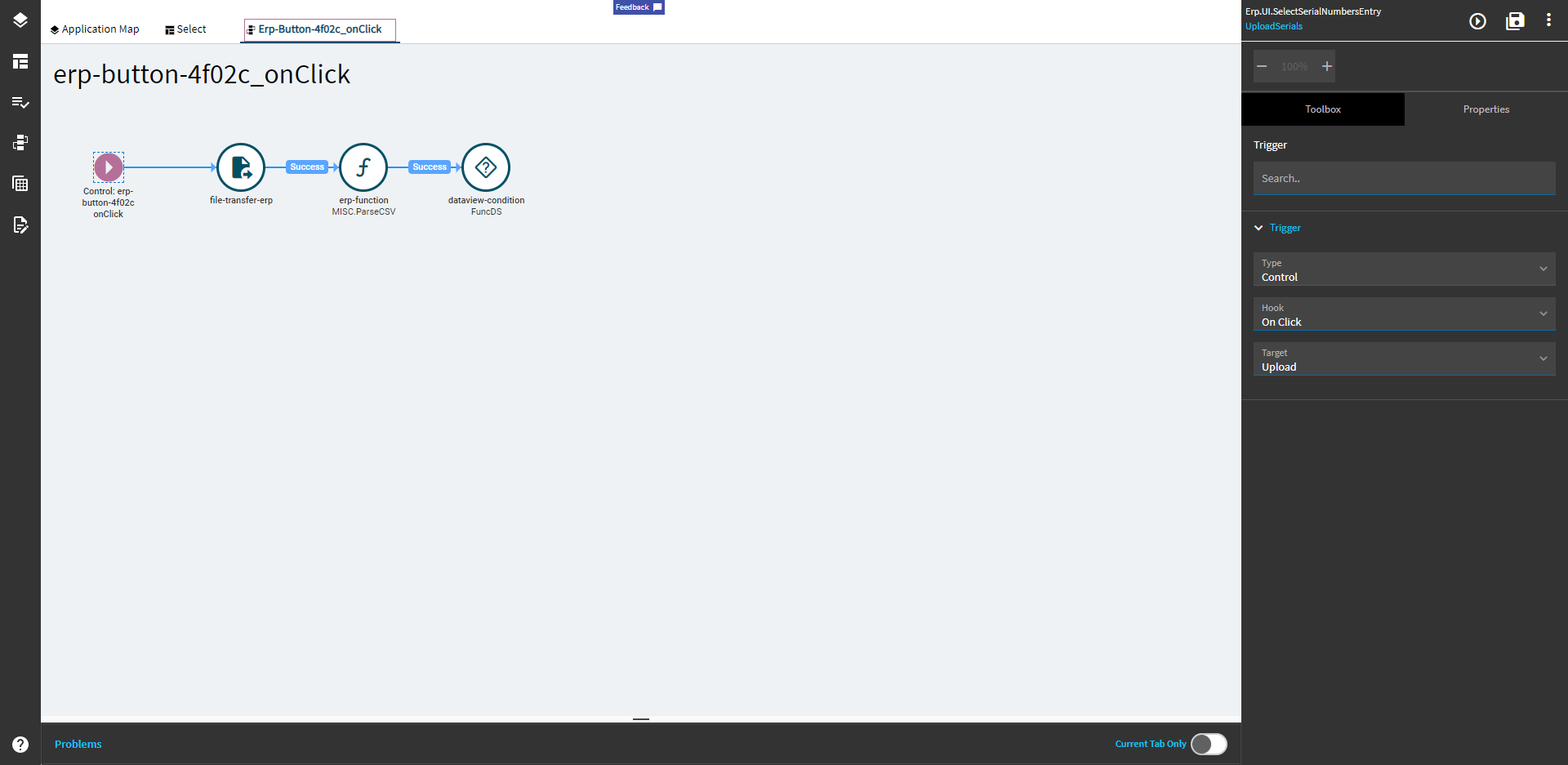
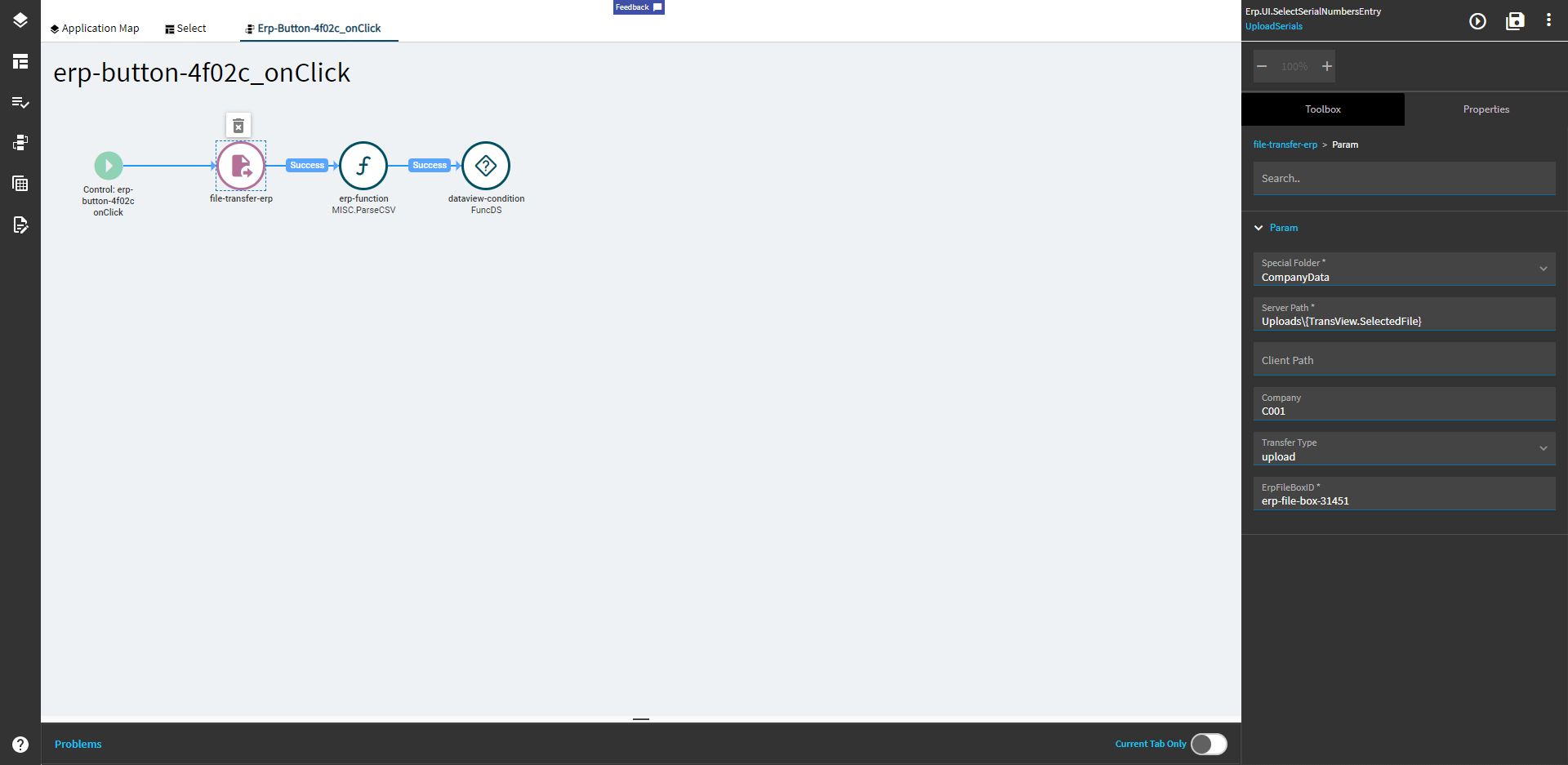
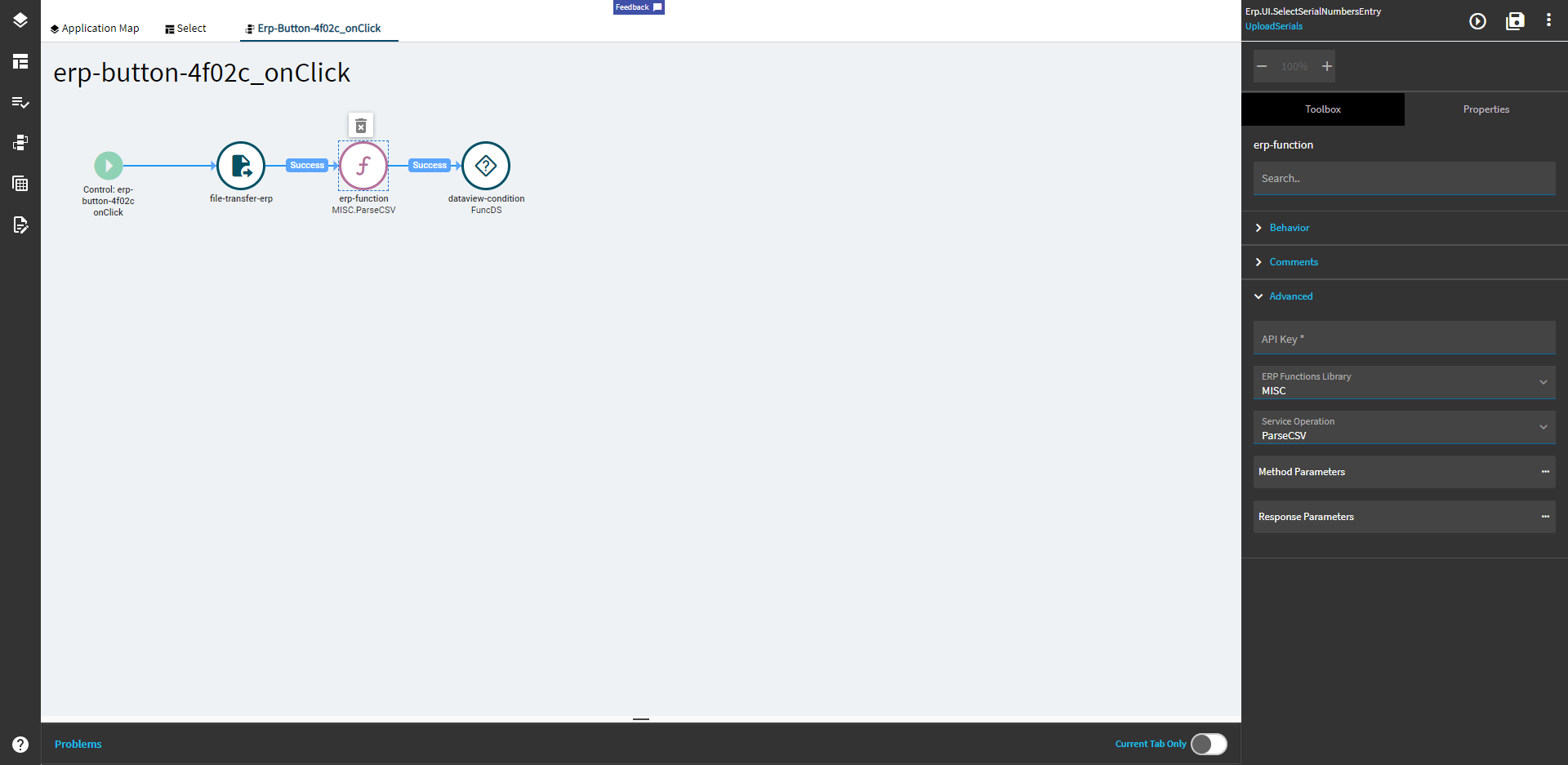
Upload Button OnClick Event:
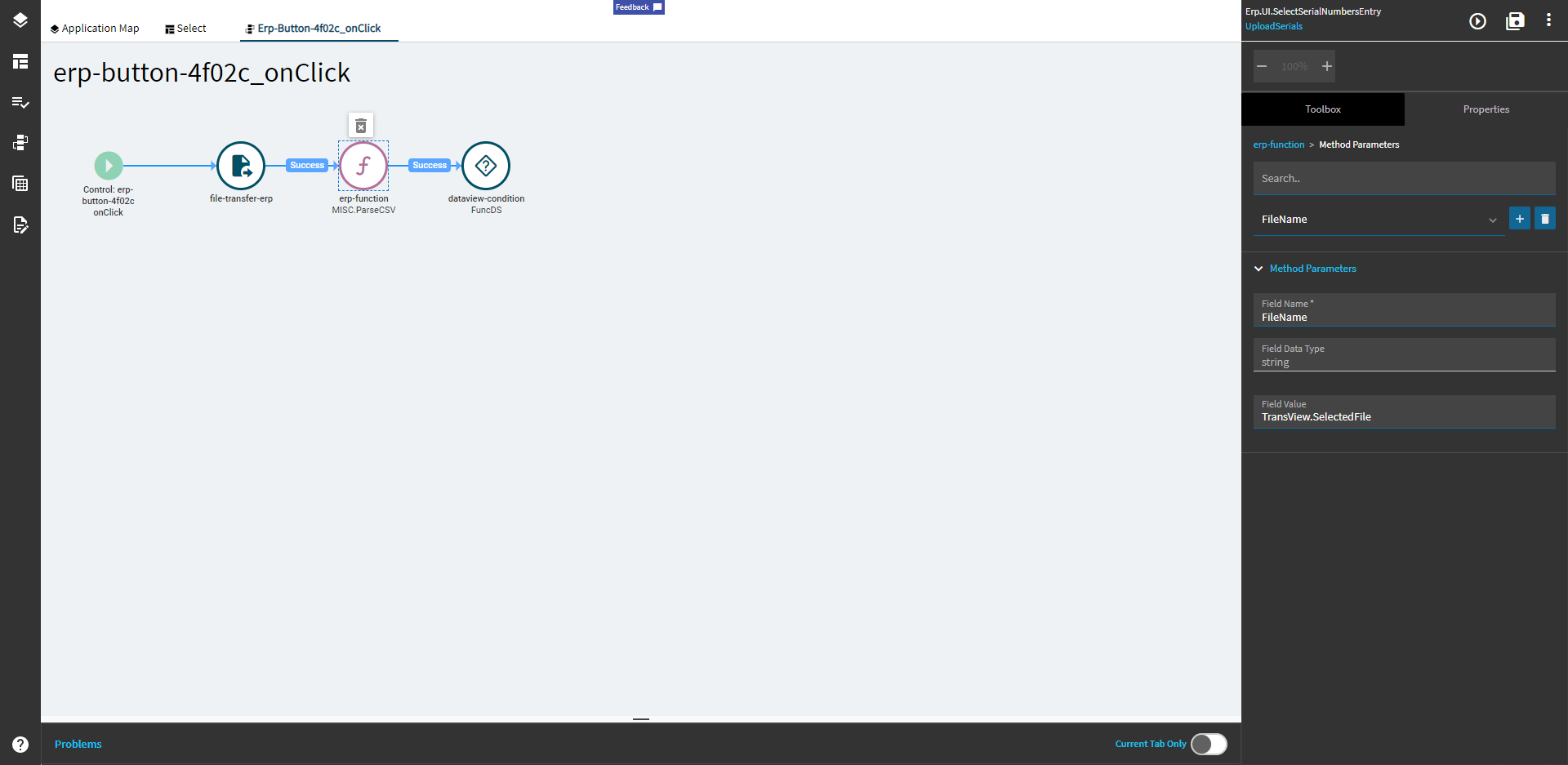
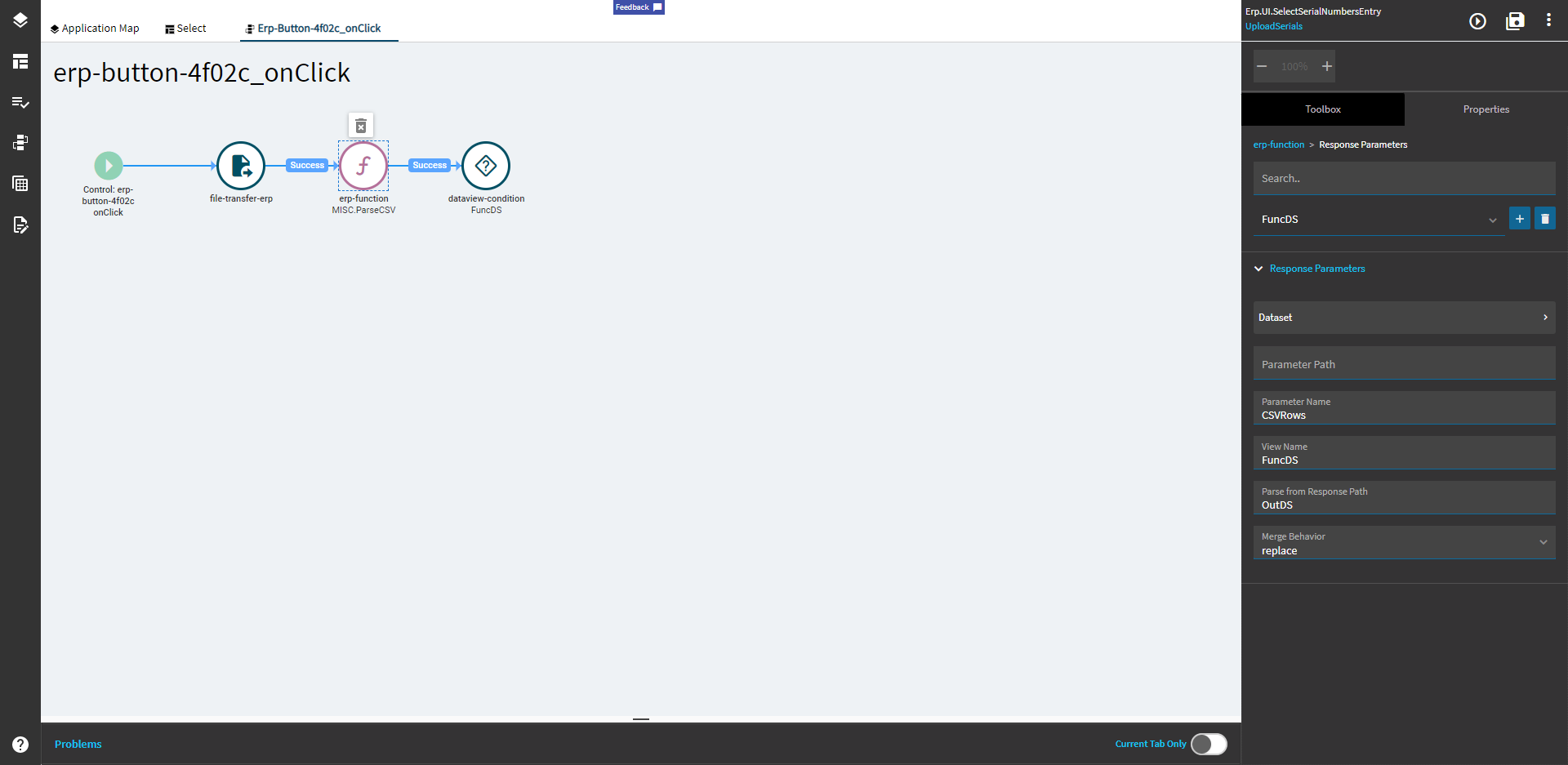
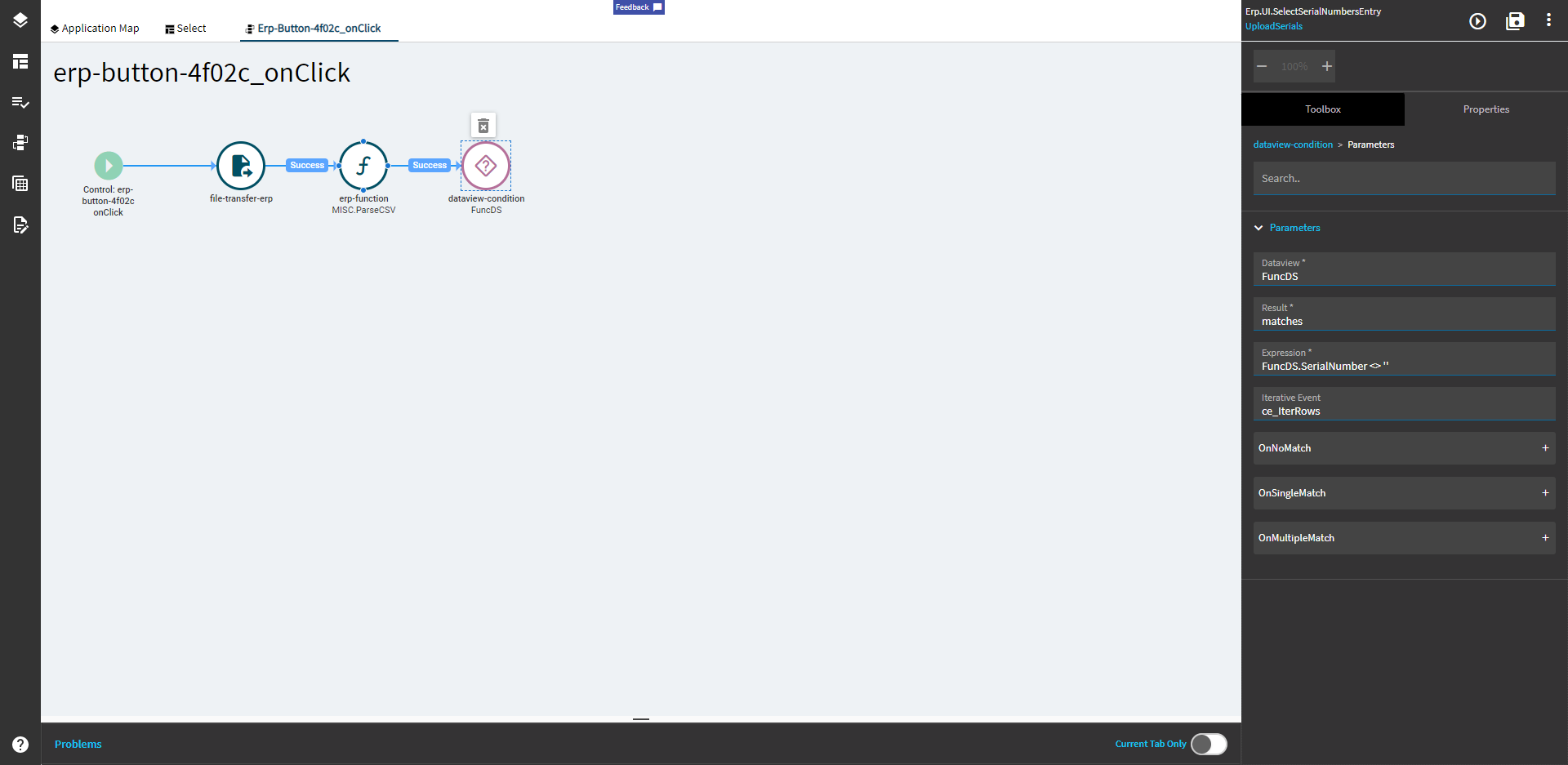
Iteration Event:
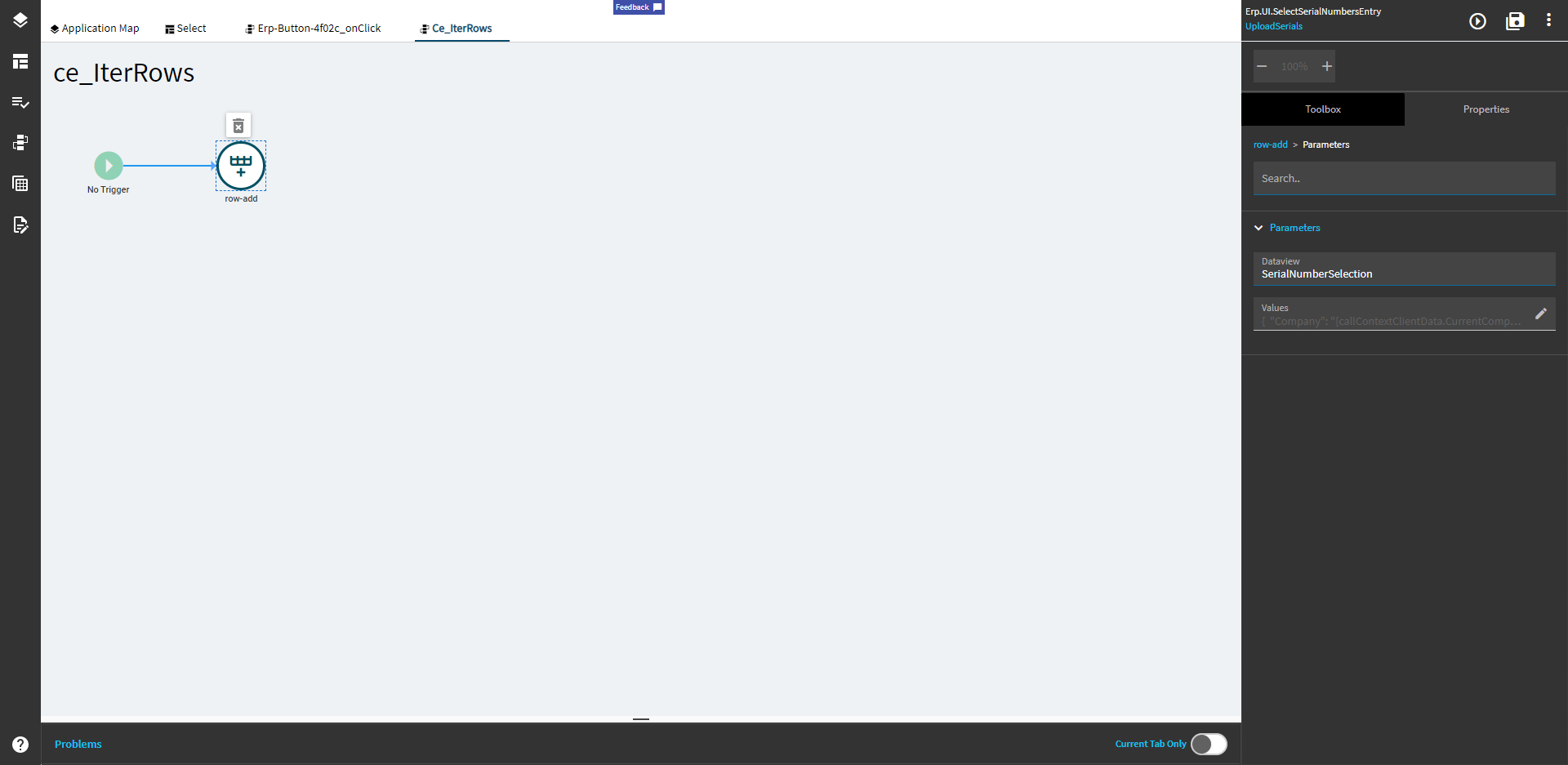
{
	"Company": "{callContextClientData.CurrentCompany}",
	"SerialNumber": "{matches.SerialNumber}",
	"Scrapped": false,
	"Voided": false,
	"PartNum": "{SelectSerialNumbersParams.partNum}",
	"SNPrefix": "S",
	"SNBaseNumber": "{matches.SerialNumber}",
	"SourceRowID": "{SelectSerialNumbersParams.sourceRowID}",
	"TransType": "{SelectSerialNumbersParams.transType}",
	"PassedInspection": true,
	"Deselected": false,
	"RawSerialNum": "{matches.SerialNumber}",
	"KBLbrAction": 0,
	"PreventDeselect": false,
	"PreDeselected": false,
	"NotSavedToDB": true
}
Function Code:
string filePath = @"\\SERVER\EpicorData\APPSERVER\Companies\C001\Uploads\"; //Change this to be your server loc
bool locked = true;

// Waits until the file is done being combined
do
{
  locked = false;
  try
  {
      FileStream fs =
          File.Open(Path.Combine(filePath, FileName), FileMode.Open,
          FileAccess.Read, FileShare.None);
      fs.Close();
  }
  catch (IOException ex)
  {
      locked = true;
  }
}
while( locked );


using( StreamReader sr = new StreamReader(Path.Combine(filePath, FileName)) )
{
  string row = "";
  DataSet thisDS = new DataSet();
  thisDS.Tables.Add("CSVRows");
  DataTable dt = thisDS.Tables["CSVRows"];

  //Add the column headers
  string[] headers = sr.ReadLine().ToString().Split(',');

  if( headers.Count() > 0 )
  {
    var dr = dt.NewRow();

    foreach(var hr in headers)
    {
      dr.Table.Columns.Add(hr);
    }
  }
  // End adding headers

  while(!string.IsNullOrEmpty(row = sr.ReadLine()))
  {
    string[] cols = row.Split(',');

    var dr = dt.NewRow();

    for(int i = 0; i < cols.Count(); i++)
    {
      if( !headers[i].ToString().Equals("") )
        dr[headers[i]] = cols[i].ToString().Replace("\"","");
    }

    dt.Rows.Add(dr);
  }

  OutDS = thisDS;
}
1 Like