So looking at ECM and viewing attachments both my environments are AZURE authenticated Kinetic and ECM. When trying to view attachments in both environments i am unable to view them saying incorrect username and password. I can login to both and find the attachments manually without any issues. Support is telling me i need to create additional user accounts to solve this and give the end user two account one azure authenticated and one a local authenticated account. I’m not sure how that is beneficial.
Your Kinetic can authenticate to ECM i’m not sure why you are being prompted (again) to login when you want to view the Document in Kinetic. Ours works fine.
I’d be inclined to review your Attachment setup, I was reading the other day that there is an authentication provider that needs to be setup for method other than STD username and password… It is mentioned int the online help.
Okay im looking at the help guide that i found under help in ECM and it show authentication from Epicor IDP. But we are setup with Azure authentication.
@josecgomez do you have some places i can check to set this up? I can login to ECM from my waffle menu but not from kinetic. I can also Login in to Kinetic from waffle. I two different enterprise apps setup in azure one for kinetic and one for ECM. Its like the authentication from kinetic is not being passed to ECM to login / Azure for access.
@Devin.Draeger Without much detail, I agree with @Hally. Take a look at the attachment method in Kinetic. This drives the auth prompt initially, but Azure might be getting in the way depending on how your user is set up inside ECM.
But step back a second. Typically Kinetic users never need access to ECM. You control security inside Kinetic and the users can only see attachments for ‘things’ they can see in Kinetic. In this case, the attachment methos should be set to use a single username/password for ALL Kinetic users. And this user should be an ECM user, not an Azure user.
If your users need access to both ECM and Kinetic, then the Attachment method should be set for “Per User” (?) and should allow Kinetic users to open ECM under their Azure creds. I don’t do this, so I’m not sure exactly, and I’m on prem, not cloud. So I’m just spouting the standard stuff. 
“Per User” should be set for View in Kinetic, when it opens ECM page in the browser.
Same was in smart client.
That said, I am not aware of seamless integration with AzureAD, only with IDP, so I am also curious how it works for Jose.
As @MikeGross said go look at Attachment Type Maintenance, do you have your authentication set up and working?
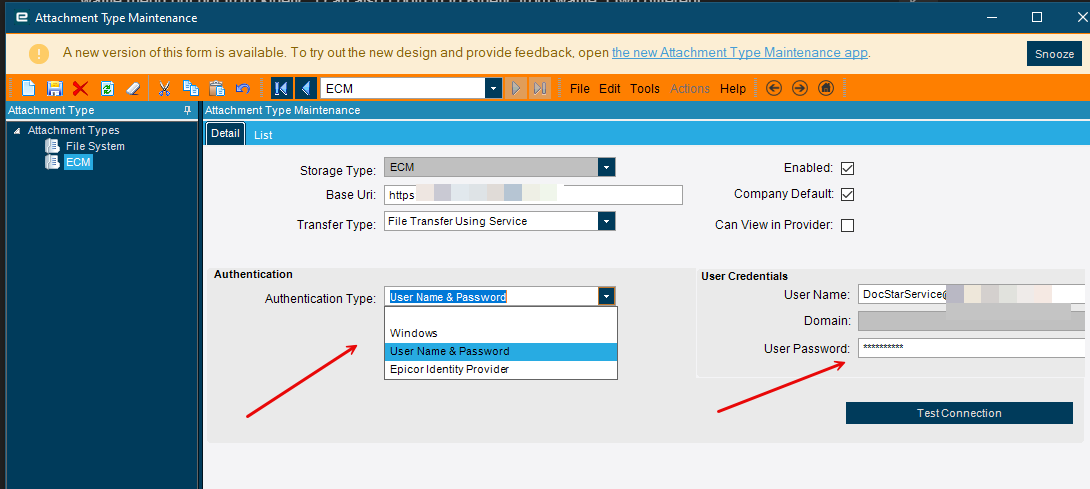
We use a standard account for our authentication into ECM from Kinetic. You can use both me thinks.
So just name and password and save credentials in the window when View in ECM is first selected, not AAD.
That I understand.
Thanks for the info and here is some of the integration screenshots. I can download and get the file. But when I click the on the View in ECM button on the attachment file in AP invoice. I get a prompt that ask for username and password When i type in my Azure username and password it say incorrect password. The account listed there is a local only account to ecm. When i use that account for my user account it lets me view it.
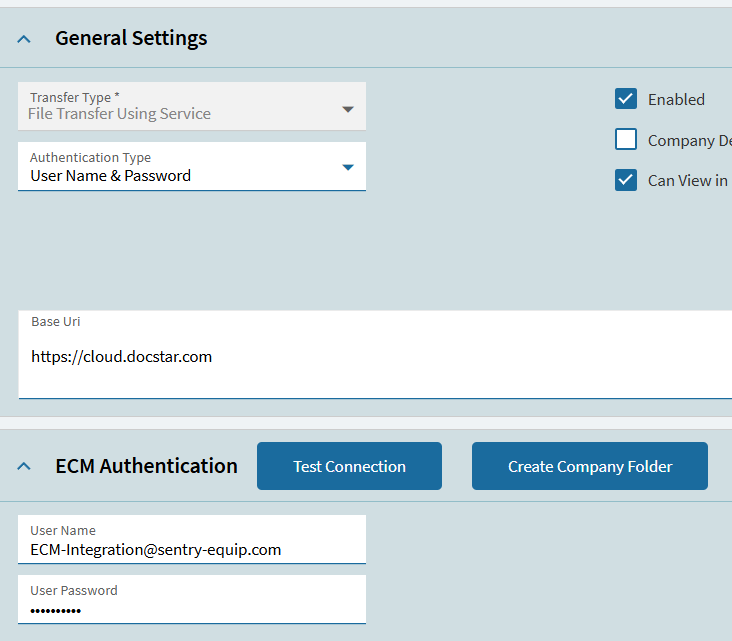
Yes, for View in ECM you need ECM account for each user, and Azure AD won’t work with just name and password, without MFA and all that stuff
I’m not cloud, but something tells me that the Base URI is incorrect. It should contain your Instance Name or something more than is shown - double check that with your direct connection URL to ECM.
Well yeah that makes sense when you click view in ECM you are going INTO ECM you have to auth there. But thorugh Azure it should be trival SSO just clic “login”