I understand REST help app has an issue with token renewal which will hopefully be fixed soon.
Is there any difference with token renewal within AppStudio and BAQDesigner shells? Not certain but besides RESTHelp, the token lifetime error only seems to happen with one of those apps open lately.
Does anyone know the token story for classic Function Maintenance? We’re 100% browser + Ipd w AAD. Launch Function Maentenance from Kinetic menu and classic comes up, obviously. After some period of time active or not Function Maintenance token expires and we must lose work and start all over.
Is there something we can do? Does launching from PowerTools help? Is this going to improve?
I’ll try that but I’m not happy about it. The only time we launch classic is to upgrade DMT. The web view pop-up on launch doesn’t remember my email/username for either IdP or M365 so I type it in twice. Not a great sso UX
As far as I can tell the only page that handles token refresh correctly at this point is kinetic /home.
REST Help, Function Maintenance, AppStudio, BAQ and BPM designers all cause token lifetime errors. At least on our auth setup: EpicIdentity IdP with AAD external provider to IdP.
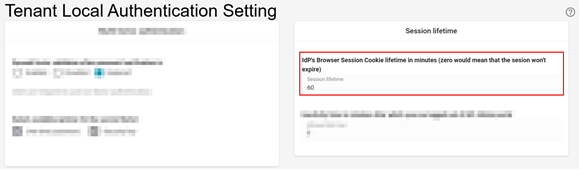
Found there is a Epicor IdP portal setting called IdP Browser Session lifetime which you can change from the default 60 minutes to a value that covers the desired maximum session duration (e.g., 480 minutes or 8 hours).
Alternatively, set to 0 to make the IdP browser session cookie valid until the user closes the browser window.
There should be no difference inside any studio ui - they’re all sitting inside the same application and dont handle token renewal, login, etc themselves.
Always possible there is some bug there though of course, but I don’t think we know of one if-so.