Thanks, I would like to address them both, with a little bias on AAD 
2 Likes
I am reading all of these posts and rooting for you!
2 Likes
yeah I just tried w SharePoint and this extension is not picking up /token POST 200 responses so won’t help with AAD-only. Maybe @mbayley can tweak it for that or I’ll do it some time I’m on this again. Just gonna let it run and look for IdP fail patterns for now. Thanks again for everyones input. I gave it a weak attempt for /token yesterday but didn’t test before now.
Bad Claude!
1 Like
I just wonder if there’s a precursor we can pick up on for AAD, an event that happens that’s just as indicative as the event you can’t pick up with the logging you have now.
AAD is a bit trickier to log as both @mbayley and @Olga have mentioned previously because the access token lifetime is set in AAD and is random variable (60-90min), AFAIR. So you have to wait a random long time to get results. With IdP in the middle, we can set access to short time and await results on a regular cadence. Maybe you could tweak your AppReg if separate from Live on your test env but IDK (?)
1 Like
But let me get this straight, when access lifetime runs out, I need to re-authenticate by going through the home screen again right?
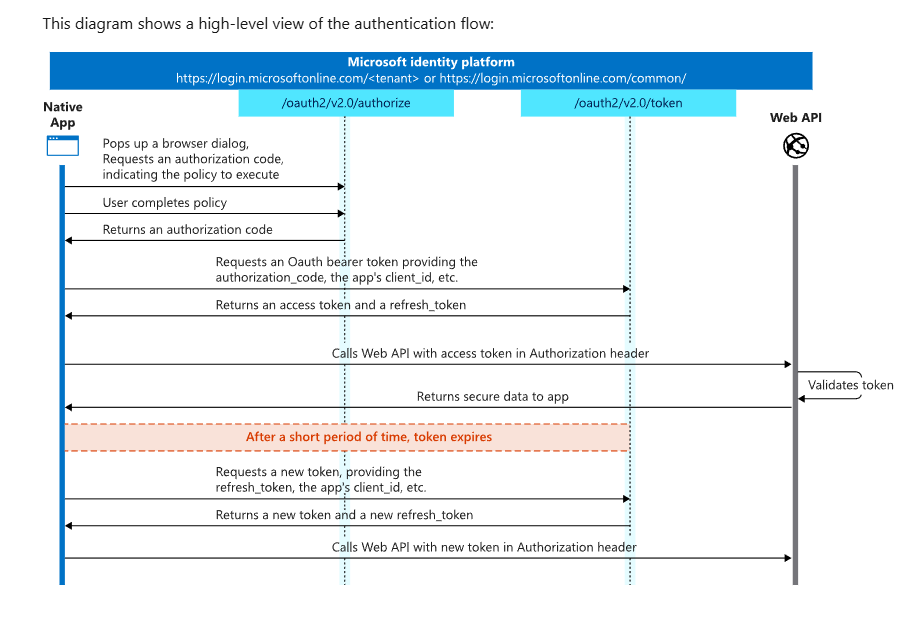
No. access token is short (minutes, 60-90min typically). Before that the app should silently refresh using refresh token (long, hours or days). Whats failing is the part labeled ‘After a short period of time,’ You should only need to reauth if this refresh fails otherwise never.
2 Likes
Thanks for breaking that down again. That’s where I was getting lost about what we should and shouldn’t be experiencing given how AAD tokens work.
2 Likes
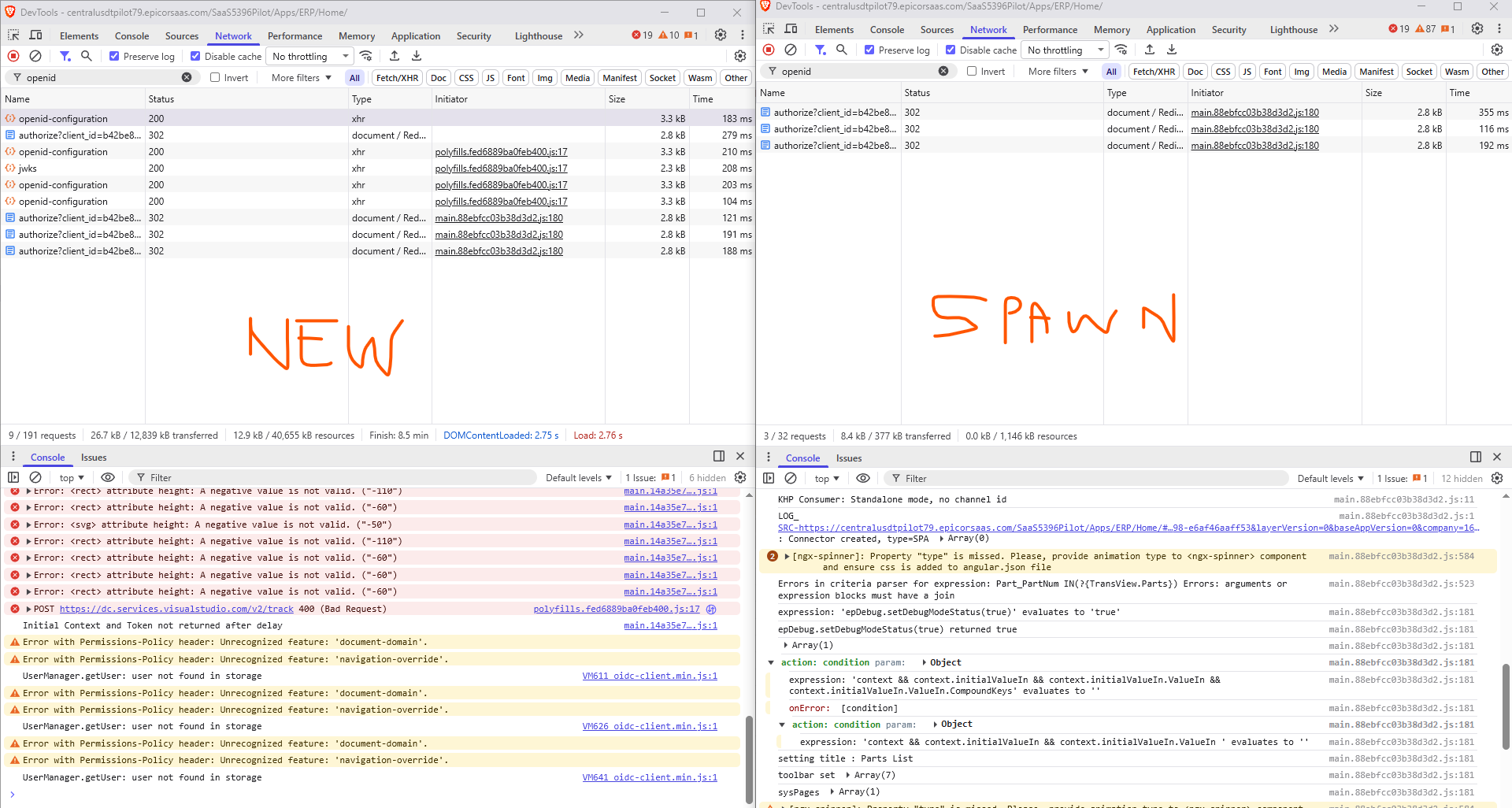
I see that your failing call precedes with call to /openid-configuration.
I wonder why.
Maybe you dashboard should show all calls to login.epicor.com too.
AFAIcantell, new tabs call /openid-configuration but spawned tabs don’t (?)
Meaning brand new tab > navigate home does so. yet duplicate-tab or open-in-new-tab or context-menu-spawn does not do so. 
3 Likes
well my question is how that list looks like when refresh fails
It would have to fail first. So far so good. Users report fewer fails today. Only ones I’m aware of are mine AppStudio and one after user walked away for a while. So signs say fails while active may’ve been mitigated by IdP session limit extension.
Not sure how/whether that translates to AAD-only folks. I’d be suprised if there is any session limit in plain AAD. So maybe that narrows our shared experience down to just the inactivity fails. (?)
Other edge cases I’ve noticed are sliders that load apps create two Iframes in same parent window. Makes sense. But it’s silent-refreshing twice. Doesn’t seem problematic though.
1 Like
I need to get our 2025.2 pilot going. I was told by support that this issue “will be resolved in the 2025.2 version”, and so far it doesn’t look like it is.
I’m looking closer at their linked problem PRB0255752 - Right now it is in “In-release planning” so I guess it’s not ready yet? I’m not going to test this again until this problem is actually marked as fixed.
4 Likes
Some KBs Epicor have created:
7 Likes
Saw this today with a user also, but works fine for me (does not expire for me).
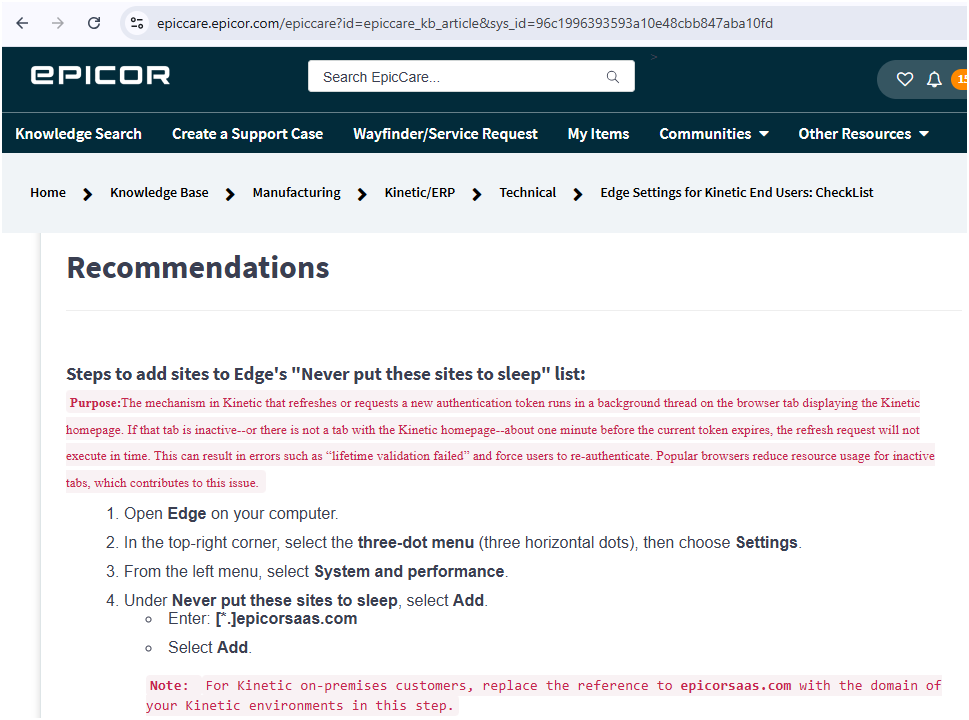
I think why it worked for me is that I did what this says, telling Edge which site(s) to “never put… to sleep.”
Because it may be more of the “other” than the tab thing itself:

But… would still be nice if this just wasn’t an issue at all…
3 Likes
I’m curious as to why the refresh authentication token has been designed to check if the tab is inactive for about one minute before the current token expires.

When historically, the License Timeout Minutes value for inactivity commonly 15 minutes or longer. Users were not logged out, only the licence was released.

1 Like
Poorly worded article. It’s not one minute of inactivity, it refreshes about one minute before expiration. So if your token is one hour, it refreshes at around 58-59 min. This is common practice to avoid expiring due to client server clock diffs, etc
No idea whether how token relates to license release.
2 Likes
This is correct - the article is a little confusing, but it’s saying that we auto-renew tokens about 1 minute before expiration.
The main remaining reasons we are seeing this kind of surprise expiration today are
-
Browsers configured to not allow third party cookies for *epicor.com, *epicorsaas.com - This causes renewal to fail as the cookie cannot be set against EntraID, IDP, etc. We’ve seen this implemented as an IT security policy at a few sites.
-
No tab is active with the web app in it at the time of renewal (this ~1m before expiration). Browsers like to pause execution of out of view tabs JavaScript to keep things performant. So you can set some browser settings to keep tab js alive to mitigate that.
9 Likes
I’m wondering if there are other browser settings outside of sleeping tabs that would pause execution of js
2 Likes
There are a few things that can get in the way of the JS running at the right time.
-
Some other javascript is running for a long time and so the renewal isn’t fired until it’s already expired (this is why its now 1m in advance)
-
JS has been killed becuase of a performance problem where it’s out of control and you tell it to stop execution.
-
You actually have it paused in devtools
Additionally some browsers will keep the js running on off-focus tabs for a while, but throttling it way down so it’s slower and timed tasks run less frequently (which of course is what you must use to schedule it to wake up and renew the token). There are more like internal dev flags that can control this in chrome.
3 Likes