For Part-A in timephase i think it will attach the quantity to the job and will then say you will be going into a minus on other jobs due to on hand stock
Thanks for reply. Yes, that’s one way to check shortage partwise.
My intention is to view job shortage job wise for all 10 jobs together and really want to see first 5 job does not show part A short but rest 05 job must show Part A short.
Hi Vipul, have you attempted your analysis using the Production Planner Workbench Process to load the production planner file with material demand data for the specified jobs and other parameters used. Then, analyze the data using the Production Planner Workbench?
I find myself today researching options for our production control office. I expected to find some system BAQs as examples to build a more tailored solution out of, but all that I really found is : Job Tracker and Production Planner Workbench and associated production planner data BAQs.
In Job Tracker, under Actions menu, Job, and then Material Status, you can inspect shortages but based only on the job that you have queried up in Job Tracker. We want to be able to query for an entire range of jobs at once. For example, job SN-1234 also has jobs like SN-1234-ABC, SN-1234-DEF, SN-1234-GHI.
If someone was willing to share some ideas or BAQs for this, that would be much appreciated.
Sounds like part allocation. All the jobs are short (not issued).
You can explore the use of part allocation, or assign po’s to the jobs.
We order to inventory requirements, not to the jobs. There is a big difference on how you handle that.
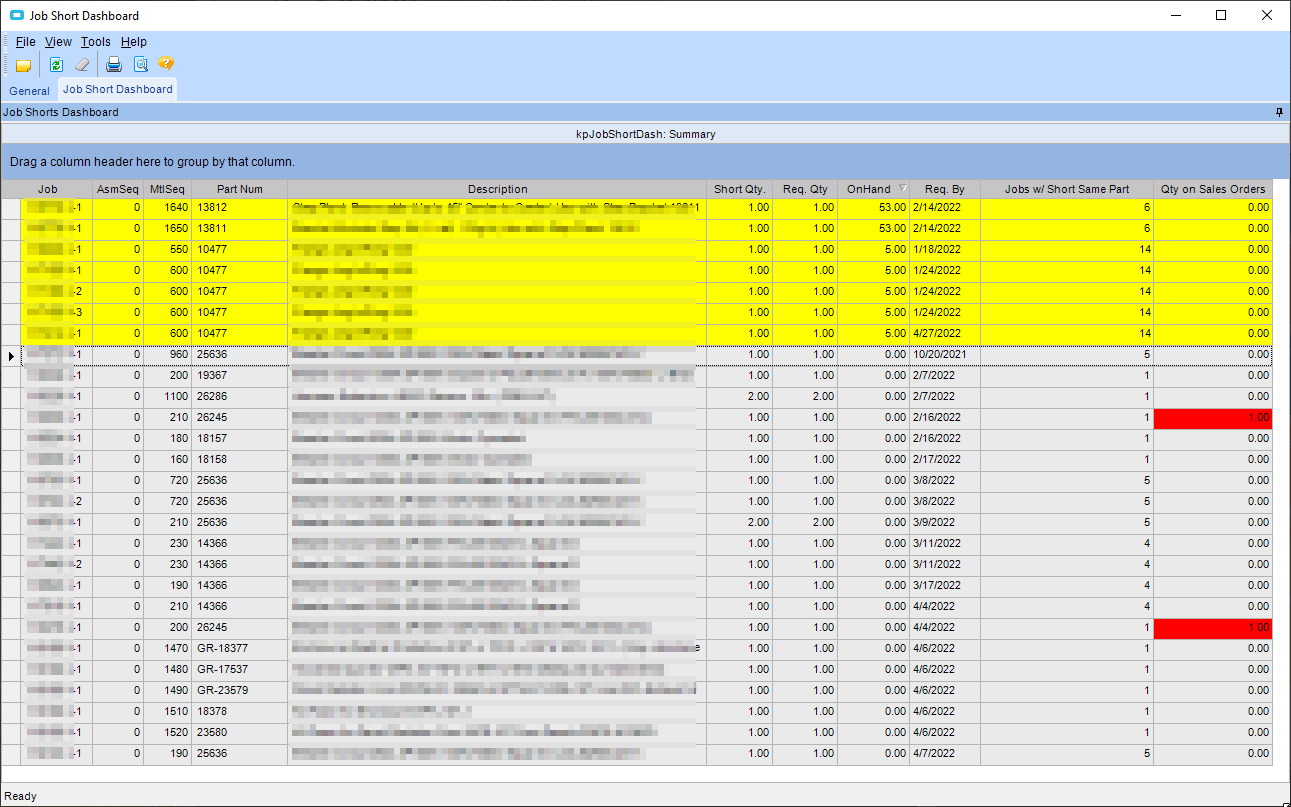
I have a dashboard/BAQ for us to list out all jobs that are released, and show the remaining parts that are not issued, as well as the on hand qty. Let me know if interested.
Our stockroom uses this, once we have qty on hand for any short parts they appear yellow and at the top of the list. The dashboard auto refreshes. I limited the display so jobs with 100% of parts not issued do not clutter it up. (just released jobs)