When we create a new PO, and choose a ShipTo by clicking “customer”, “site”, “supplier”, or “company”, the Country Dropdown does not update to the value stored in those locations. Is this a glitch/bug?
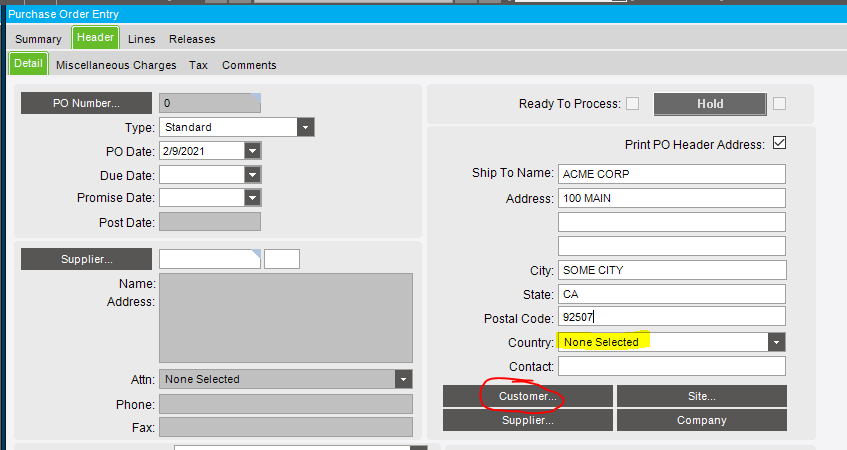
And what shows on the Customer entry screen for ACME CORP?
edit
particularly on the ShipTo list
USA, on everything I’m trying.
When I test by selecting a customer (“ZZZ999” my test customer), but not a specific ShipTo (the ShipTo ID is blank),
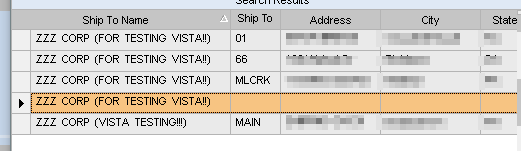
I get “None Selected”, even though the customer has a Country specified on the Deatil sheet of Customer entry.
If I chose one of the real ShipTo’s (as listed on the ShipTo tab in Customer entry), it populates with the country of that shipto.
I think this is because even if you have no ShipTo’s defined for the customer, one still exists with a blank ShipToNum. And when you search for the customer in the PO window, it is listing the ShipTo’s for that customer. Notice in the picture above the row with the blank ShipToNum has blanks for all the fields.
Odd. I’m choosing a Ship To with an ID and all of the fields filled out. That exact Ship To id also has a country assigned to it when I go to the customer maintenance.
Confused…
You could always enable tracing, and see what data is passing through at the various BO calls.
Funny thing. When I look in the DB, the country is there, but it doesn’t show on the dropdown.
I think I need to “refresh” the dropdown somehow… if that is possible.
Some dropdown’s have a “Refresh List” option when you right click them.
But before trying that, select the customer as normal, letting it show “None Selected” for the country. Then save the record. Did the UI control update?
If not, click the Refresh button on the toolbar. Did that do anything?
How about if you close the PO window, re-open it, and then reload the PO in question?
All of that is to determine if it is possibly being stored correctly in the DB, but the UI is a step or two behind.
Your help is greatly appreciated.
- I select a customer, save the record… no, the UI control doesn’t update
- I hit refresh… no, the UI doesn’t update
- I close the PO window, re-open, and reload this PO… YES, the UI is proper, showing the country
I was just doing some digging, and see that there is a method named ChangeCountry on the PO BO.
In that trace packet, there are a few lines for “country”
    <ShipCountry>USA</ShipCountry>
    <ShipCountryNum>0</ShipCountryNum>
    <ShipCountryNumDescription>USA</ShipCountryNumDescription>
and at the end of that packet, the parameter ShipCountryNum is being set to 0
<changedValue tableName="POHeader" rowState="Modified" rowNum="0" colName="ShipCountryNum"><![CDATA[0]]></changedValue>
All of the above is what the trace showed, and the UI ended up showing:
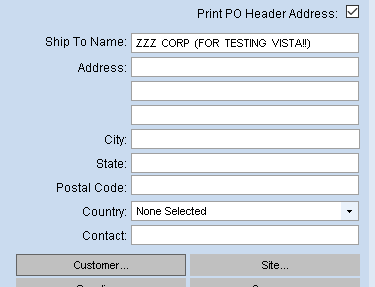
The fact that it is being set to 0 is what is causing the “None Selected”
Helpful analysis, thank you. Do you know of any way to make this dropdown display as expected?