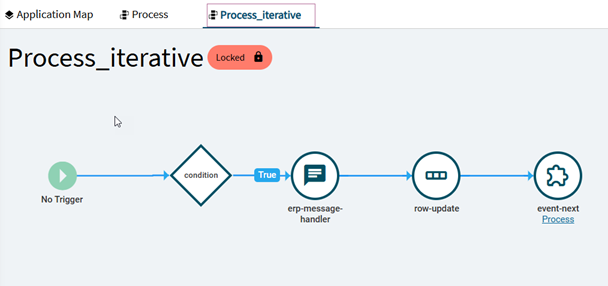
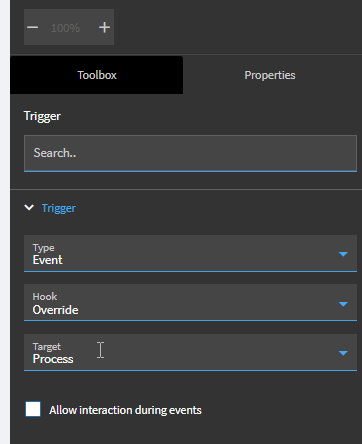
If you’re copying an event in App Studio to add the layer information, look at the start point of the event. If it says “No Trigger” like above, you need to set an override. Click on the starting point and in Properties on the right set the following:
Type: Event
Hook: Override
Target: The Stock Event Name (in the case below it was "Process)
Just picking your brain here. Have you seen instances where it will use the base even after selecting override? That’s a problem I have been running into.
I have not seen this particular issue. Is it affecting all users or just certain ones? I’ve seen weird stuff personalization and browser cache so if a certain user is affect have they try a Incognito window or other browser.
My personal issue with this is: doesn’t it defeat the purpose of layers?
We’re about nine months into Epicor, so in theory we should have fewer customizations than most companies at this point. Still, it feels like we’re uncovering new issues every week.
Based on Support’s recommendation, I went ahead and submitted an Idea.
When you Customize 1 Menu ID, you apply sometimes the same Customization to all Menu IDs (if you are a larger corporation) while smaller companies tend to sometimes have different Customizations on different Layers.
As you know a Menu can exist under Order Management, Production Management, Finance Management and depending on the Users Security in classic you could specify the Program Name it would find the one that the user has available, so you avoid Menu IDs.
But if you specify JC1234, for example that may reside under Order Management, so the Finance user would get an error, wouldn’t they, because you may have Security Maintenance on the folders, not necessarily the Menu IDs.
I am not 100% sure as yet but from what i saw the URL link that i had saved in my browser included the Company and Site (we are Multi Site). I have removed that from the link and at the moment i am not seeing the error.