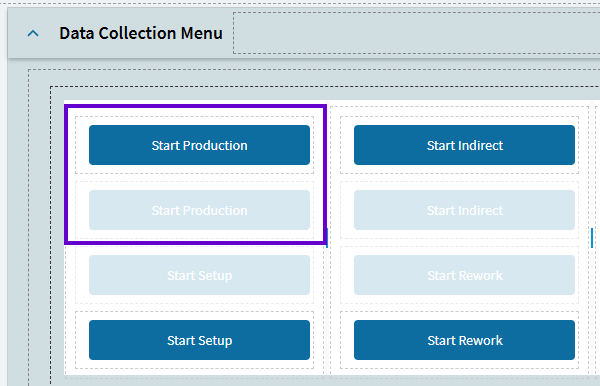
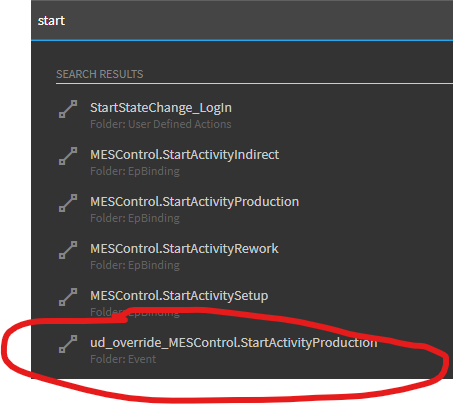
Since you’re reverse engineering… just tossing out another possible scenario (because it is what WE did). We didn’t touch the base controls or events… we just hid the base buttons and created our own button and event.
So, notice, if I unhide in my MES layer, I’ll see the base Start Production button is dimmed. My custom button is the one tied to my custom Start Production event with my layer applied.
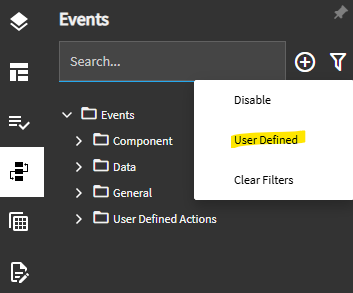
Then, in application studio, when you search in events, you should be able to apply the User Defined filter… this is a huge help in finding YOUR events vs. system events.
I’ve been scratching my head and working with support over this since the update. Am I missing something, or does this defeat the purpose of layers? We have updates to our Process Menu: Print Inventory Tags (ID PR000325, Program Erp.UIRpt.MtlTags.dll), am I supposed to find every place the app can be launched from (End Production, Receipt Entry, Inspection Processing, Report Quantity, Material Request Queue, DMR, RMA, and probably a million more.), and then update the layer in the app-open?
Previously, all we had done was copy PR000325 to our current company and apply the layer.
Hi Corey,
Did support share this with you? KB0141698 It helped me wrap my head around what was going on and get our layers corrected. (I reworded some of it below)
The issue I have run into is that the Base Layer is calling App-Open with an App ID alone (no Layer defined), but all of my menu items have a layer defined (because I want to use my custom layer!) This results in situation 2b, and there’s no way to fix it because we can’t modify the Base layer’s App-Open event properties. And as you pointed out, how could we possibly find all the instances where this is called and fix them, even if we had the ability to?
The following menu security logic is followed when launching an app via the App-Open event widget:
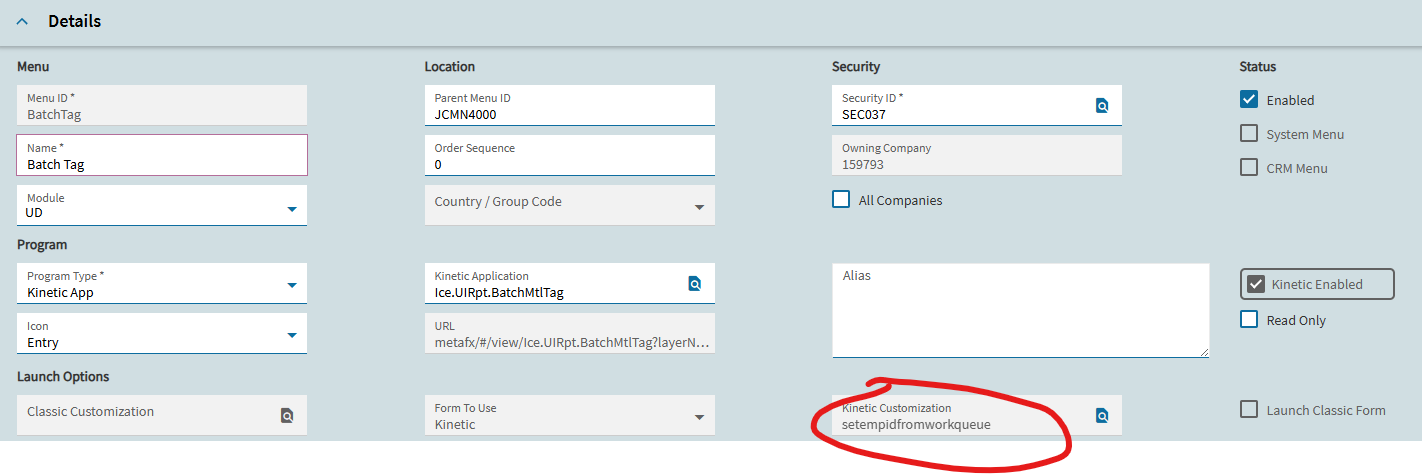
When the “View” Property is set to a “Menu ID” and the “Layer” field is set to a Kinetic Customization Layer, Kinetic will now verify if the Menu ID Exists. If the user has Menu Security access to that Menu ID, and if the Kinetic Customization Layer is deployed to that Menu ID, adding the “Layer” field in the App-Open widget is no longer needed. The layer is defined in the Menu Item record.
When the “View” Property is set to a “Kinetic App/Program” ID:
a. If app-open is called with the ‘View’ property set to the App ID alone (Layer Field blank) and there is an accessible Menu Item with App alone (no custom layer), the app should launch successfully.
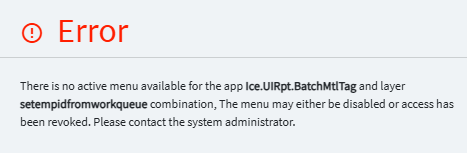
b. If app-open is called with the ‘View’ property set to the App ID alone (Layer field blank), but all accessible Menu Items have a layer defined, the User will see the error message.
c. If app-open is called with the ‘View’ property set to the App ID and a ‘Layer’ property is defined, and there is an existing Menu Item with the same App and Layer combination to which user has access, the app should launch successfully.
d. If app-open is called with the ‘View’ property set to the App ID and a ‘Layer’ property is defined, but there is no existing Menu Item with the same App and Layer combination, the User will see the error message.
Support had not shared this with us, thank you! It definitely looks useful and seems to explain our situation. I’m going to go over it today (and then probably have to read it again on Monday haha)
I have been able to resolve most of these instances in our system, but one is still giving us issues.
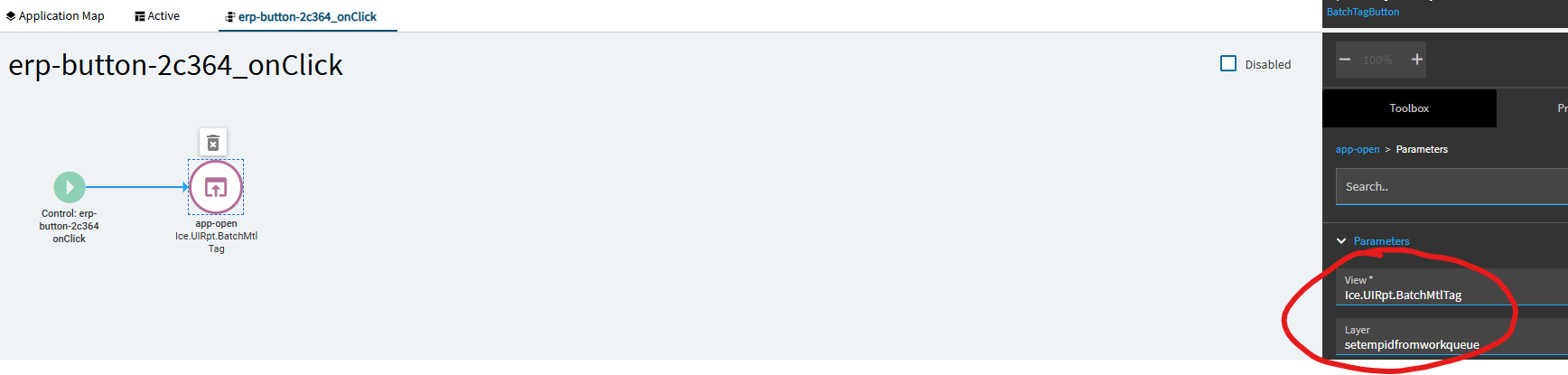
I have a custom button in Work Queue which mass prints tags for selected jobs in the queue.
I have the layer defined in the OnClick
Your understanding and analysis of the issue are correct. This behavior is occurring due to a recent security enhancement. The recommended solution is to customize the PO Entry UI so that it opens the MENUID associated with the layer, rather than using the Kinetic app name.
Extrapolating from that answer, it is necessary to customize the ‘App-Open’ event in any app that is attempting to open another App with a custom layer. That could lead to creating a LOT of custom layers that were previously not necessary.
Not sure if this issue is related and as I am a novice in App studio I am not sure how to fix it. This morning, we deployed a customisation to Job Entry which works fine however Job Manger is now broken. If I go to Job Manager and click a Job the slideout gives the error
Business Object Exception
Description: Access not allowed. -
Program: Ice.Services.BO.Menu.dll
Method: CheckMenuSecurityForUser
Table: undefined
Field: undefined
How do I fix?
Not positive about this, but here’s what it sounds like to me:
The Job Manager slide-out uses JobEntry with no customization. When your company deployed the customization to Job Entry, that meant that there was no longer a menu item with Job Entry AND NO CUSTOMIZATION on the menu. So now when you try to open that slide-out, it looks for a menu item for Job Entry & No Customization, can’t find one, and throws an error.
Note: Requiring a slide-out to be on menu with access was never a thing until 2025.2
I think the solution is probably to add a menu item to the menu somewhere for Job Entry and no customization. That will let the slide-out find the menu it wants.
The problem with this is that it will come up on menu searches. What I would do to avoid someone opening the wrong menu item for Job Entry: Name it something like “zz Jb Entry”.
I know that looks stupid, but mis-spelling “job” will keep it from showing in results when someone searches for it.
As long as it’s in here, with a Security ID accessible to the user, the slideout should function. It should not pop up in the menu search.
I’ve had to do this for the same reason, I have customized menu items in Epicor that I’ve purposefully removed the base for, but there are some scenarios like a slideout call from another app that need the base.
This is the solution I went for thank you, Job Manager now works and the cloned menu doesn’t show in search, thanks all for the replies much appreciated
In 2024.1 most of my slide outs were calling Menu IDs with a layer defined, both in the menu id and in the call for the slide out. I ended up having to remove the call from the slide out ANDF copy the Menu IDs tot he current company for all of my companies, it seems the All Company flag is not honored in 2025.2.
If I go through the menu for them normally, they all work but calling them this way did not seem to translate.
We’re encountering new errors almost daily that require changes such as turning off our layer on a menu or making adjustments elsewhere. We haven’t been able to get some of the workarounds we’ve seen circulating to work in our environment. (Or we are implementing the fix incorrectly which very well could be!! But why do I need to implement a fix?)
For simpler changes, like moving a few fields, we disable the layer on the menu, take note of it to turn back on later. For others, we try modifying the app-opens or creating multiple menu options. Even when a workaround seems viable, we’re unable to reliably identify every app-open tied to a given process menu that we’ve modified, which makes long-term stability difficult to maintain.
We’ve been slowly working with support but it seems that breaking the purpose of layers is “working as intended”