Hi Doyle,
Are you using Service Connect 9.05.702 with Epicor 0.05.702a?
The number of threads on the first screen shot (for the asynchronous pool System) controls how many threads Service Connect (SC) is allowed to use for independent asynchronous processing of messages (concurrency of synchronous calls to SC is not restricted).
SC allows to call Epicor using .NET or Web/WCF references.
During the execution of the workflow, when Epicor .NET reference is invoked, SC needs to supply a logged-on Epicor session for Epicor to accept the call.
The session is opened with the first invocation of Epicor .NET reference by the workflow, and is released when the workflow completes, unless session caching is enabled.
Session caching allows to save on time needed to open the session, if SC is under heavy load, keeping the session open between workflow executions for some time (session is only reused if appServer/user/password/company/… are the same).
The behavior you describe (if workflows use .NET references) may be caused by the session cache mis-behaving, and not releasing/not reusing the Epicor session in time.
To see whether that is the case, you can use SC administration console:
-
Expand Connectivity
-
Select .NET References
-
Right-click .NET References and select Properties
-
In .NET References Properties dialog, un-check Cache Epicor sessions
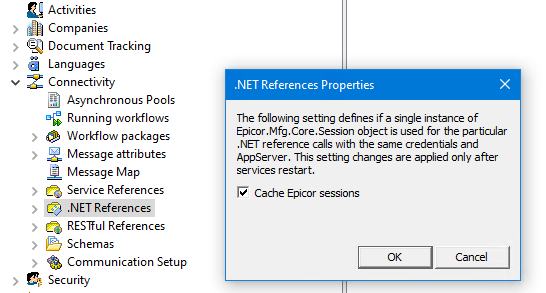
-
Restart SC services
Note: restarting SC services breaks the processing of the messages being processed at that time, so, you need to pick up such time when messages are not being processed. If the integration used input channels to pick up incoming messages, then disabling input channels (you will need to re-enable them after services are restarted) and checking with Document Tracking / Events\All Logs in SC Administration Console would allow ensuring that no messages are under processing at a particular time).