We have a Part which has somehow gotten an Extended cost of -0.00002 and we cannot correct because anyy timie you access the record an error pops up…at times locking Epicor up completely. Any ideas how to fix?
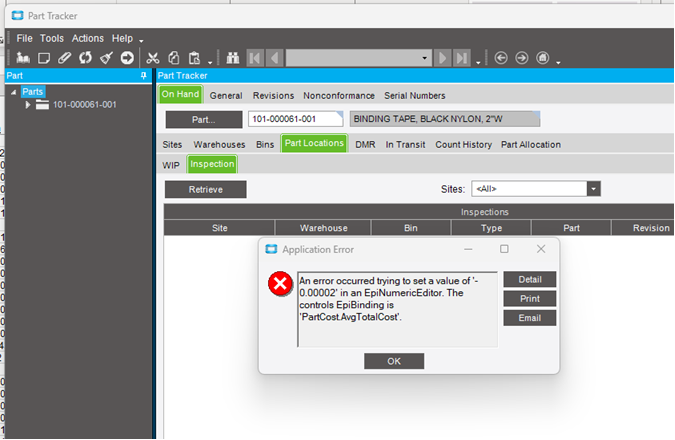
We have a Part which has somehow gotten an Extended cost of -0.00002 and we cannot correct because anyy timie you access the record an error pops up…at times locking Epicor up completely. Any ideas how to fix?
Do you have access to the DMT tool? You could DMT a corrected cost into the relevant record which should clear things up. Alternatively, you could create a UBAQ and update the value through that.
Ironically I am just now learning DMT, so that might be a good training operation.
Thanks for the feedback!
Agreed! Let me know how it goes. Once you get a handle of the tool it’s very powerful. But with great power… well, you get the picture. 

AvgTotCost is a calculated field, so no to DMT. What do the average fields look like in part tracker? Having a negative is ok, See below.
Field help
The sum of AvgBurdenCost, AvgLaborCost, AvgMaterialCost, AvgMtlBurCost and AvgSubContCost
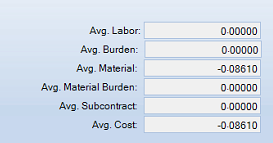
have you tried to manually update the cost first using part cost (cost adjustment), it would be the same as using DMT.
if you cannot manually update with the cost adjustment screen, then you may need to contact support to get this fixed. Not sure how you got stuck in that hole, but it should theoretically not be possible.
Makes sense, but would it be feasible to use DMT to correct the offending average value that is used in the calculation of AvgTotCost? This was more so what I was getting at, I should have stated that explicitly, granted.
I would first go for the cost adjustment in the client and make all of the averages zero which is what DMT would try without the display issue.
Where there is a will, there is a way!
Tried it…any time I enter the part number I immediately get an error screen about the Negative value. I don’t think it is because it is negative but instead because it is so small it is outside the normal range of values.
Can you look in ssms at the Avg fields in PartCost and get the actual number of decimal places on this part?
I have a ubaq we use for a “0” quantity that has places beyond the 5 you can see in quantity adjustments. I should be able to adapt it to do zero PartCost if the places are the issue.
-.00002
which of these of these had that value?
AvgBurdenCost, AvgLaborCost, AvgMaterialCost, AvgMtlBurCost and AvgSubContCost
Also the FIFOAvg fields
PartCost.AvgTotalCost
That field is not in the db.
run this query in ssms.
select top 10 *
from erp.partcost
where partnum = 'badpart'
show us these fields.

Sorry…don’t know how to do that …probably don’t have access to do it.
Ok, I think it is time to ask support for a datafix.