I am trying to convert our Bartender labels to SSRS. Has anyone done this successfully? I’ve created a BAQ and BAQ report and can preview the classic form and Kinetic Application from the BAQ report action menu. I input the job number to retrieve the part number and barcode. The Print Preview view looks ok but when I print to the label printer (Toshiba BA410), however, the quality is terrible and I’m struggling to get the label spacing correct. Any advice?
We have an old version of Bartender and have quite a few intermittent issues with it. I figured using SSRS would do away with the cost of our Bartender licences too.
Issues such as labels not printing? What are you trying to use SSRS to print? Shipping Labels? Job Labels?
If your labels are not very complex, such as you only need 1 label per job and very basic information it might be easier to switch but if it has to use a bunch of calculations for customer shipments or whatever you need it for, I might suggest upgrading your Bartender. At least from personal experience it offers a lot of versatility but can be quite annoying to setup
All of our labels are SSRS driven, primarily to Zebra printers (not Toshiba). Could be a printer setting/driver issue. Perhaps the Code39 font isn’t installed or something.
“Spacing” I’m assuming would just be an SSRS design trial & error to get the layout correct.
“Poor Quality” could be a font issue or a resolution issue?
They are mostly barcode labels for parts and products. One recurrent issue is that every few months 1 or more labels will stop fitting on their label or “slip”. We are on version 10.1 of Bartender with 5 licences (which we exceed every time someone prints to a printer using a different printer name). Our labels are pretty basic so we don’t really want to upgrade to the latest version which would require a maintenance and support contract.
We got rid of Bartender about 6 months ago and converted all of our Bartender reports to SSRS. The biggest key is to make sure that the barcode font you are using is installed on both the client and the server. Some fonts don’t seem to work as well but we have used Data Works Bar 39 as our barcode font and have had very little issues. It can be a little bit of a pain to get everything lined up through trial and error, but once done, it’s done.
We dumped Bartender as we were tired of them locking up our label printers and having to wait for them to release them due to someone sharing a printer that Bartender was using or printing on the wrong printer or doing one of the hundred things that cause Bartender to lock out printers. We dealt with this for a while until one time it took them a week to unlock, so at that point we decided we’d rather fight through getting it set up rather than being locked out without our IT team being able to fix it and having to wait on outside services to fix it.
There were also a couple replies to my post on this subject which may be of use to you. One was about Zebra printers and another was if you needed to create other things than just barcodes. That post is here:
Can you explain when/why this happens? Is it just the barcode which is having issues or text as well? Is this due to an extra long part number?
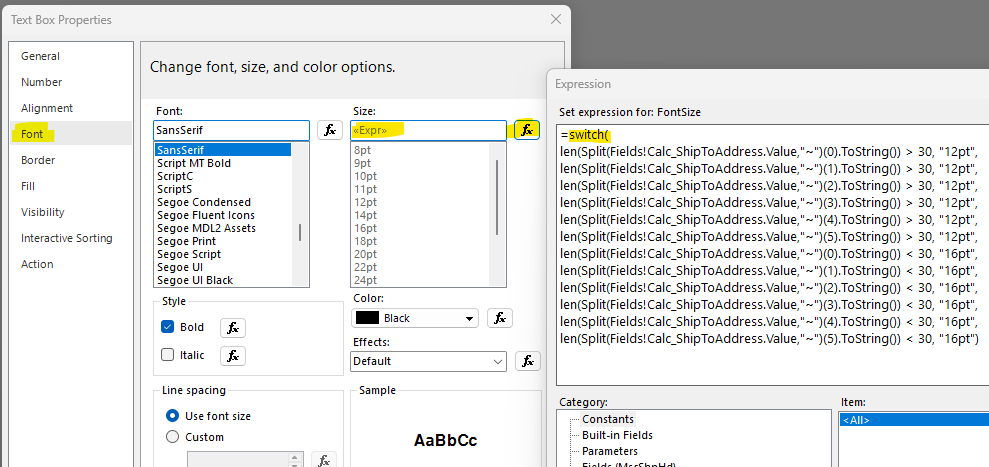
I’m just asking because we run into issues at times, for example, printing labels for customers who have absurdly long names and/or addresses (Chinese companies and addresses are big offenders here). Not a barcode issue per se, but I got around this by setting an expression on the texbox’s font size… basically, if it is over a certain character length, decrease font size.
Again, not sure if this is applicable for you or not. But it worked for us.
If it is a barcode not fitting, I would assume decreasing the font size dynamically may at least get it onto the label… whether it is still readable or not at a reduced size may be a different issue.
Todd,
Did you have any quality issues printing landscape vs portrait? I have a ZT411 that when printing on a 4 x 6" label in portrait mode prints a nice crisp clear barcode but in landscape the barcode is fuzzy and jagged. This is using the Epicor Mtl tag report. Any suggestions for landscape mode?
My labels are printed in landscape mode without any issues. We do not use Zebra printers though, as we use Intermec and Brother printers for our labels. I know someone had posted specifically about Zebra printers in the post I had made, but I honestly didn’t look too far into it since we don’t use them.