There are a lot of great features in the new BAQ Designer but I’m still finding myself reverting to Classic in certain situations, especially when analyzing data. Below is a list of issues I’ve experienced.
I am running Kinetic 2024.2.19 aka 11.3.200.19. Maybe some of these issues are fixed in a later release? I could submit to Support but I’m guessing that many will have to be submitted as ideas, and some are not easily recreated (and I’m willing to live with them anyway).
When analyzing data in Run Query, I have to go to Classic for a # of reasons:
Show Summaries is n/a
Group By doesn’t give an item count like it did in Classic. Classic will also show the sums/counts/etc. for each group when using Show Summaries
Terrible performance: when using group by and expanding/collapsing, the browser chokes and dies, even with < 2,000 records
The % display format is ignored in Run Query. Need to multiply by 100
Paste Insert is n/a for a specified constant list. Paste Update is flukey. It says “All records have been processed successfully” after doing nothing or just inserting one item. I have to add the exact # of blank items first to make it work
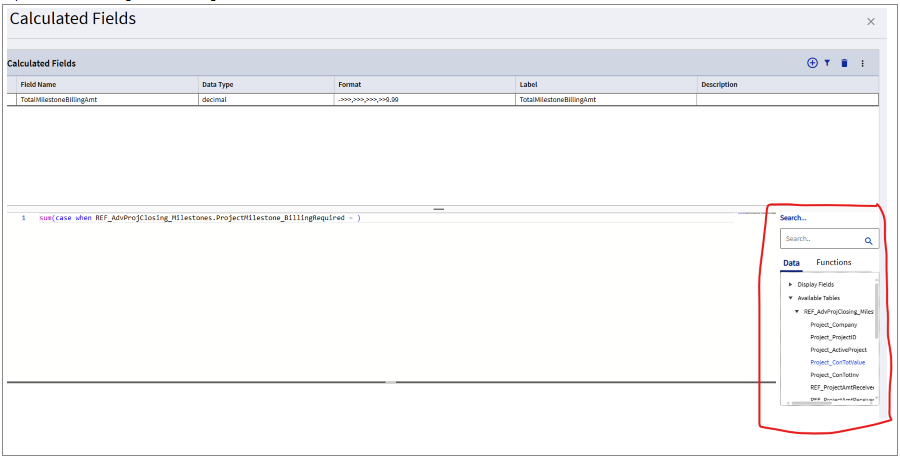
Calculated Fields: Tiny box way down on the bottom right for Data and Functions, can’t expand it, need to scroll up/down and left/right. Frustrating to work with
Switching between BAQs: when I go back to the BAQ Designer landing page and select a different BAQ, sometimes it loads the previous one again instead of the one selected
In Display Fields, select multiple fields to move between Available and Display, sometimes it changes the selected fields and moves the wrong ones
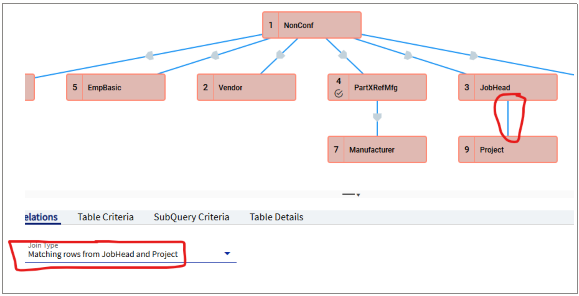
Need to be careful when moving tables, adding relations, etc. To avoid random relations being added automatically, I have to click a table and make sure it’s selected before dragging it
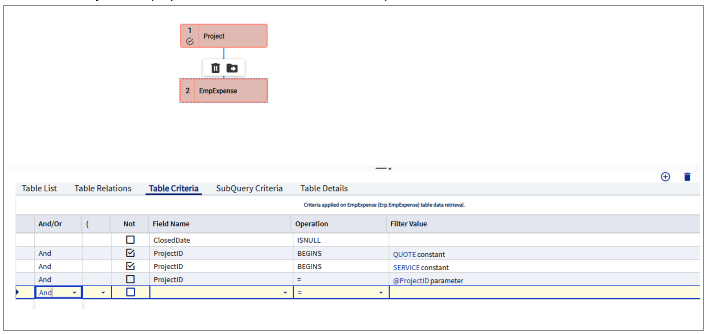
Sometimes the selected table is not as indicated. In the example below, EmpExpense is selected but the Table Criteria for Project is displayed. Have to close the BAQ and re-open it to resolve
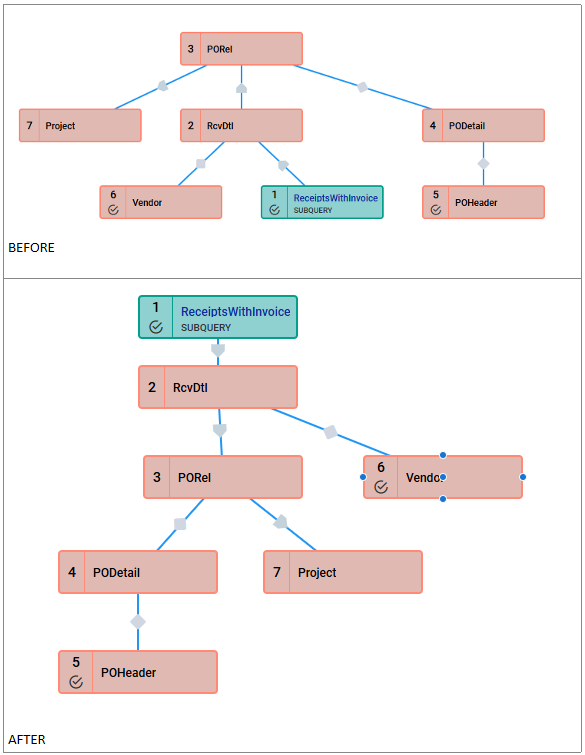
When first opening in the browser, tables are rearranged to fit better on the canvas graphically, disregarding the table order. In this example it looks like we’re starting with PORel but the actual first table (subquery) is at the bottom. Very confusing! I have also had my tables rearranged automatically while I was working on a BAQ.
True/false values are sometimes not displayed at all
When the list of columns to select from is long, and you scroll down and try to click on one to select it, the list jumps back to the top without selecting the one you clicked on. Have to keep scrolling down and clicking to try to get it to select.
You can’t remove calculated fields using the < arrow anymore, have to launch the calculated fields editor and delete it there
A lot of times when you click on a table it doesn’t go to the criteria panel as expected. Have to click on another table and click back multiple times to get it to focus on the right table.
Same issue with joins. You want to edit the relationship but when you click on it, something else is selected
When trying to add relationships to the join, a lot of times nothing shows up in the drop downs. Have to expand the drop down over and over again before it will populate
After working on a BAQ for some time, sometimes it will just stop saving. Meaning, I click save but there is no blue bar. And if I go away from the screen and come back, my work is lost. I now have a specific kind of OCD called Kinetic OCD where I click save after. every. single. change.
Sometimes after leaving a baq and returning later, it has incorrectly changed the order of the criteria. So for example, I will have a criteria that says x and y. It will move it to say and y, x. And then it won’t execute anymore. This has happened multiple times, not a fluke.
Most of these issues I have given up trying to report to support. If Epicor developers would simply use their own product, they would run into these issues nonstop, and perhaps feel motivated to fix some of them.
I also think its important to note that most people I talk to refuse to use the kinetic baq designer at all. I feel its been very easy for support and development to dismiss issues that are reported because there are so very few of us even using it at all. Support flat out will not submit any issue to development that they can’t personally reproduce. Since many of the issues are down to the overall flakiness of kinetic in general, that means development doesn’t even hear about many of these issues, which means there is no effort to stabilize the app, which means the majority of the user base is going to be extremely unhappy when they wake up to find classic baq designer is gone. I strongly believe baq designer MUST be included in power tools, at least for 2026.1. This is core functionality that is simply not ready for prime time.
I agree with every single one of these issues. I have experienced all of them at some point. They cause me to either give up, or go back to classic.
Having said that, I do force myself to use kinetic for as much as possible now. The main things I go back to classic for are: functions, UBAQs, and to relieve the sense of existential dread that the impending Kinetic switch is causing.
I’m used to the classic baq designer (used it for the last 5-6 years) and i’ve been using the Kinetic one for a couple of months.
I’ll not make friend here but, to be honest, it’s not that bad. For me, I’ve saved more time with the new features than wasted with the bug and glitches. The ability to test subqueries individually is such a big deal, especially in baqs with multiple union subqueries. The grid filters and “data” search box are great to find fields (way too small for sure). And the ability to copy a subquery from another baq… thank god.
Don’t get me wrong, I’m not saying that there is no place for improvement ; all those bugs and glitches are valid and I’m experiencing them everyday. I’m just saying that, with the new designer, I’m at least as productive if not more than with the classic designer.
I still MOSTLY use Classic BAQ designer because of all the issues. Plus Classic Function, BPM, Menu Maintenance, etc as the Kinetic versions all have annoying issues.
And that’s exactly why I continue to use it, even with all the issues. The query references alone are worth it, plus all the other fantastic features you mentioned. But Epicor has this habit of saying, bugs, what bugs? Did you report them to support? (see the thread Trudy split this from). And so I am listing all the issues Epicor wants to pretend do not exist.
Ooooh, didn’t know about that. That could be handy.
I’m trying to use Kinetic BAQ Designer more, but - aside from bugs - like the rest of Kinetic its a UX downgrade and inefficient use of screen real estate.
Most of these are framework improvements, not UI. And to be fair, if they’d have been working on the classic screens over the last 5 year, I’d venture to say they’d have some new improved functionality there as well.
When the value in the baq is null, the grid will show a zero. For example, I have created a left join. The fields pulled from the second table should display a null where they do not exist, yet they do not.
Apart from the carpal tunnel the Kinetic designer is going to give me from all the excessive clicking, my biggest issue is some BAQs analyze/ execute fine in the client but fail to run in the Kinetic designer.
No for numeric fields. It has wasted a lot of my time troubleshooting joins I thought were wrong. Turns out they were fine, the designer was lying to me telling me there was a record there when there was not.


 Was not very readable