So you want to know the last unit cost, meaning the last invoice line that was issued for a part? And in this query do you expect to receive back all of your parts or just a specific part you supply?
Firstly, we’re saying cost. If you want AP invoices, I’d start with APInvHed. InvcHead belongs to AR, which is price not cost. Just checking that I’m following.
MAX will give the highest DocUnitPrice and not necessarily the last price.
This is not valid SQL syntax. Date literal values should be surrounded by single quotes. Also, the filter column needs to be specified in both sections of the OR clause, like this:
InvcDtl1.ShipDate >= '1/1/2020' or InvcDtl1.ShipDate <= '12/31/2020'
It can also be written this way, though I don’t know the BAQ designer supports this:
InvcDtl1.ShipDate between '1/1/2020' and '12/31/2020'
I prefer to write date literals in the yyyy-MM-dd format, to avoid any locale-specific issues:
InvcDtl1.ShipDate between '2020-01-01' and '2020-12-31'
I think having Max on that UnitPrice is a part of the whole problem. Assuming this is a BAQ and not direct SQL, if we are looking for the last received cost and also restricting it to a certain date range I would have that date range as a criteria (filter) on the APInv(Presumably DTL) table in a SubQuery where we group on Company & PartNum and then have a calculated field for MAX(Date). Then in the top level query I would have the APInv(Presumably DTL) table again and have it show Company, Part & Unit Price in the Select/Display list. Link the sub-query to the Top Level APInv table and use the Max(Date) field from the sub-query to compare against the top level table (I would probably do this in the Join but it can be done with Sub-Query Criteria as well IIRC).
I don’t know the exact fields off the top of my head but that is how I would do this in a BAQ.
As long as you don’t want to know anything else about that record, just the date but not the invoice number, etc., then MAX within a date range will work. But the moment you want any other field on that record, then you will want to use a Windowing Function.
But if the goal is to get the last value, Max on the value won’t give you that (unless it is the date). I mean, if you do a Max on the date AND a Max on the price then that would work but otherwise, what was written will give you the highest cost paid during the date range provided.
Bottom line and I should have been more clear at the outset is this.
I’ve been asked to list the dates that unit costs changed throughout the years for all part numbers. Management is concerned that some part numbers haven’t had a unit cost update in many years. In order to build this BAQ I’ve limited my search to a specific part number and date range so that I can tell if my BAQ is working at all, that is why I started down the line with the question I started with. Also have assumed that I will need to have a user specify the customer rather than listing all customers and their part numbers due to the enormity of data that could be returned.
So, I want to get a list of part numbers, their unit cost and the date that the unit cost changed. Unfortunately this company did not use the costing tables (I’m assuming these tables were what I would have used if they had been used appropriately).
So what I really don’t know how to say in the BAQ is this:
Look at a part number & unit cost
When the unit cost changes return the part number, unit cost and date it changed
Only Active parts and we don’t use the “Standard”, “Average”…pricing that is why I feel I cannot using the “Cost” tables. The Unit Cost has to come from the Invoice.
You mention looking at it based on Customer, is the ultimate intention to look at what your Unit Cost is vs Selling Price and then track how the Unit Cost as changed in comparison to the Selling Price?
No comparing Unit Cost vs Selling Price. Management just want’s to know when the Unit Cost has changed to make sure that the Unit Cost is being reviewed and increased (or decreased) as is fit.
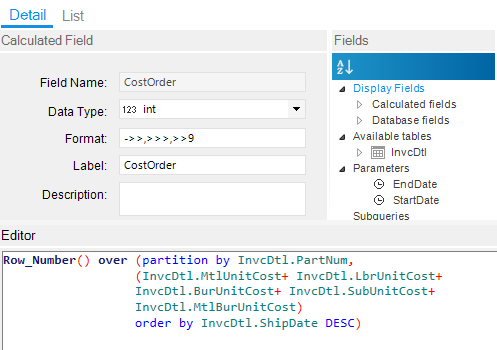
What this says is for every part/cost combination write a row_number. I ordered it by ShipDate Descending. So, for the latest date for the part/cost combination, it gets a 1, the next SAME part/cost combination will get a 2, the next SAME part/cost combination with get a 3, and so on. When the part/cost combination changes, it will go back to 1 and start over.
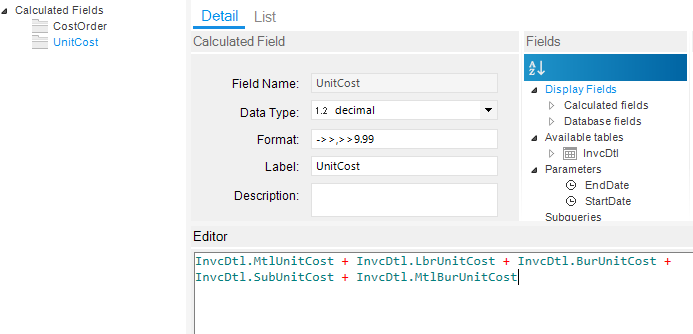
For convenience, I created a unit cost calculated field too:
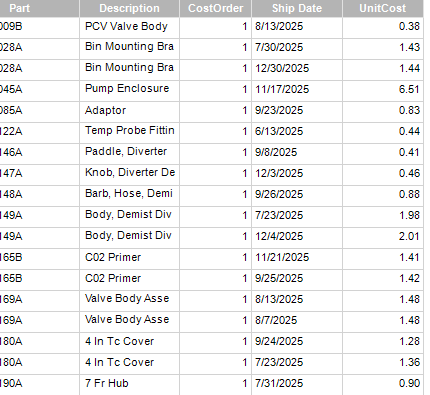
This should give you each time the part changed cost. This is rounded to 2 decimals, so there may be some duplicates due to rounding. However, you’re interested in the most recent change, but you should be able to get there from here.