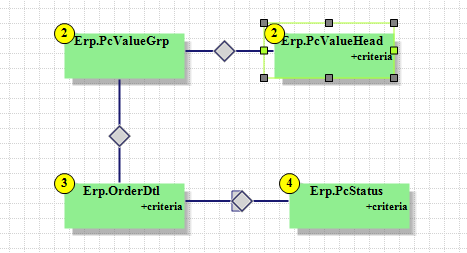
I got you buddy. We had the same issue. We do it using a UBAQ/dashboard (so it forces a user to at least review the order # / basic info before arbitrarily updating it). But you could do it with a BPM if you were so inclined. The key is to update the PcValueHead.ConfigVersion so it matches the PcStatus.ConfigVersion for the given configurator. Our BAQ is structured like this:
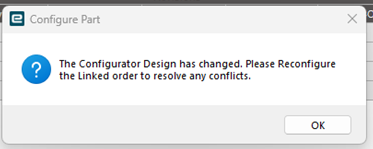
Will this just stop the warning but not fix this issue? I probably should have attached this before. We get this error message when trying to create a job and someone has to go to an order and literally just open it and re-save it.
The “verify existing configurators” menu option will attempt to handle changes to the configurator for existing quote/order/jobs. The log file will list those that can’t be resolved. The situation you indicate the verify process should handle most of your issues.
The key to avoiding this is as Captain Obvious would say, avoid code changes to the configurator. The key to accomplishing this is use of lookup tables and avoid as much as possible hard coded code that needs tweaking regularly.
If you find yourself changing the configurator regularly I would suggest analysing these routine changes and see how you might incorporate the flexibility into lookup logic.
Even on descriptions I try hard to pull the pieces from the lookup tables. By using a string format token approach you can replace the token with the appropriate piece from the lookup table, which sometimes could be blank and removed later a part of a final string cleanup. It has been awhile so don’t have example code but I have put the token names in a lookup table and then a mapping to the value i need to replace it with. Either the actual value to replace it with or the name of the item to replace it with. For example Token1 might be mapped to PartNum for one department and mapped Inventory Unit of Measure for another.
Another approach is making sure the configurator pushes all the data they might want out to the quote/order/job in easily digested format and then modify the reports to reorganize the data the way a department wants it. Use the Report style to give them what they want.
Its not code that is causing a lot of these issues. Our UD method to put parts on jobs and the method and call never changes.
Usually what is causing the issues is character01 description might need to be changed. We have multiple factories in multiple states and finding descriptions on options people like is constant. We make garbage trucks and each truck, and we have many models, has about 500 configurable option part numbers.
But when change something even slightly hundreds of orders need to be opened and re-saved because the drop down blanks out.
This assumes that you don’t actually need to update anything and just open and resave. Yes this makes that error go away. The “Verify Existing Configurations” was sporadic for us when we first started using it. I will try it again and see if it is working now. Intially we were on 10.2.300 and I am suspecting it might’ve been broken in that version. That’s what led us away from using it in the first place. But if that doesn’t work, you can sync the version numbers. That’s what prompts that error message to pop up and prevents jobs from being generated.
As long as you haven’t unapproved and re-approved the configurator there shouldn’t be any issues with Epicor complaining about a changed configurator due to a lookup table change. The whole reason for lookup tables is to avoid needing to un-approve and approve a configurator.
If you are only changing the value in charater01 that is used as the Display Member and the Value Member stays the same the configurator shouldn’t care about such a change. If the record itself went away and had been a selection for the configurator I’m not sure the configurator would care about that either. For existing configurations it will keep whatever value it had at the time it was saved.
The Get Details may not work properly due to missing values if the record is used as part of a lookup during Method Rules.
I ran a test and I was told by my predecessor that this is what was causing the issue. I did not get that error after altering my tables and it still created a job fine. It does blank out the drop down, but the price stays the same so it is still pulling the rest of the information from the getdetails.
Ill have to run more tests on why our scheduling team gets this error message so often because actually going in and altering code is very uncommon. Maybe once a month an engineer touches something they shouldn’t and it deletes a rule tied to a BOM.