I am trying to determine if it is possible to set up a comment that will be carried forward to new PO’s without having to manually enter them on the line item each time. I found this thread which sounds promising PO Notes Relative to Supplier - #2 by Ernie but I don’t understand what “You can create a UD field on the Vendor table for this, and you’ll also need a BPM to bring them onto the PO” means, as I don’t know what a UD field or a BPM are.
My goal is to get a comment that can get displayed in the Inspection Processing Entry screen under the PO Comment box that would alert my quality inspectors to information that would assist them (focus on specific dimensions, previous quality issues, etc.), without forcing my purchasing team to have to manually enter said comment on the PO line item each time.
If the comments you describe are part-specific (meaning that a given part number ALWAYS needs the same comments), the using the Purchasing Comments field on the Part table will work just fine. If the comments could vary based on some other setting (like if you bought this part from multiple vendors, and depending on the vendor you’d have different inspection instructions), then you’d need another approach.
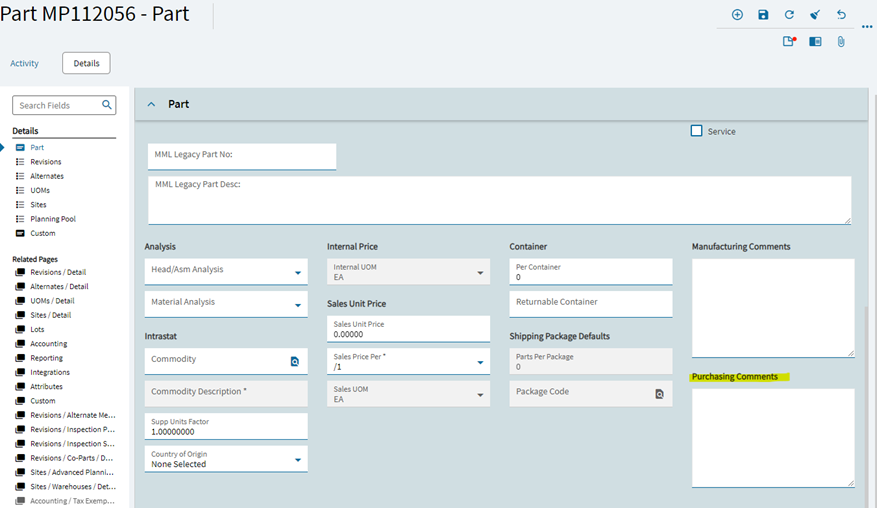
Just to clarify, when you say Part table you mean the screen where you program in new part numbers, right? So if we input comments in the section highlighted below, those should carry over to the PO line item comment. Do we have to do any special connections on the backend for that to work or is just automatic?
That is the correct field, and nothing else is required . I strongly recommend that you test it out in your PILOT environment and make sure it does what you want it to do.
Do you know how to expose the Field Help? The Technical Details on the Field Help for this field gives a description of how it works.
EDIT: In the screenshot of your Part program, the fields “MML Legacy Part Number” and “MML Legacy Part Desc” are examples of UD fields (from your original post). “UD” stands for “User Defined”, which means they are custom fields that some has added to the base Epicor data structure. “BPM” stands for “Business Process Management”, which is a process that allows some custom thing to be done based on data entered or process run.