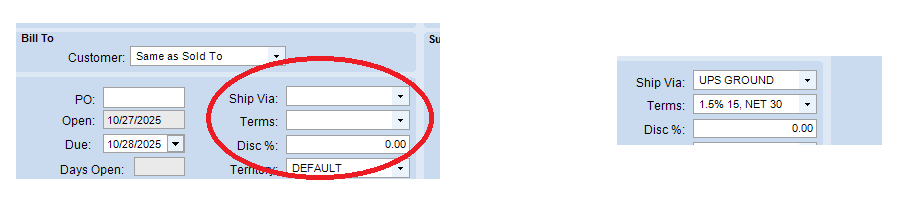
I’m trying to create quotes via the swagger UI links. So far I have it working, I have it creating a quotehed via /{currentCompany}/Erp.BO.QuoteSvc/Quotes, and then adding lines via /{currentCompany}/Erp.BO.QuoteSvc/Quotedtls.
The only issue left, is its not applying default values. For example in the actual UI, under Bill to, it does not automatically pull the ship Via, or terms. But if I were to change the customerID, like add a space, then hit tab, it will then properly pull all of the information.
I’ve tried various ways to get this to pull, like calling the api validateECCtype, getcustomerinfo, /{currentCompany}/Erp.BO.QuoteSvc/QuoteDtlRefreshPriceListAndQuantities, etc.
Nothing I do makes it change though, even though the call is returning code 200. Any ideas? I’ve tried an update/updateext after each call as well.
Before and after changing customer ID, I’d like to have an API call to automatically set those defaults as well just as if i was pressing tab on the UI.
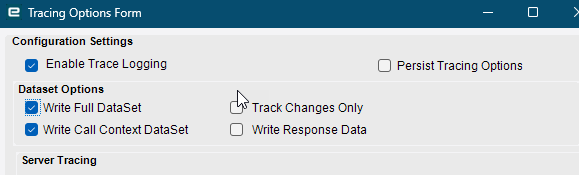
Best way is to use the Dev Console and the Kinetic Trace Helper that Jose posted here to get what events trigger when manually creating a quote. Then you can know what REST calls and in which order to call them.
I tried that earlier but just got lost.
The order that it seems to go in is:
GetNewQuoteHed
ValidateECCType
getcustomerInfo
GetShipToInfo
Update
But when trying to do it through swagger, I’m not sure how to actually create the quote, I read through the trace and see the giant DS, do I just have to basically steal that DS, and thats what I pass in the body of the rest API for each of those calls? My main concern is I don’t see a quotenumber assigned at all, it just appears in the getbyID near the end.
The current way I was doing it using the
/{currentCompany}/Erp.BO.QuoteSvc/Quotes
It would create a quote just if I passed it
I tried calling the BO’s I saw in trace using that quote I already generated, by giving it quotenum, sysrowid, etc, and then update, but nothing actually changes despite it returning code 200.
Okay I was wrong, by following the exact same order, and passing it the exact same parameters, but changing the customer number, it created a new quote. So I just have to disect this it seems.