@jadixon are you using Azure as your Identity system? or are you trying to go via SSO (windows SSO)
Azure
Then this will work it doesn’t have anything to do with the web (per say). Are you doing this in Excel as a VBA Macro?
Right now I am just trying to test this all out in Postman, but yes it is Excel (or Access) VBA code.
The problem you are going to run into is taht Excel / Access do not support this interaction styule they don’t have a browser etc …
So in the end you will probably have to do something else… or use a weird embeded browser in a USer FOrm but that’s super gross.
If you want to do it in postman though I posted above how to set up postman for it in a screen shot its pretty easy.
I did follow your token example and a browser window pops up but is just blank and never returns.
 Just because you can… doens’t mean you should. This uses an embeded browser in the workbook. And a macro to do the leg work… But I must say this is pretty gross, I’m 99% sure there isn’t another way to do it in VBA because its so out-dated.
Requires a Custom Form within the VBA Excel Macro with an embeded browser becaue you need to go to the browser and follow redirects etc to grab the Authorization Code
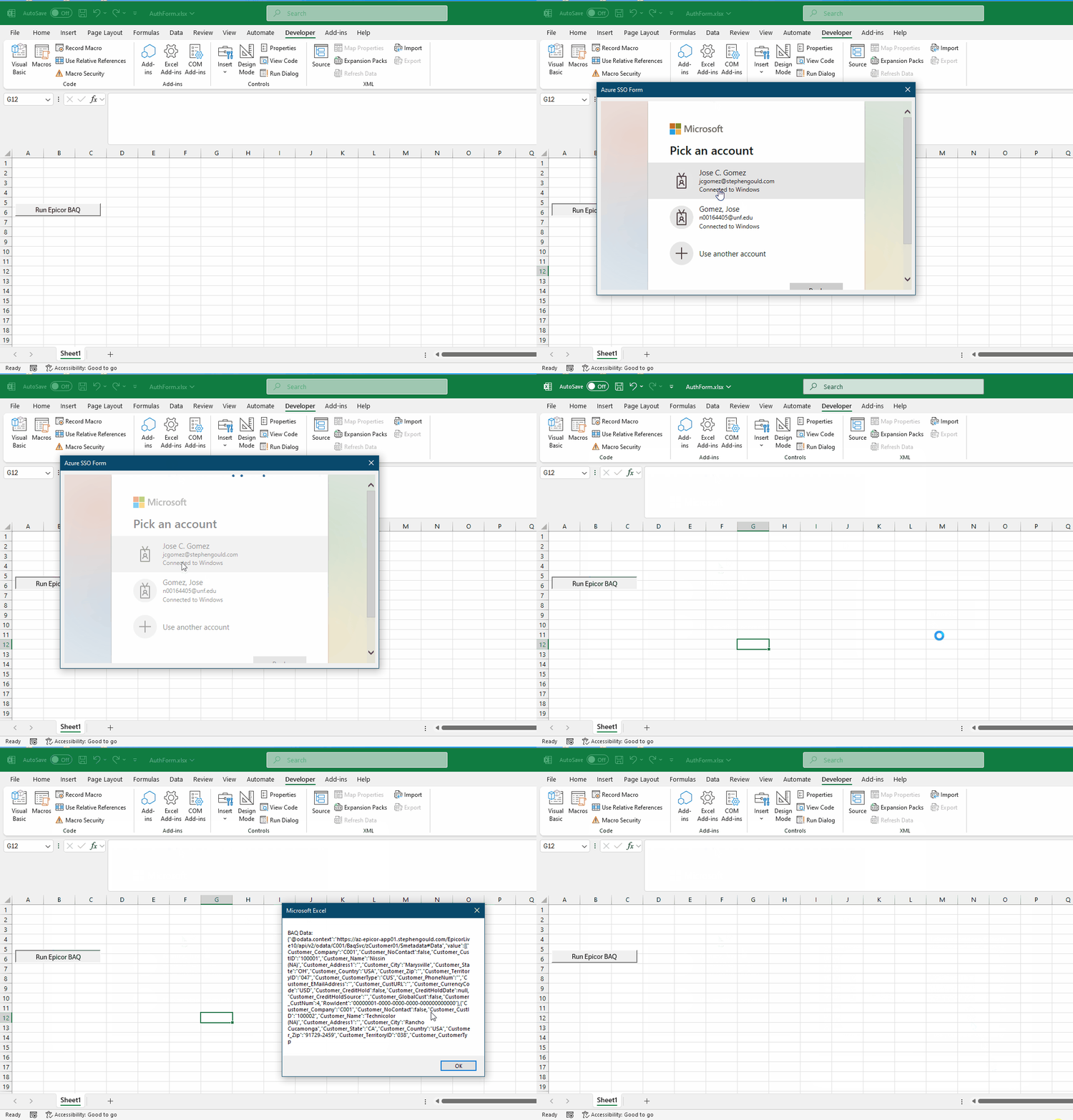
AuthForm.xlsm (26.1 KB)
Here’s the VBA Code
' Initializes the OAuth authorization flow when the form loads
Private Sub UserForm_Initialize()
    Dim clientId As String
    Dim redirectUri As String
    Dim authUrl As String
    Dim scope As String
    Dim tenantID As String

    ' Your Azure App Registration client ID. Must be the same one you use in Epicor
    clientId = "ENTER_YOUR_APPLICATION_ID_HERE"

    ' Standard redirect URI for native desktop apps (no server needed). This must be a valid redirect in the above application.
    redirectUri = "https://login.microsoftonline.com/common/oauth2/nativeclient"

    ' The scope you are requesting access to (should match the API’s scope)
    scope = "ENTER_YOUR_SCOPE_HERE/user_impersonation"

    ' Your Azure tenant ID (GUID)
    tenantID = "ENTER_YOUR_TENANT_ID_HERE"

    ' Construct the OAuth2 Authorization URL
    authUrl = "https://login.microsoftonline.com/common/oauth2/v2.0/authorize?" & _
              "client_id=" & clientId & _
              "&response_type=code" & _
              "&redirect_uri=" & redirectUri & _
              "&response_mode=query" & _
              "&scope=" & scope & _
              "&state=12345" '

    ' Launch the login prompt in the embedded browser
    WebBrowser1.Navigate authUrl
End Sub

' Handles the OAuth redirect once the user logs in and approves access
Private Sub WebBrowser1_NavigateComplete2(ByVal pDisp As Object, url As Variant)
    Dim code As String

    ' Look for the authorization code in the URL
    If InStr(url, "code=") > 0 Then
        code = ExtractCodeFromUrl(url)
        MsgBox "Got Authorization code: " & Left(code, 10)

        ' Close the browser form and begin token exchange
        Me.Hide
        ExchangeCodeForToken code
    End If
End Sub

' Extracts the authorization code from the redirected URL
Private Function ExtractCodeFromUrl(url As Variant) As String
    Dim parts() As String
    Dim queryString As String
    Dim i As Integer

    ' Ensure URL has a query string
    If InStr(1, url, "?") = 0 Then Exit Function
    queryString = Split(url, "?")(1)

    ' Loop through parameters to find "code"
    parts = Split(queryString, "&")
    For i = 0 To UBound(parts)
        If Left(parts(i), 5) = "code=" Then
            ExtractCodeFromUrl = Mid(parts(i), 6)
            Exit Function
        End If
    Next i
End Function

' Exchanges the authorization code for an access token via Azure OAuth token endpoint
Sub ExchangeCodeForToken(authCode As String)
    Dim http As Object
    Dim url As String, body As String
    Dim clientId As String, redirectUri As String
    Dim response As String
    Dim json As String
    Dim tenantID As String
    Dim scope As String

    ' Define Azure values
    clientId = "ENTER_YOUR_CLIENT_ID_HERE"
    scope = "ENTER_YOUR_SCOPE_HERE/user_impersonation"
    tenantID = "ENTER_YOUR_TENANT_ID_HERE"
    redirectUri = "https://login.microsoftonline.com/common/oauth2/nativeclient"

    ' Azure token endpoint URL
    url = "https://login.microsoftonline.com/" & tenantID & "/oauth2/v2.0/token"

    ' Compose POST request body
    body = "grant_type=authorization_code" & _
           "&client_id=" & clientId & _
           "&scope=" & scope & _
           "&code=" & authCode & _
           "&redirect_uri=" & redirectUri

    ' Send token request
    Set http = CreateObject("MSXML2.XMLHTTP")
    http.Open "POST", url, False
    http.setRequestHeader "Content-Type", "application/x-www-form-urlencoded"
    http.Send body

    ' Parse token from response
    response = http.responseText
    json = GetAccessTokenFromJson(response)

    MsgBox "Got Epicor Access Token: " & Left(json, 20)

    ' Call Epicor with the token
    CallEpicorODataApi json
End Sub

' Parses the access_token string from a raw JSON response without using external libraries
Function GetAccessTokenFromJson(jsonString As String) As String
    Dim tokenStart As Long, tokenEnd As Long
    Dim token As String

    tokenStart = InStr(jsonString, """access_token"":""")
    If tokenStart > 0 Then
        tokenStart = tokenStart + Len("""access_token"":""")
        tokenEnd = InStr(tokenStart, jsonString, """")
        token = Mid(jsonString, tokenStart, tokenEnd - tokenStart)
        GetAccessTokenFromJson = token
    Else
        GetAccessTokenFromJson = ""
    End If
End Function

' Uses the access token to call Epicor’s OData REST endpoint
Sub CallEpicorODataApi(accessToken As String)
    Dim http As Object
    Dim url As String
    Dim response As String

    ' Your Epicor REST BAQ URL (update with real URL and BAQ ID)
    url = "https://YOUR_EPICOR_URL/YOUR_EPICOR_INSTANCE/api/v2/OData/C001/BaqSvc/zCustomer01/Data"

    Set http = CreateObject("MSXML2.XMLHTTP")
    http.Open "GET", url, False

    ' Set required Epicor headers
    http.setRequestHeader "Authorization", "Bearer " & accessToken

    ' You need an API key
    http.setRequestHeader "x-api-key", "YOUR_EPICOR_API_KEY"

    ' Optional: CallSettings header if Epicor requires company/plant context
    ' http.setRequestHeader "CallSettings", "{""Company"":""C001"",""Plant"":""029"",""Language"":"""",""FormatCulture"":""""}"

    ' Send the request
    http.Send

    ' Return result
    response = http.responseText
    MsgBox "BAQ Data: " & response
End Sub
No matter how I tried I could not get it to work. I ended up going old school and coding a connection string in VBA
    Set dbEpicor = New ADODB.Connection
    strConn = "driver={sql server};server=MyServer.COM;Authentication=Active Directory Default; Encrypt=True; Database=EpicorERP;"
    dbEpicor.ConnectionString = strConn
    dbEpicor.Open
This uses the Active Directory information to validate access. I have to write the queries in code vs calling a BAQ but I have been able to remove the username and password requirements.
How did you go from SSO to a hard coded db connection from the client 
You are going to give users direct db access 
In the cloud too…
We are on-prem so no cloud issues.
The queries are read-only. No updating going on in what we are doing. We are on a tight timeline and this was the path of least resistance at this point. Things may change later on when we go to Kinetic.
I am not a VBA expert, but can you connect your Entra ID account via Organizational Account as I have described here?
Connecting to Kinetic API from Excel with Azure AD (Organizational Account)