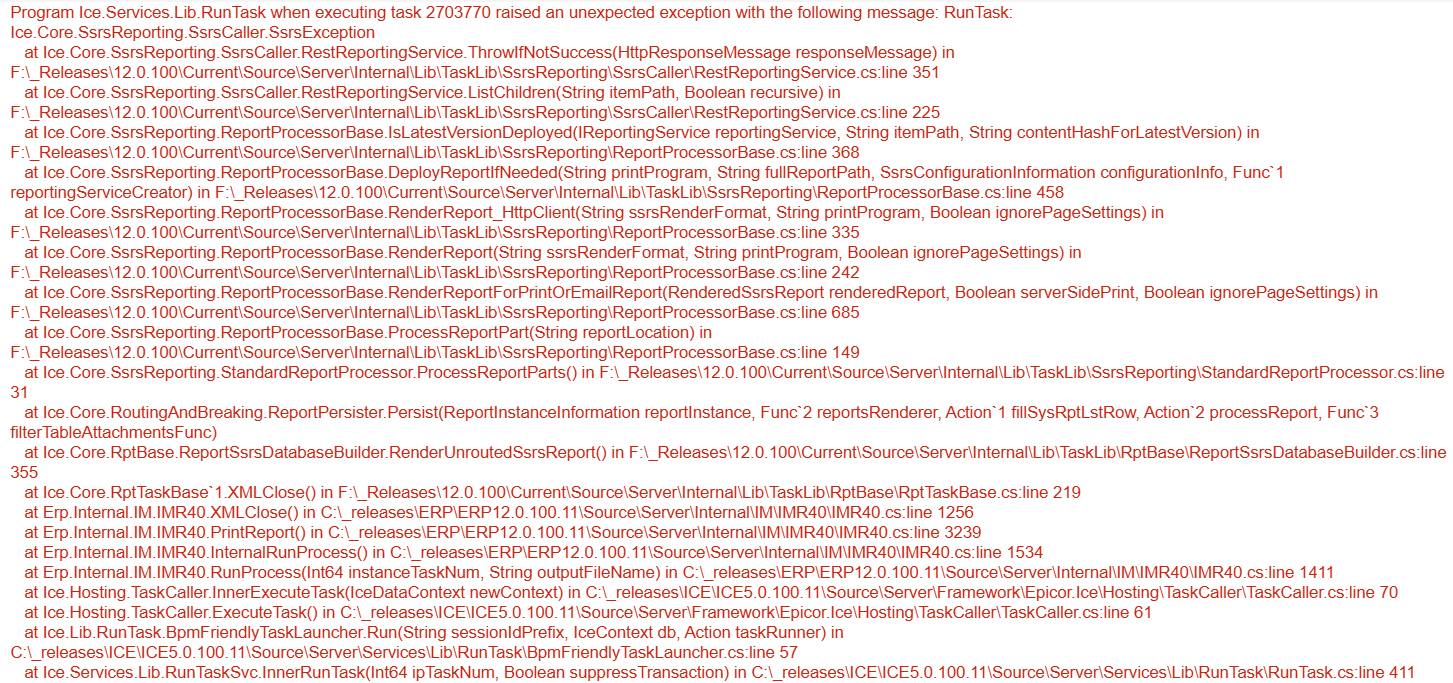
Users still getting massively slowed down by the Epicor Cloud SSRS Printing. Got a new error today, though. Anyone seen this one before?
Program Ice.Services.Lib.RunTask when executing task 835028 raised an unexpected exception with the following message: RunTask: Ice.Core.SsrsReporting.SsrsCaller.SsrsException at Ice.Core.SsrsReporting.SsrsCaller.RestReportingService.ThrowIfNotSuccess(HttpResponseMessage responseMessage) in C:\_releases\ICE\ICE5.1.100.7\Source\Server\Internal\Lib\TaskLib\SsrsReporting\SsrsCaller\RestReportingService.cs:line 351 at Ice.Core.SsrsReporting.SsrsCaller.RestReportingService.CreateCatalogItem(String ItemType, String Name, String Parent, Boolean Overwrite, Byte[] Definition, Property[] Properties, Warning[]& Warnings) in C:\_releases\ICE\ICE5.1.100.7\Source\Server\Internal\Lib\TaskLib\SsrsReporting\SsrsCaller\RestReportingService.cs:line 82 at Ice.Core.SsrsReporting.ReportProcessorBase.DeployReportIfNeeded(String printProgram, String fullReportPath, SsrsConfigurationInformation configurationInfo, Func1 reportingServiceCreator) in C:_releases\ICE\ICE5.1.100.7\Source\Server\Internal\Lib\TaskLib\SsrsReporting\ReportProcessorBase.cs:line 529 at Ice.Core.SsrsReporting.ReportProcessorBase.RenderReport_HttpClient(String ssrsRenderFormat, String printProgram, Boolean ignorePageSettings) in C:_releases\ICE\ICE5.1.100.7\Source\Server\Internal\Lib\TaskLib\SsrsReporting\ReportProcessorBase.cs:line 336 at Ice.Core.SsrsReporting.ReportProcessorBase.RenderReport(String ssrsRenderFormat, String printProgram, Boolean ignorePageSettings) in C:_releases\ICE\ICE5.1.100.7\Source\Server\Internal\Lib\TaskLib\SsrsReporting\ReportProcessorBase.cs:line 243 at Ice.Core.SsrsReporting.ReportProcessorBase.ProcessReportPart(String reportLocation) in C:_releases\ICE\ICE5.1.100.7\Source\Server\Internal\Lib\TaskLib\SsrsReporting\ReportProcessorBase.cs:line 159 at Ice.Core.SsrsReporting.StandardReportProcessor.ProcessReportParts() in C:_releases\ICE\ICE5.1.100.7\Source\Server\Internal\Lib\TaskLib\SsrsReporting\StandardReportProcessor.cs:line 31 at Ice.Core.RoutingAndBreaking.ReportPersister.Persist(ReportInstanceInformation reportInstance, Func2 reportsRenderer, Action1 fillSysRptLstRow, Action2 processReport, Func3 filterTableAttachmentsFunc) at Ice.Core.RptBase.ReportSsrsDatabaseBuilder.RenderUnroutedSsrsReport() in C:_releases\ICE\ICE5.1.100.7\Source\Server\Internal\Lib\TaskLib\RptBase\ReportSsrsDatabaseBuilder.cs:line 355 at Ice.Core.RptTaskBase1.XMLClose() in C:\_releases\ICE\ICE5.1.100.7\Source\Server\Internal\Lib\TaskLib\RptBase\RptTaskBase.cs:line 219 at Erp.Internal.PM.POForm.RunProcess(Int64 instanceTaskNum, String outputFileName) in C:\_releases\ERP\ERP12.1.100.0\Source\Server\Internal\PM\POForm\POForm.cs:line 451 at Ice.Hosting.TaskCaller.InnerExecuteTask(IceDataContext newContext) in C:\_releases\ICE\ICE5.1.100.7\Source\Server\Framework\Epicor.Ice\Hosting\TaskCaller\TaskCaller.cs:line 71 at Ice.Hosting.TaskCaller.ExecuteTask() in C:\_releases\ICE\ICE5.1.100.7\Source\Server\Framework\Epicor.Ice\Hosting\TaskCaller\TaskCaller.cs:line 62 at Ice.Lib.RunTask.BpmFriendlyTaskLauncher.Run(String sessionIdPrefix, IceContext db, Action taskRunner) in C:\_releases\ICE\ICE5.1.100.0\Source\Server\Services\Lib\RunTask\BpmFriendlyTaskLauncher.cs:line 57 at Ice.Services.Lib.RunTaskSvc.InnerRunTask(Int64 ipTaskNum, Boolean suppressTransaction) in C:\_releases\ICE\ICE5.1.100.0\Source\Server\Services\Lib\RunTask\RunTask.cs:line 349
What I find interesting is the first method “DeployReportIfNeeded” and someone somewhere was talking about how the upgrade messed up that flag right? I’d have to find the thread, I forget if it was @aosemwengie1 or someone else talking about all the custom RDDs
I uploaded a file of 741 ssrs errors last week. I’m sure that one was among them. Only response from support was about completely unrelated BAQ errors in the admin logs.
Similarly, my backlog of errors i’ve logged (which includes the above one in OP) is so long, it literally lags my browser now, so I avoid going into that EpicCare case. Which has been open for many many months. I asked CS if it was useful to continue logging unique errors and was given the helpful guidance “It’s up to me”.
Let me translate that for you. Please continue uploading errors to the case so you feel like progress is happening even though no progress is happening. You’re welcome.
Is this perhaps an issue that stems from trying to offer a SaaS product on a backbone/architecture/software design that doesn’t fit cloud? Like others started posting on the larger thread? In other words, are they trying to use SSRS in a way it was never designed and that’s why this is happening?
We have no idea why this is happening or what the root cause is because all they will tell us is that they are “working with Microsoft” (for over 6 months). I have not heard of anyone on prem running into this which seems to be a good indication its cloud related though.
I think we lack enough information on the customer facing side to determine;
It appears to be a load/concurrency issue, and SSRS servers in Cloud are 1:many AppServer:SSRS Server, so on the customer side we can’t get a clear picture of the load/task pipeline to arrive at a conclusion.
Among the things Epicor has done/tried is throwing more resourcing at the SSRS server, which caused SSRS reports to return completed sooner, reducing the amount of concurrency, and thus the frequency of the issue.
From my end, it seems as though they could workaround this by implementing a FIFO queue on the SSRS server side, just make things line up, we already wait for reports to process. Additional latency seems preferable over failures. If this slows things down too much, allow limited concurrency (with a check that overlapping report styles aren’t being printed simultaneously, which exacerbates the error)
I suggested this and other approaches, along with volunteering to set up a reproducible scenario on my end. They indicated a queue would be a prohibitive amount of programming at the current time.
I was able to successfully demonstrate a repro scenario and we got more detailed logging out of it (back in September, the error was very generic)
Although the queue solution would be more cloud like. When the queue fills up, the system adds more servers, and as the queue empties, the system shuts down servers.
Imagine how people feel that have scheduled end-of-year reports that may be inventory related or otherwise year end closing related, so the timing of the report is key.
They slept that night, without worry that their reporting would be delivered as needed in their inbox or in server file download. Latency in that case might not be quite so important.
Epicor needs to account for both (all) scenarios in their Cloud product.