Hi,
I noticed that one of our SSRS reports was restored to an old version, and I’d like to understand why this happened. Has anyone seen this before or had a similar experience?
we’re on Kinetic 2025.1.11 cloud version!
Thanks,
Adam
2 Likes
Did someone reinstall a Solution that may have contained that report?
Could someone of uploaded the old version via Report Style?
1 Like
No, it’s just me working on this stuff, and I’m the only one with access
1 Like
We are having the same issue with a Job Traveler form for one of our companies. I upload the updated version and after an hour or so it reverts back to the old version. I ended up renaming the file by adding _01 at the end. I have an open case with tech support, but so far, no resolution.
We are on Kinetic 2025.1.11 version also.
1 Like
We seen issues after moving to 24.2. I ended up just adding new report styles and it fixed the issue.
2 Likes
Thanks for sharing your experience! It looks like I’ll need to redesign more than 40 templates.
2 Likes
It’s really weird. It’s not all report styles. It was just some of them - no rhyme or reason from what I could tell. I gave up trying to figure out why and just started redoing the styles when we found them wrong.
2 Likes
Is your custom reports in the “customreports” folder? I’ve seen a case where the base reports were being overwritten. Every upgrade would overwrite them --of course.
1 Like
I’m not sure I follow what you mean.
All my SSRS reports are custom, but this issue happened on the one that has over 40 templates.
Each template was customized for specific parts, and I haven’t touched it in the past month.
I think Randy’s referring to the report folder path, to double check that all of your custom styles land in the \CustomReports\ folder, because the path might have gotten corrupted and point at \Reports\ and could overwrite an OOB style.
1 Like
What @GabeFranco said, the report path should point to \CustomReports... otherwise it will get overwritten or deleted.
I don’t think we have that option on the cloud site.
Epicor is handling the path on their end.
You’d be surprised what unintended changes in a dotfix allow things that shouldnt happen to happen  There was a bug that was just closed recently on 2025.1.x (i forgot which one) where that path wasn’t being set up correctly. If you had created a report style on this specific dot release, it could be possible to inadvertently change the path (or epicor could even do it for you)
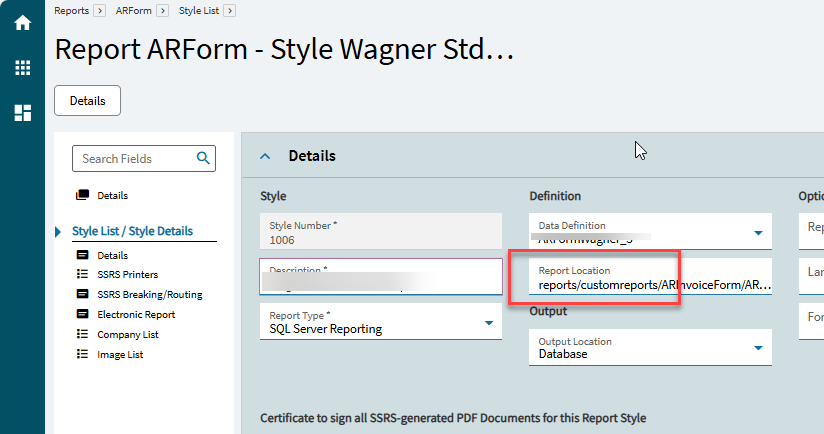
You mean you change the path of the report from reports/CustomReports/… to something else to avoid this issue?
No we make sure each report has it’s own name and is somewhere in reports/CustomReports/. Example: reports/CustomerReports/ARForm/ARInvoice-001
Where reports/CustomerReports/ARForm/ is the folder path and ARInvoice-001 is the name of the report RDL.
1 Like
Epicor is correctly creating the Reports/CustomReports/... folders for all newly added or modified templates, so that cannot be the cause of the issue I’m currently experiencing.
I have a report with over +40 ReportStyle in it! and now all of them has been restored to the old version ( 2 months ago)!
1 Like
That’s really odd as I’ve never experienced our custom reports being rolled back without someone doing it somehow.
We went Live On-Prem with 2025.1.10 a month ago and something like this is happening to us. Some of our reports get overwritten with old versions. We would update the rdl but as soon as the report is run the system automatically reverts it back. I found another thread with people having this issue and what we are doing now is renaming the rdl and changing the report style to point to the new file.
1 Like
It just happened to us over the weekend when we upgraded to 24.2 on-prem. The report would be correct until someone ran it. Then it would overwrite with the old style. And that was happening on-prem…
4 Likes