Couple of things to look at.
First, the ShipCOO does not have the data you need?
Second, the error you are getting is probably due to not marking Company as included for the PartCOO table.
Couple of things to look at.
First, the ShipCOO does not have the data you need?
Second, the error you are getting is probably due to not marking Company as included for the PartCOO table.
as i said i am super new to this so is there some documentation somewhere that you can point me to that will where to make fields as included?
Also no, we need PartCOO and then Country then we should have everything we need. Sorry for the noob responses.
No worries. I am not aware of any documentation.
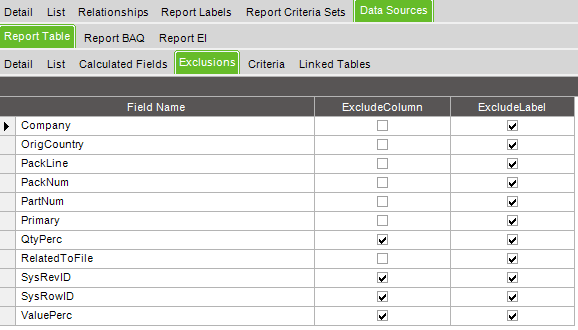
Here is a screenshot of the ShipCOO in the PackSlip RDD. To include/exclude fields on a table in the RDD; go to the Data Sources tab, then the Report Table tab, and the Exclusions tab. Use the check boxes in the ExcludeColumn column to control them. If a field is checked, that means it will be excluded from the data that is generated.
I would also double check that the OrigCountry does not give you what you need. That should be the COO for the Part on the PackLine, which should be the same as what is in the PartCOO.
awesome! let me try this and i will let you know!
added everything and it worked with the exception i cannot see the new table? Do i have to press create new SSRS report again? 90% of the formatting changes are already made.
Did you use the PackSlip RDD or the BAQ you created?
packslip RDD
Did you change the RDD on the Report Style? I forget to do that all the time.
nope, we changed that
Where can you not see the new table? In the SSRS Report Database? Or in the RDL?
the RDL.
You will have to manually add it into the rdl query. Both the SQL and the fields.
Right click on the ShipHeadShipDtl Dataset and select Dataset Properties.
Click on the fx 
I recommend copying the whole expression to a better text formatter so you can update the select statement with the new fields you want and updating the tables and their joins. Once done, copy and paste it back in.
Close out of the editor and select the Fields in the tree. Add Query Field for each new field. Close out and you should have the data now.
Am I are using SQL code for that?
Yes
So update. turns out there was something wrong with the RDL. We recopied the packslip and it seems to be working now. Thank you very much for your help.