All true. ‘jsonifying’ and zipping is not too big of a deal, but the real trouble is the remaining binary-only formats. Here’s a tracker of where we’re at last I knew:
1 Like
Dev tools has the code to read/write the BOs via plain text, could be easily adapted to import that way, so that we don’t have to deal with a binary representation at any point.
Use the BOs to output json/xml/c# + metadata, store in plain text format in a heirarchical file tree, add to zip, download zip. your source control flavor of choice goes here inverse for upload/import, upload a zip, unpack client side, write directly via BOs as applicable (per versioning metadata)
1 Like
Yeah. @AlwaysFocus is doing much of that automatically via GitHub actions.
Been super busy as of late but I have another function library that I’ll be sharing soon that lets you sync a given Epicor environment to a github repo (releasing the github->epicor portion). It supports dependencies and all. You just run the function (with some necessary security setup) and point to the repo you want to sync from and just keep all your known good copies of customs there and then takes a few seconds to import everything and kicks out a log to the user folder. This lets us create branches for different environments and then just push to a live/pilot/third branch when we want the other environment to import the customs automatically by having the sync function run on a schedule (optional).
9 Likes

wow. cant wait to see it. By push assume you mean between git branches.
Your couldn’t be publishing back to ERP? or could you?
Correct. You would make your changes in whichever dev env you have, then you could check out a given branch like pilot and push the updated customization to it. Then have the function running on a sync schedule in that pilot env (or just run manually via rest or schedule epicor function) and it will pull the latest changes from that github repo and sync them to that environment. This lets us quickly set up new environments and move customs between environments. One part that is still outstanding in terms of how I would like to implement it is the version tracking within Epicor. I’m thinking of just using user codes (to make it as reusable as possible without addition UD fields) where we store the custom name along with the current commit id so that we know when we need to actually sync a change for long term deployments.
4 Likes
Could you simply add a getVersion() method to every library and rev the hardcoded commitid on commit. Not perfect but avoids db dependency, management, more gh steps fewer erp steps.
Or perhaps a gh build script that gens a versionInfo class with all sorts of juicy bits hardcoded like commit note, , date stamp, tags, author, ErpMinVer, branch, semantic version
That auto code converter definitely injected alot of bad code, especially with String interpolation.
6 Likes
Man it’s good to hear from you
Haso! Where ya been?
@jgiese.wci is a slave driver doesn’t give him even an hour of lunch
4 Likes
If you eat all day, you don’t need to take off for lunch.
9 Likes
I need to try this life hack
1 Like
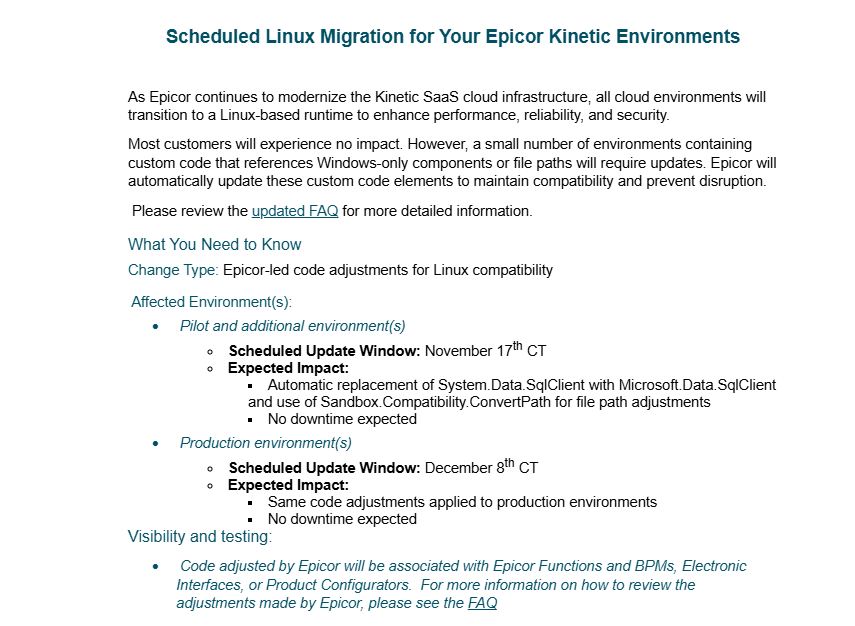
Haven’t read this entire thread but looks like they are now openly admiting they will be updating our code in the next couple weeks:
2 Likes
I just read that announcement. I’ve got a bunch of code in BPMs and functions. This makes me very nervous. Here is what the FAQ says:
• How can customers identify which custom code will automatically be updated?
Any code flagged with warnings for System.Data.SqlClient or backslash-based pathing will be updated. Code already corrected before November 17, 2025 will be skipped.
• What code patterns will Epicor automatically update for Linux compatibility?
The Linux issues pending remediation are in Electronic Interfaces and Product Configurator custom code: Two patterns will be remediated automatically:
System.Data.SqlClient → Microsoft.Data.SqlClient
OS-dependent file paths will be updated using Sandbox.Compatibility.ConvertPath.
• How can I verify what was changed after Epicor updates the code?
For changes to BPMs and Epicor Functions, you can review the conversion log for 2025.1 for conversion 215.
For changes to Electronic Interfaces, you will find a backup file for every changed file. It will be in the same Azure File Share location. For example: FileName.cs → FileName.20251028_144300.cs.bak. These files can be accessed from the Server File Download menu item (System Management/Schedule Processes/Server File Download)
For changes to Product Configurator you can compare the difference in Pilot vs. Production before production is converted. If you would like to review the conversion log, please contact support for a copy.
• Should I expect any downtime when Epicor automatically updates the custom code?
There will be no downtime for this update. Changes will be reflected after the system is restarted, which can be done in the Epicor Cloud Management Portal, or by submitting an EpicCare ticket.
3 Likes
Ya, I just read through it too.
“No downtime expected”.
Famous last words.
3 Likes
I ran the Custom Code Report and there is a ton of “warnings” but when inspecting the code none of them are doing anything with paths. I’m still worried they’ll all be FUBAR by Epicor when they force change our code.
1 Like
Look here, I have code in my live environment, that they already run this “conversion” on.
It has screwed up the code so badly on some of my bpms, that it is impossible to even edit them, in classic, or the browser.
I cannot even fix them without extreme measures. I literally cannot save or even move to another one.

11 Likes
Who is responsible for this?
These conversions are literally so bad, that I can’t even get into edit them to fix them. You can’t even move to another bpm in classic or the browser to fix it.
You are catching things that aren’t even paths. No downtime expected my ass.

11 Likes
I can’t even delete the BPM without error.
5 Likes