Hello- I have set up security groups by function in our company. I’m just trying to confirm. Do I need to go through all 1800 of the different menu security fields and decide which users should be able to see which menus?
The challenge is I don’t know what half of them are because they are either named the same thing, like “Memo Maintenance”, and that it appears there wasn’t a real logical path for the naming convention they used for the Security ID. Like if it was all for purchasing maybe they put in PUR-123 instead of SEC024.
Has anyone had success with an easy method to assign security?
The short answer is no, you don’t need to check 1800+ SECIDs.
Start from the top and work your way down.
By default, everybody [probably] has access to everything, but the “zero trust” approach isn’t too bad if you can figure out which “level” someone needs.
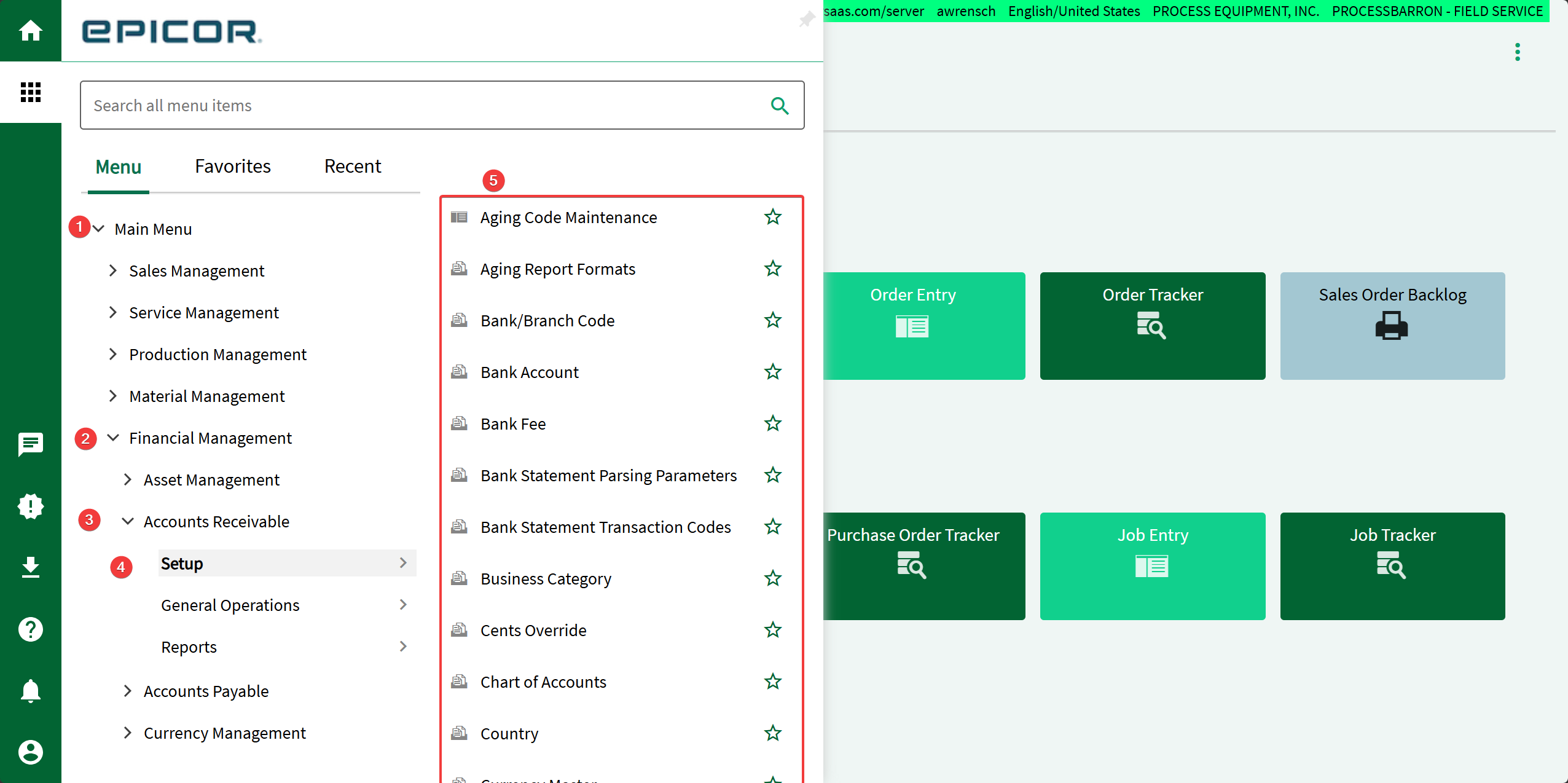
In the attached example image, we see 5 levels: 1 - Everybody needs access to this (without this, the menu is blank) 2 - Only finance people need this (think AR, AP, etc.) 3 - Only AR people need this (somebody doing inventory wouldn’t need this) 4 - Creating things (some people can create, some people should only view) 5 - Specific access (you almost never need to go this deep)
Counterpoint - Applying security group access to each endpoint ensures that context menu navigation always works when it should even if main menu navigation isn’t possible, and won’t be a sneaky workaround when security stops at main menu navigation instead of drilling down to secure each endpoint. Sometimes context menus point to that one random menu instance off in Executive Analysis instead of a more generally navigable instance.
Securing endpoints also locks out other alternative navigation methods. Clicking through the UI isn’t the only way to get around.
If you’re starting from scratch, it might be nice to make your own securities for groups of identical endpoints. For example, ‘Job Tracker’ is spammed all over the place and context menu navigation will benefit if all endpoints have identical security. Applying a single security to the whole herd ensures consistency.
Using your own securities provides an opportunity to configure them in an identifiable way so you can easily spot new menu endpoints when updates quietly insert them with security defaulted to either ‘Security Manager Only’ or ‘Allow All’, because they’ll have an oddball associated security ID that’s not like the others.
It’s a major pain to set up this way since security only secures navigation instead of securables, which requires someone doing manual effort to identify and group all the things. But if you want to audit security after each update so you’re not surprised by a new allow-all Chart of Accounts endpoint (seriously, true story, happened ~2 years ago). Some up front effort makes frequent auditing exponentially easier.
Cannot stress enough, work out any DMT/REST updates to death on Pilot. Menu and security updates are supported well beyond the UI. Details are practically undocumented and unintuitive. Footguns abound.
I’ve done something very much in this vein of thinking in two different variations:
Folders either maintain their Epicor native security ID’s (optionA) or they all are set to wide open (OptionB). Either way this addresses all the ‘trunks and branches’, but not the leaf’s - they get custom security codes either unique or segregated by well defined roles of access and responsibilities.
Security is set at the 'Leafs" - for every App, Tracker/dashboard, Report etc.
Leafs of the exact same app or tool get the same custom security code, regardless of where in the tree they appear - Part Tracker is part tracker for whomever needs it and they can find it where ever it is and they will likely make favorites in folder areas of their roles.
Leaf’s are bundled in combinations with a collection of Security groups with the defining idea of user role and needs. A shop floor user might be for instance a level1 = basic user, in a production role with basic job related data entry apps, trackers as needed and MES employee config for their role requirements - the security group might be named ShopL1. They also get access to either (A) only the folders that retain security groups they need to access or (B) they get access to the whole tree but they see only empty folders in most places because the security hides leaf’s they are not granted, if they are exploring the tree. AP staffer who needs to enter invoices may be a Level 2 would have (A) access to the Gen Ops and Reports folder under Finance, or (B) they see the apps, dashboards granted by their sec group(s) leafs and empty folders where they have no specific item grants within their sec group(s). Sometimes it is a 3 or 4 level hierarchy of roles that tends to basic user to senior or critical role or responsibility like handling PII or bank transfer info etc.
Sometimes one-off sec groups get made to grant a access to a very powerful tool or for occasional needs. Grant as needed and take away when not needed. We did this for things like Quantity Adjust and Cost Adjust and a few other tools.
Worked well, depending on the company size, industry and culture. If public company or DOD/ITAR is a governing factor, all this might not work as well because it would become a security role per person or small groups and that gets really tough to manage. Ditto’s on being very thorough in PILOT testing and with familiarity with the DMT before touching PROD and make backups before doing anything and do that all in approved maintenance windows once you have it all worked out perfectly. Good luck!
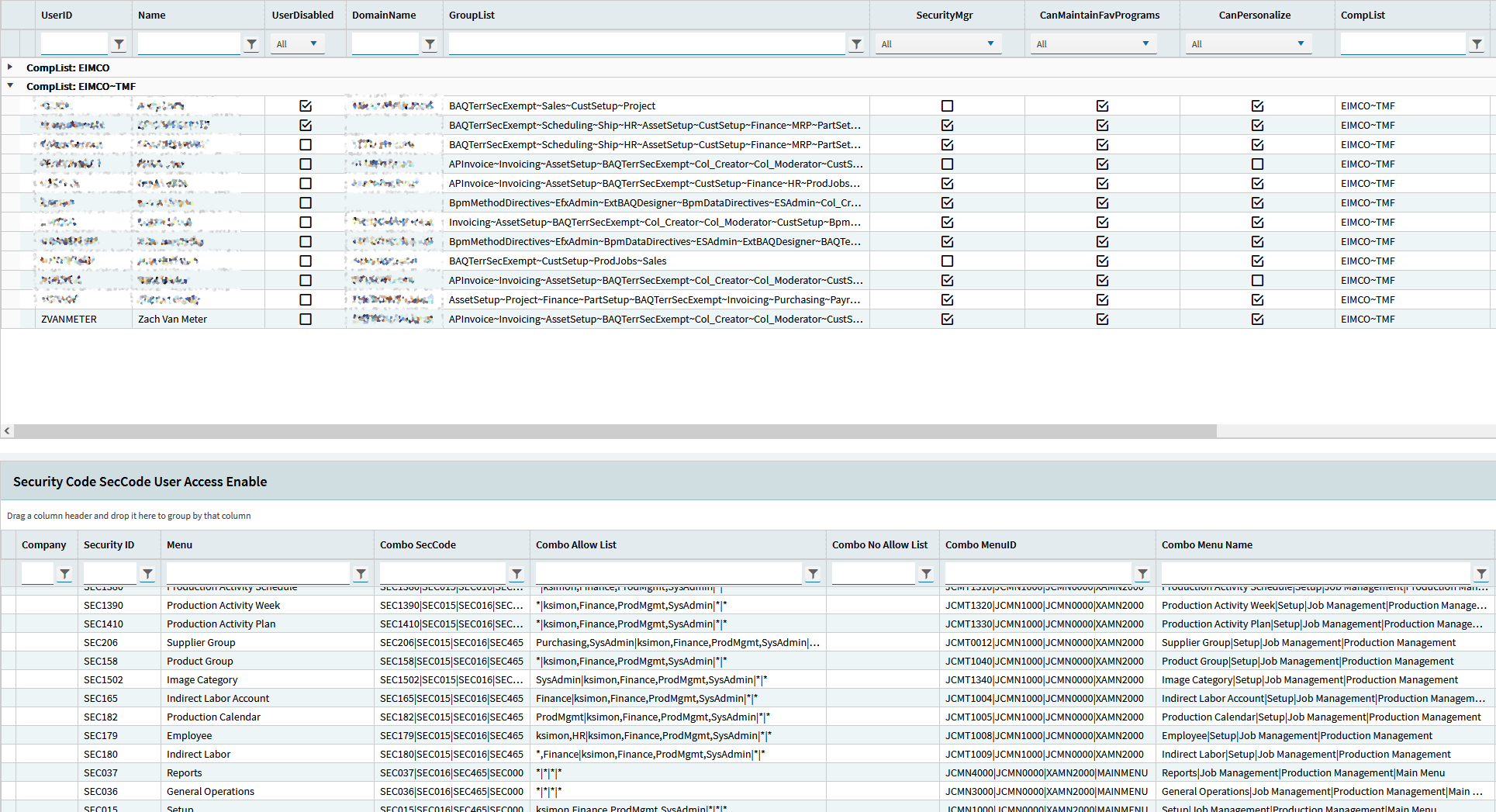
The key here is that in the bottom gridbox we have these combo fields, which shows ascending security tiers like Menu|Setup|Job Management|Production Management. It does this for your security code, your allow list, MenuIDs and the actual names themselves.
This made it a lot easier to reference users in the gridbox above and the menus they can access in the box below.
I personally prefer to lock things up at the Setup/GenOps/Reporting level, but it really depends on your use cases.
FWIW we use our security groups in our BPMs. For example, many people are allowed to access the Supplier menu, but our BPMs prevents those with lesser permissions from changing the Vendor Bank table via that menu. I don’t recommend that you mix and match BPM-based security groups and Allow / Disallow named security groups via Menu Security Maintenance.
Put another way: have VendorSetup as one security group, which allows access to the Supplier Entry menu, then have VendorSetupPLUS referenced in your BPM, but not in Menu Security Maintenance. YMMV.
@CAD2CPQ - the process has been manual for projects I’ve seen, especially for companies with strict compliance/separation of duties requirements.
Several years ago I put together an Excel workbook with sheets for User to Security Group and Security Group to Menu. Helps to give a good visual, although this is still manual. Just yesterday I learned there is a Epicor security matrix tool (also Excel-based) their consultants can share with customers. Initial look looks very interesting, although this too is manual.